We may earn affiliate commissions for the recommended tools. Learn more.

Writesonic.ai Review 2025: A Creative AI Writer with SEO-Friendly Power

Writesonic.ai is a versatile AI writing assistant built for creators, marketers, and businesses who want more than just text generation. From my experience using the tool, it strikes a balance between ease of use, accuracy, and creativity. The interface is clean and beginner-friendly. The outputs are fluent and human-like. While the free plan feels limited, Writesonic’s premium options unlock powerful customization, tone control, and integrations, positioning it as a practical, SEO-friendly AI writing solution.

Who is it Best For?

  • Freelancers & Solo Creators – who need quick blog drafts, ad copy, or paraphrased text without spending hours.
  • Social Media Managers – especially those creating LinkedIn carousels, catchy headlines, and captions.
  • Startups & Small Businesses – looking for affordable AI writing support to scale blogs, SEO content, and marketing campaigns.
  • Marketers – who want diverse tools like ad generators, video scripts, and AI humanizers to repurpose content across platforms.
  • Students & Bloggers – who need structured outlines, rewrites, or human-like essays in seconds

What Makes it Stand Out

Unique Creative Tools – Unlike many AI writers, Writesonic goes beyond text with features like the LinkedIn Carousel Generator and AI Humanizer, helping you create engaging, polished, and platform-specific content.

Flexibility in Tone & Style – From casual captions to professional blog posts, you can adjust tone easily and even define brand voice in premium plans.

Diverse Use Cases – It covers everything from blogs, ads, and video scripts to social media headlines and product descriptions, making it a true all-in-one assistant.

Beginner-Friendly Yet Scalable – The interface is simple enough for students and freelancers, while paid plans unlock integrations, plagiarism checks, and SEO tools for businesses.

7.5Expert Score
A Balanced AI Tool for Creative Content

Writesonic delivers natural, accurate writing and unique features that set it apart. The free plan feels limited, but with premium upgrades it’s a powerful option for freelancers, small businesses, and marketers seeking affordable AI assistance.

Ease of Use
9
Writing Quality & Output Accuracy
8
Customization & Control
8
Features & Functionality
8
AI Capabilities
8
Language & Format Support
7
Speed & Performance
8
Integrations & Compatibility
6
Pricing & Value for Money
7
Customer Support & Community
7
How We Rate? Our ratings reflect hands-on testing and comparison across key parameters such as usability, features, pricing, support, and overall value.

Performance Breakdown: Pros and Cons

Ease of Use (UI/UX)

Writesonic is easy to get started with. You just sign up using Google or email, and you’re ready to write. The interface is clean and intuitive, making it friendly even for non-technical users. Onboarding is smooth, with tutorials and prompts that guide you through its main tools. Overall, starting projects feels simple and hassle-free.

Writing Quality & Output Accuracy

The tool produces strong, coherent, and fluent writing that feels human-like. Whether generating blog drafts or paraphrasing text, the grammar and readability are on point. It can maintain context across longer passages quite well. However, in some cases, the tool may output repetitive or slightly generic content, reminding you that light editing is still necessary.

Customization & Control

Tone flexibility is one of Writesonic’s strengths. You can switch between casual, professional, or persuasive tones easily, and premium plans add options for brand voice customization. Editing flexibility is solid, too. You can rewrite, expand, or shorten content to match your needs. This makes it versatile for both marketing and creative projects.

Writesonic.ai Features I Used...

The free tools tested worked exceptionally well:

  • AI Article Writer → Produces long-form articles with good quality, though it runs slower than expected. Uploading images and PDFs is only available in paid plans.
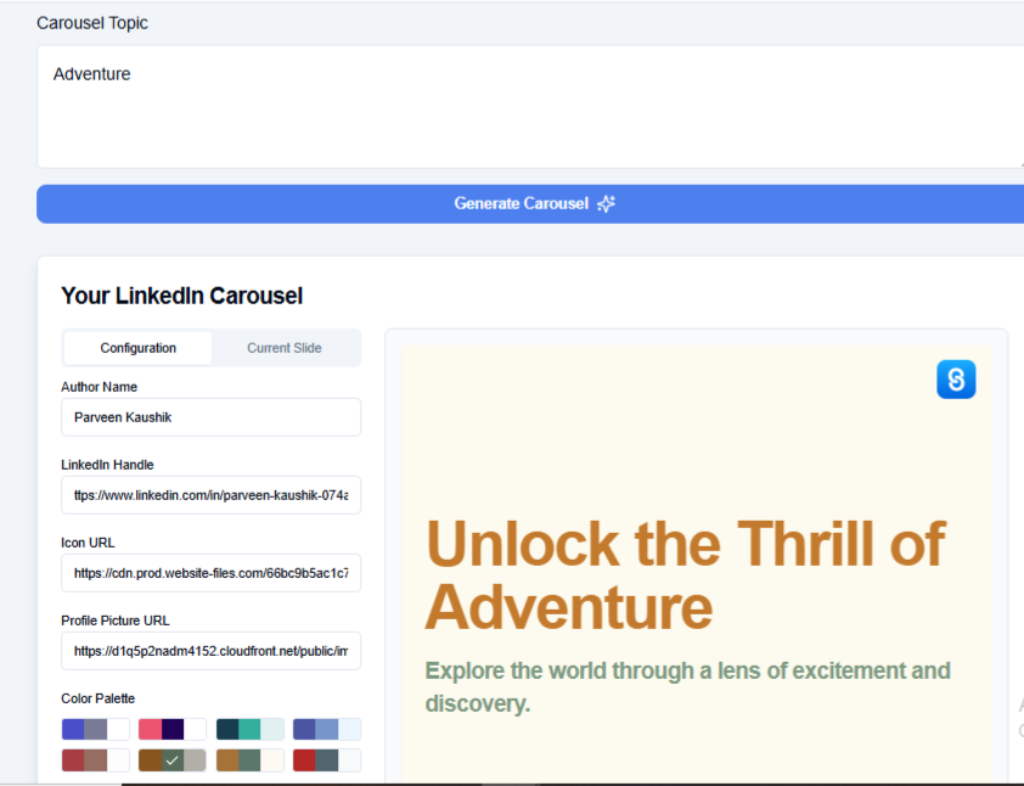
  • AI LinkedIn Carousel Generator → A standout tool. It creates swipeable carousels with color palette options, profile picture integration, and icon uploads. Downloading in PDF format is possible even in the free plan, making it great for social media creators.
  • AI LinkedIn Headline Generator → Generates five polished headline options from a short description—helpful for professionals building their LinkedIn presence.
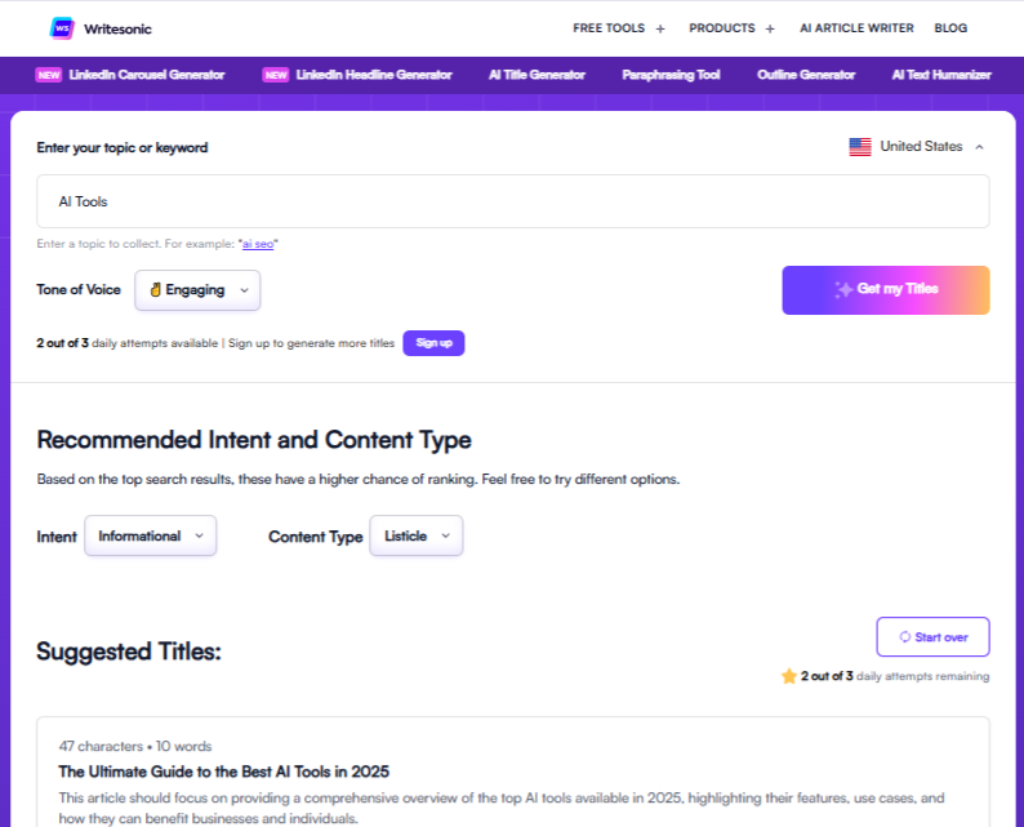
  • AI Title Generator → Quickly generates titles for blogs or articles, though the free plan limits you to three attempts. You can also adjust tone between casual and professional.
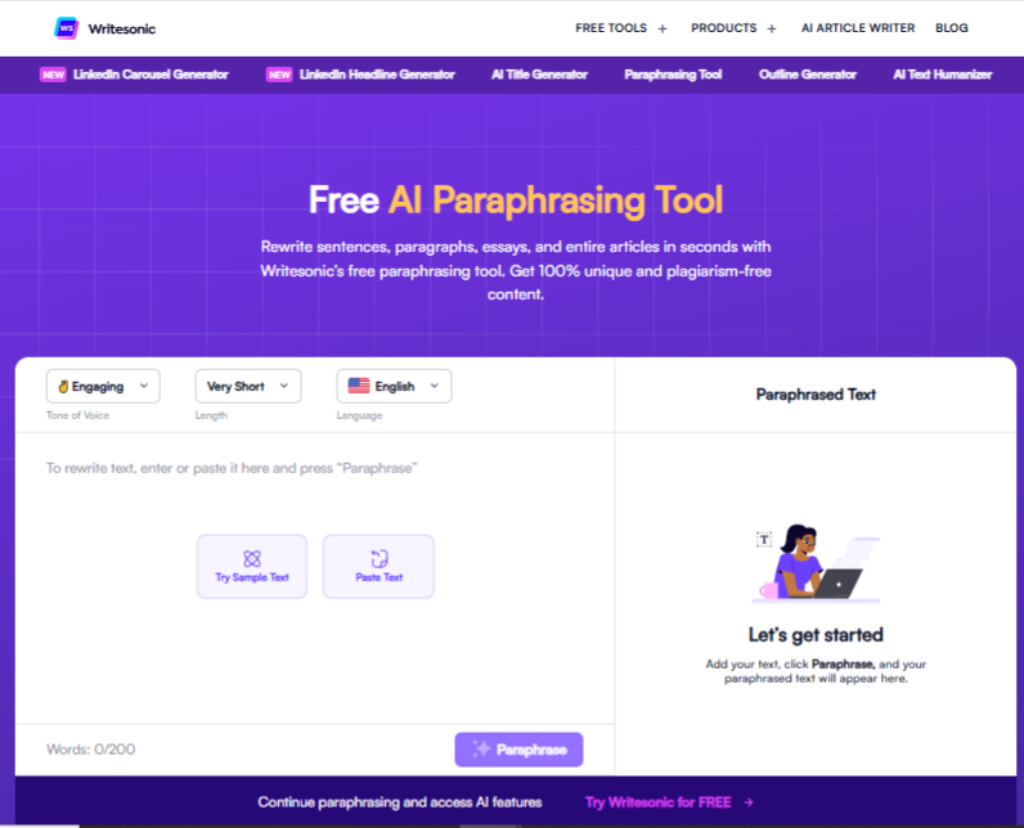
  • AI Paraphrasing Tool → Rewrites entire articles or essays with different tone and size options. Fast and accurate, this tool boosts readability and flow.
  • AI Outline Generator → Limited to 3 outputs per day in free plan, with only one result visible, but useful for structuring blog posts.
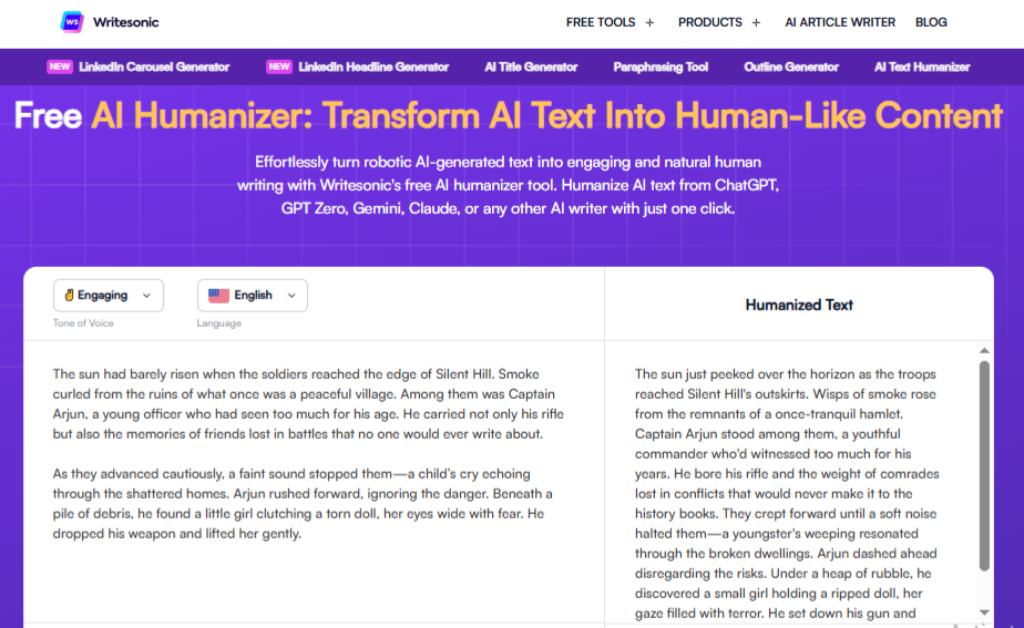
  • AI Humanizer → Converts AI-like text into natural, human-sounding writing. The results are good, but the tool is slower than others.
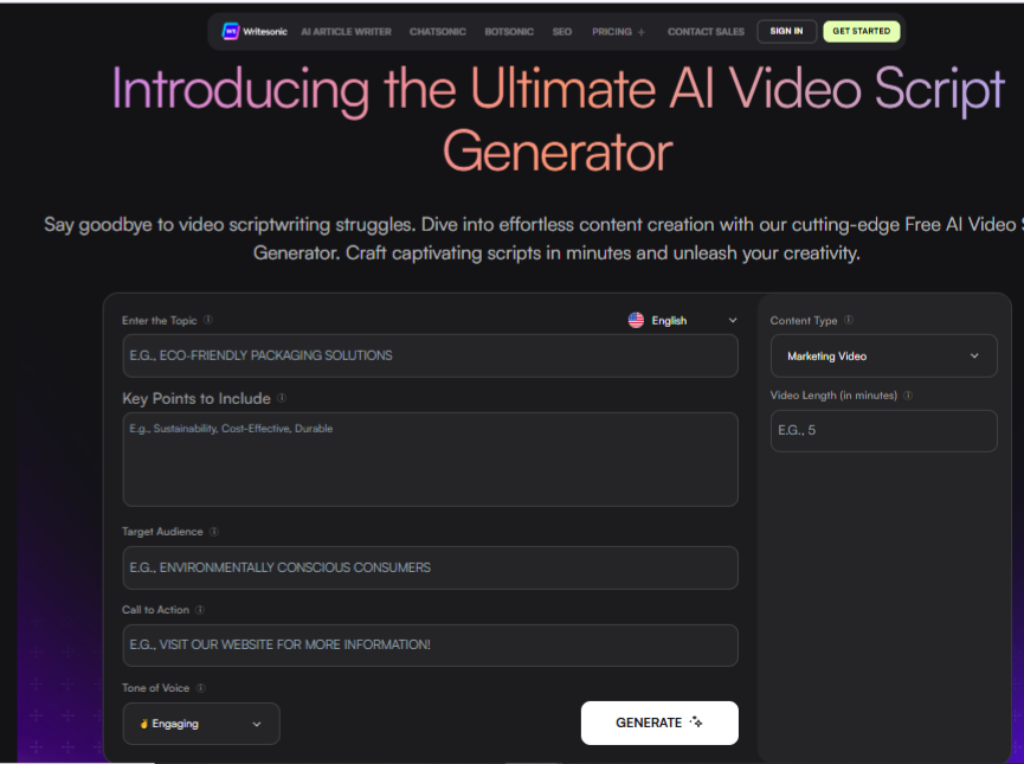
  • AI Video Script Generator → Produces structured video scripts when given basic parameters. Tone can be adjusted for different audiences.

On top of this, premium access unlocks Chatsonic (an AI chatbot) and even the ability to create custom AI bots for organizations.

AI LinkedIn Carousel Generator

This is one of Writesonic’s most unique tools. It lets you create swipeable LinkedIn carousels using just a single topic. You can choose a colour palette, upload your profile picture, and even add icon URLs for branding.

The generator delivers creative, professional-looking carousels that stand out on social feeds. What impressed me most is that you can even download them in PDF format under the free plan, which is rare for AI tools.

AI Title Generator

A handy tool for bloggers and marketers, the Title Generator quickly produces relevant and catchy titles for your content. It lets you adjust tone (casual, professional, or persuasive), which makes it flexible. However, the free plan restricts you to just three attempts per day, which can feel limiting if you’re brainstorming multiple ideas

AI Paraphrasing Tool

One of the faster and more consistent features, the Paraphraser rewrites sentences, paragraphs, or entire essays in seconds. It supports tone adjustments (casual, formal, etc.) and lets you decide the length of the output. The results are fluent and natural, improving readability while reducing the “AI feel” of text. It’s particularly useful for refreshing existing content or making drafts SEO-friendly.

AI Humanizer

This feature is designed to take obviously AI-generated content and make it sound more natural. The outputs are indeed smoother and more human-like, with better flow and nuance. The only drawback is that it’s slower to process compared to other tools, which can be frustrating for quick projects. Still, for creators worried about “AI detection,” it’s an invaluable addition.

AI Video Script Generator

The Video Script Generator is built for creators who need structured scripts for explainer videos, ads, or presentations. When I tried it, the tool asked for a few basic parameters like topic, tone, and purpose and then produced a well-organized script with clear sections (intro, body, call-to-action). The flexibility to adjust the tone of voice (casual, professional, persuasive, etc.) makes it useful for different audiences. The outputs are fluent and easy to follow, which can save hours of manual drafting. It works best for short to medium-length scripts. For longer or highly detailed videos, you’ll still need to edit and expand the draft.

AI Capabilities

Writesonic follows prompts effectively and adapts its tone to different content types. It shows creativity in storytelling and ads, though occasional limitations appear, sometimes it leans on repetition or produces factual inaccuracies. Still, it’s reliable for most use cases.

Language & Format Support

The platform supports multiple major languages and regional dialects, which broadens its reach globally. However, export formats like Word, HTML, or Markdown aren’t supported in the free plan, limiting flexibility for advanced users.

Speed & Performance

Most tools generate outputs within seconds. Paraphrasing, headlines, and ads are particularly quick. Features like AI Humanizer and Article Writer are slower, though the quality balances it out. Stability is excellent; no errors or downtime were noticed during use.

Integrations & Compatibility

Writesonic integrates with Google Docs, WordPress, Notion, Shopify, and Zapier—but only in paid plans. There’s also a browser extension and API, again gated for premium users. Free users are limited to standalone usage.

Pricing & Value for Money

The free plan provides a taste of Writesonic’s capabilities but feels restrictive with daily usage limits and feature lockouts. Paid plans open access to premium features like Chatsonic, plagiarism checks, integrations, and advanced templates. Compared to competitors, Writesonic offers affordable pricing with unique tools like carousels and humanizers that justify the upgrade.

Free Plan:

  • Limited daily credits
  • Basic AI writing tools
  • Access to core features (titles, outlines, paraphrasing)
  • 1 seat

Best For: Beginners, students, and casual users who want to test AI writing without cost.
Why: It provides access to core tools (titles, outlines, paraphrasing) with limited daily credits, making it enough to explore Writesonic’s capabilities before upgrading.

Lite Plan ($39/month, billed annually):

  • For freelancers & solo creators
  • Professional SEO + content tools
  • More content capacity than free
  • 1 seat

Best For: Freelancers, solo bloggers, and students who need reliable AI writing with light SEO support.
Why: It’s affordable for individuals and includes the essentials without overwhelming extras

Standard Plan ($79/month, billed annually):

  • For small teams & startups
  • Increased content limits
  • SEO-focused tools unlocked
  • 3 seats

Best For: Small marketing teams or startups looking to grow their content and SEO presence.
Why: Offers more output capacity and SEO-focused tools, making it easier to scale campaigns.

Professional Plan ($199/month, billed annually):

  • For mid-sized brands
  • Full SEO + AI search visibility
  • High content output capacity
  • 5 seats

Best For: Mid-sized businesses or brands that require full SEO tracking and AI search visibility.
Why: Ideal for those handling multiple campaigns and needing consistent, higher-volume content.


Advanced Plan ($399/month, billed annually)

  • For agencies & scaling teams
  • Advanced AI-driven SEO optimization
  • Maximum workflow automation
  • 10 seats

Best For: Scaling teams, agencies, and larger organizations aiming to maximize SEO performance.
Why: Unlocks advanced AI-driven optimization features, offering the best balance of power and scalability.

Customer Support & Community

Support options include an AI assistant chatbot and email. While helpful, there’s no live chat or phone option. Tutorials and blog posts guide new users, but the platform lacks a strong community forum. That said, the onboarding walkthroughs do a decent job of helping first-timers.

Best Alternatives of Writesonic.ai

  1.Jasper.ai 

  • Why it’s an alternative: Stronger in long-form content, deeper brand voice customization, richer workflows.
  • Best For: Agencies, content teams, marketers needing scalable and consistent content.
  • Trade-off: More expensive, steeper learning curve.
  1. Copy.ai
  • Why it’s an alternative: Excellent at generating short, creative marketing copy (emails, captions, product descriptions).
  • Best For: Freelancers, social media creators, eCommerce stores needing quick catchy text.
  • Trade-off: Less optimized for structured long articles or SEO content.
  1. Rytr.ai
  • Why it’s an alternative: Very affordable, versatile, supports many use cases and tones.
  • Best For: Students, solopreneurs, small-scale users who want maximum value for cost.
  • Trade-off: Free plan limits and fewer advanced integrations.
  1. Anyword (or similar marketing-copy tools)
  • Why it’s an alternative: Focuses on persuasive copy and performance metrics (ad copy, headlines) rather than general content.
  • Best For: Marketers, advertisers, and conversion-focused campaigns.
  • Trade-off: Less suited for long articles, creative storytelling, or broad writing tasks.
ParameterWritesonic.aiJasper AICopy.aiRytr.aiAnyword (Marketing-Focus)
Ease of UseBeginner-friendly, easy login, smooth onboardingIntuitive but more complex for content teamsSimple, clean, fast startVery easy, ideal for beginnersMore specialized, possibly steeper learning
Writing Quality & AccuracyGood, human-like, maintains contextPolished, strong for long content & brand voiceCreative, natural in short formAccurate, human-like across use casesHighly optimized for persuasive marketing copy
Templates & FeaturesRich creative features (carousels, humanizer, scripts, etc.)Strong long-form workflows, many templatesWide variety: emails, captions, product copy40+ templates & use casesFocused on ads, headlines, conversion copy
Customization & ControlTone switching, brand voice in paid plansDeep brand voice & tone controlTone presets, brand voice in paid20+ tones free, custom in paidIntensely focused on copy style & performance metrics
AI CreativityBalanced creativity + SEO, especially for social featuresExcellent storytelling, detailed contentGreat for marketing & catchinessStrong in stories, captions, creative formsVery strong in persuasive, conversion-oriented content
Speed & PerformanceGenerally fast, though some slow tools (humanizer, article writer)Fast, reliableVery fast for short-form outputFast outputs in secondsFast for copy tasks, optimized pipelines
IntegrationsAvailable in paid plans (Docs, WordPress, etc.)Rich integrations (CMS, APIs)Paid plan integrations (Docs, platforms)Paid extensions onlyMarketing tools, ad platforms, analytics integration
Free PlanAvailable but limited daily caps and featuresUsually limited trial or no true free planGenerous free toolsFree forever with 10K characters/monthMay offer trials focusing on ad copy
Pricing & ValueFlexible, feature-rich with paid upgradesPremium pricing with enterprise valueStrong value especially for marketing creativesOne of the most affordable optionsPrice focused on ROI from ads/copy performance
Best ForFreelancers, social creators, marketers needing creative and multi-format contentAgencies, enterprises, content teams needing scaleCreators, small businesses focusing on marketing copyStudents, solopreneurs, affordable all-round writersMarketers, ad specialists, conversion-focused campaigns

Final Verdict

Writesonic.ai is a creative and versatile AI tool that goes beyond standard text generation. With standout features like the LinkedIn Carousel Generator, AI Humanizer, and multiple tone presets, it’s well-suited for freelancers, marketers, and startups who need engaging content quickly. While the free plan feels limited and some tools are slower, the premium tiers unlock serious value for businesses looking to scale their content.

Best For: Freelancers, startups, and social media managers who want affordable, creative, and SEO-friendly AI writing support

On this page

Tags:

We will be happy to hear your thoughts

Leave a reply

Diztel
Logo