We may earn affiliate commissions for the recommended tools. Learn more.

Paperpal AI Review: A Smart Companion for Academic and Professional Writing in 2025

Paperpal AI stands out as an intelligent writing assistant built for precision, academic tone, and deep research integration. It’s a refined editing, paraphrasing, and reviewing platform tailored for students, researchers, and professionals. Logging in is simple, and the clean interface makes it effortless to start writing or revising instantly.

Even on the free plan, Paperpal provides enough room to test core functions like rewriting, plagiarism checks, and research assistance. However, its true potential unfolds with the Prime Plan, which unlocks unlimited rewriting, detailed plagiarism reports, AI-based review, and advanced citation tools.

Who is it Best For?

  • Students & Researchers – Ideal for academic writing, paraphrasing journal papers, and ensuring originality through plagiarism checks.
  • Educators & Academics – Great for reviewing student submissions, improving clarity, and refining academic tone.
  • Professional Writers & Editors – Perfect for users who need AI-powered rewriting and structural feedback with detailed language suggestions.
  • Scholars Submitting to Journals – The AI Review and Plagiarism Detection tools make it an excellent companion for polishing manuscripts before submission.
  • Non-native English Users – Helps improve sentence fluency, grammar, and tone consistency for academic and professional contexts.

What Makes it Stand Out

  • All-in-One Academic Assistant – Unlike generic AI writers, Paperpal combines editing, plagiarism checking, research assistance, and AI review — all in one dashboard.
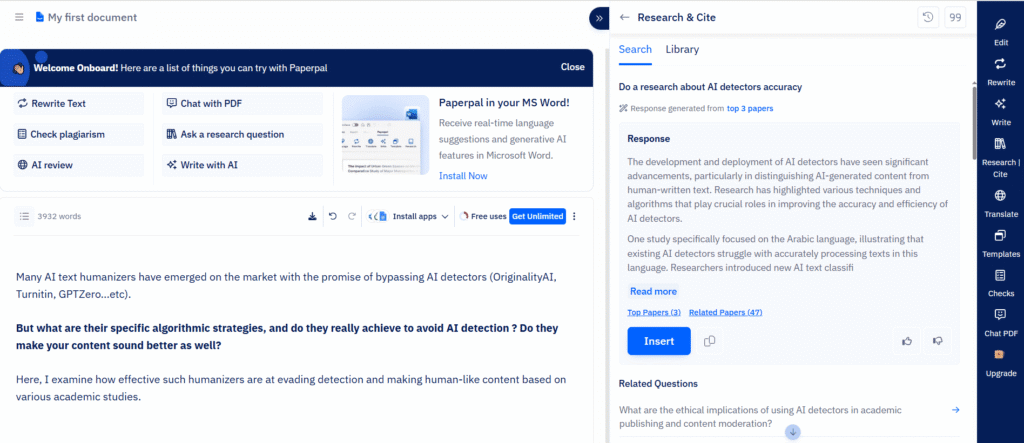
  • Research-Driven Features – The Ask AI Research and Cite Generator tools make it perfect for scholarly or publication-level writing.
  • Context-Aware Editing – The AI Review tool not only corrects grammar but also gives point-by-point improvement feedback on coherence and structure.
  • Accurate Plagiarism Checker – Detects copied content quickly and provides credible source references.
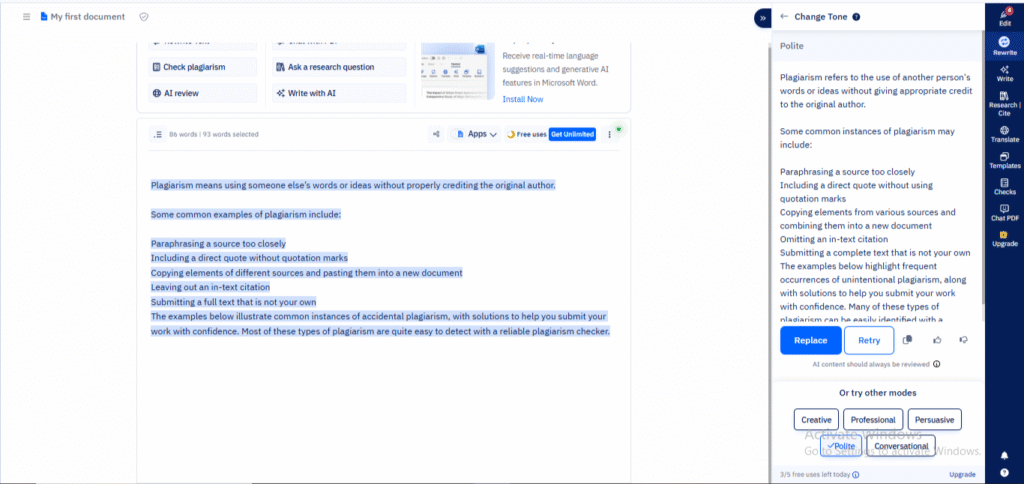
  • Refined Tone Controls – Supports tones like polite, academic, persuasive, and professional, giving full flexibility for formal writing.
  • Clean, Distraction-Free Interface – Designed for focus and precision, it feels more like a research workspace than a casual text generator
8Expert Score
A Smarter AI Companion for Academic Writing

Paperpal AI stands out as a research-focused writing assistant that blends precision with clarity. It not only rewrites and edits but also checks plagiarism, analyzes structure, and provides academic feedback, making it ideal for students, scholars, and professionals aiming for polished, publication-ready work.

Ease of Use
9
Writing Quality & Output Accuracy
9
Customization & Control
8.5
Features & Functionality
9
AI Capabilities
8.5
Language & Format Support
8
Speed & Performance
9
Integrations & Compatibility
7.5
Pricing & Value for Money
8.5
Customer Support & Community
7
How We Rate? Our ratings reflect hands-on testing and comparison across key parameters such as usability, features, pricing, support, and overall value.

Performance Breakdown: Pros and Cons

Ease of Use (UI/UX)

Paperpal is refreshingly easy to navigate — you can sign up, log in, and start working within seconds. The interface is clean, minimal, and intentionally designed for focus. Unlike many AI editors that overwhelm users with options, Paperpal’s layout feels calm and intuitive. Even first-time users can jump into rewriting, checking plagiarism, or asking AI research queries without confusion. What stands out most is its thoughtful onboarding: a short guided tutorial appears on your first login, showing how to use rewriting tools, citation helpers, and document feedback features. It’s clearly built for busy researchers and writers who value simplicity over clutter.

Writing Quality & Output Accuracy

Paperpal’s output quality is remarkably polished. The tool doesn’t just rephrase words — it understands meaning, tone, and sentence intent. Whether you’re rewriting an academic paper or improving a business email, the results sound fluent and natural, with no robotic phrasing. Grammar corrections are spot-on, and transitions between sentences feel human-like. In long-form writing, it maintains context seamlessly, ensuring logical flow between ideas. When tested on research paragraphs, it not only improved readability but also reduced redundancies — making the content publication-ready. Overall, it delivers high-grade linguistic precision and consistency expected from academic-level writing assistants.

Customization & Control

Paperpal gives users fine-grained control over tone, intent, and writing style. You can instantly switch between polite, professional, academic, or conversational tones, depending on the target audience. The Rewrite tool offers several modes  Paraphrase, Trim, Simplify, Change Tone, or Improve Fluency each producing fast, contextually aware results. The AI Review feature goes a step further, analyzing clarity, structure, and coherence, and suggesting exactly what to modify. This level of transparency builds trust, especially for researchers refining dense or technical documents. While the tool could benefit from more creative tones (like storytelling or marketing), it excels at precision, structure, and factual coherence.

Paperpal.ai Features I Used...

Here’s a closer look at the tools tested:

1. Rewrite Text

A standout feature that goes beyond simple paraphrasing. Users can choose from multiple modes such as Paraphrase, Simplify, Trim, Improve Fluency, Change Tone, or Use Synonyms.
Test Result: Fast output with good accuracy. The rewritten text retained meaning while sounding natural and academically polished.

2. Check Plagiarism

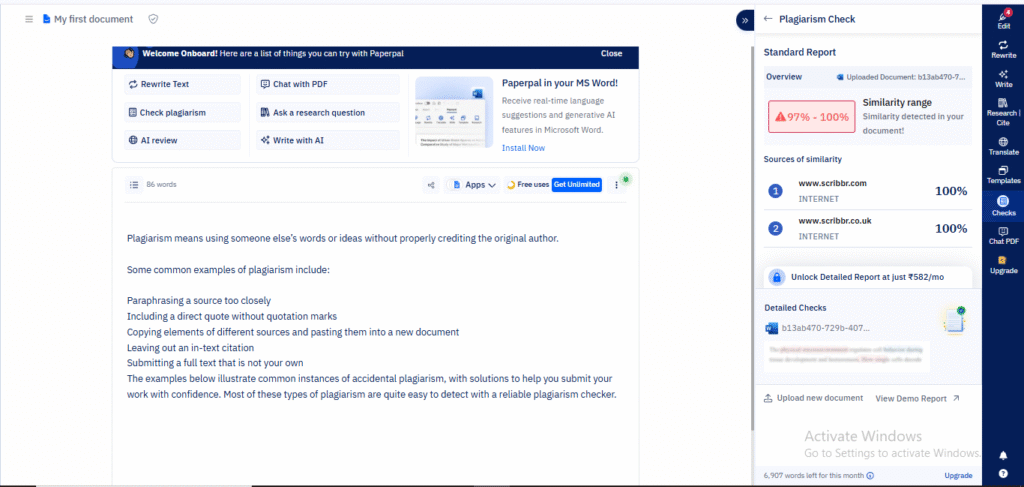
Reliable and quick. It not only detects copied text but also provides original source links for verification.
Test Result: Produced results in seconds and proved helpful for cross-checking citations before submission.

3. Ask AI Research Question

This feature transforms Paperpal into a research partner. It answers academic or topic-related questions with credible, contextual results.
Test Result: Delivered relevant, well-structured research explanations with proper reasoning.

4. AI Review

An analytical gem. It scans your paragraph and gives clear, point-by-point feedback covering flow, coherence, sentence transitions, and examples.
Test Result: Helped identify weak transitions and improved readability by suggesting precise alternatives.

5. Write with AI

Perfect for drafting from scratch. Users can input a topic, and the AI develops structured, academic-quality paragraphs.
Test Result: The output was coherent, logically structured, and required minimal edits.

AI Review

On out testing, this feature acts like an intelligent proofreader that goes beyond grammar checks. When you paste a paragraph or upload your text, AI Review highlights issues in flow, structure, and coherence. It doesn’t just flag errors, it explains why a sentence feels off and suggests clear, concise alternatives. During testing, it provided feedback like “improve flow between examples” or “reorder for logical clarity,” which felt genuinely helpful rather than generic. For academic or research writing, this level of insight is invaluable. It refines tone and logic without losing originality.

Plagiarism Check

Paperpal’s plagiarism checker is fast, accurate, and transparent. Once we run the scan, it not only gives a similarity percentage but also shows the original sources where overlap was detected. This feature worked flawlessly in our testing, identifying subtle matches that typical free checkers often miss. The results are well-structured, showing exact sentences and sources, making it easy to edit or cite properly. It’s especially useful for researchers and students who need to maintain originality while referencing published work.

Rewrite – Change Tone

This tool gives your text the ability to speak in the right voice. With tone options like polite, professional, academic, persuasive, and conversational, you can easily tailor content to your audience. During testing, tone adjustments were instant and context-aware. For example, converting a plain paragraph into a polished academic explanation without losing meaning. It’s a subtle but powerful tool for anyone switching between formal reports, research articles, and everyday communication.

Rewrite – Paraphrase

The Paraphrase option stands out for both speed and fluency. We simply paste a sentence or paragraph, and the tool rewrites it to improve clarity and style while preserving intent. In tests, the rephrased versions were grammatically perfect and avoided robotic phrasing, which is ideal for academic writing where precision matters. It also helped simplify overly complex sentences while keeping them professional and natural. The output was consistently human-like, making it a reliable editor for improving drafts or avoiding unintentional repetition.

Write with AI

Paperpal’s feature turns ideas into structured, readable content with minimal effort. Once you enter a topic or a short brief, it expands it into full sentences and paragraphs that sound professional and coherent. The tone remains academic yet approachable, making it ideal for essays, research summaries, or formal reports.

In testing, it delivered fast, logically connected text, often suggesting follow-up sentences or better phrasing to maintain flow. You can easily edit or refine the output mid-process. It is a big plus for writers who like to stay in control of their draft. While the free plan limits how many times you can use it, the quality of generation rivals premium tools.

Best for: Researchers, students, and professionals who want to turn short ideas into publication-ready paragraphs without losing precision or context

AI Capabilities

Paperpal’s AI engine feels purpose-built for writers and researchers. It follows prompts precisely and shows strong understanding of sentence structure, tone, and intent. When rewriting or answering research questions, it interprets nuances well and avoids typical AI errors like over-simplification or irrelevant expansion. Its AI Review and Research Q&A tools display a clear understanding of academic and contextual writing, providing smart suggestions that improve readability without altering meaning. Creativity is controlled but thoughtful, making it suitable for professionals who prefer clarity and factual precision over flashy phrasing.

Language & Format Support

Paperpal supports a wide range of major global languages and delivers high-quality translations. It works best in English, but tone accuracy and grammar checking hold up well across multiple dialects. The standout feature here is its export flexibility. Users can download results in DOCX or share outputs directly through link access, making it ideal for academic collaboration or peer review. While it doesn’t yet support exporting to PDF or Markdown natively in the free version, its integration with standard formats like Word makes it accessible for researchers and professionals alike.

Speed & Performance

Performance is one of Paperpal’s strongest traits. Outputs whether paraphrased text, AI reviews, or plagiarism scans are generated within seconds, even for long paragraphs. The interface is lightweight, responsive, and stable; there were no crashes or lag during testing. Long research queries and plagiarism checks returned detailed results quickly without freezing or timing out. Compared to heavier AI platforms, Paperpal maintains speed without compromising depth, making it a reliable companion for daily academic or business writing tasks.

Integrations & Compatibility

Currently, integrations are limited in the free plan, but the Prime plan unlocks broader compatibility. Paperpal works best as a standalone editor but can also integrate with platforms like Google Docs and Microsoft Word in paid tiers. There’s no dedicated browser extension or mobile app yet, which may limit on-the-go productivity. However, its “Share via link” option provides an easy workaround. Collaborators can view or comment on outputs directly. For researchers and professionals working within document editors, its DOCX export keeps the workflow smooth and accessible.

Pricing & Value for Money

Paperpal’s Free Plan offers generous access to core tools like Rewrite, Research Q&A, and Plagiarism Check, though each comes with monthly usage limits. For students or casual users, it’s enough to test the ecosystem. The Prime Plan ($25/month) unlocks everything — unlimited language editing, rewriting, advanced plagiarism checks, and journal submission checks. Given the academic precision and reliability it provides, the pricing feels justified. It’s a good value for users who need research-grade accuracy, not just basic writing help.

Free Plan:

  • Limited monthly usage for each tool
  • Access to core AI tools (Rewrite, Research Q&A, Plagiarism, Chat PDF)
  • Basic AI writing and editing
  • 1 seat

Best For: Beginners, students, or researchers exploring Paperpal’s capabilities without commitment.
Why: The free plan provides limited yet valuable access to essential features like paraphrasing, research Q&A, and plagiarism checking—ideal for testing workflow accuracy before upgrading.

Prime Plan ($25/month):

  • Unlimited rewriting and language editing
  • Full access to writing tools (Paraphrase, Trim, Simplify, Tone Change)
  • Predictive Writing and AI Review
  • Unlimited Research Q&A and Citation Generation
  • Unlimited Chat PDF with advanced AI
  • 10,000 words/month plagiarism check with detailed reporting
  • Unlimited journal submission checks

Best For: Researchers, academicians, and professionals who need consistent academic assistance for manuscripts, reports, and publications.
Why: The Prime Plan provides a complete writing and research ecosystem — blending advanced rewriting, real-time citation generation, and detailed AI feedback for accuracy and tone. Perfect for users seeking editorial-level refinement in every draft.

Customer Support & Community

Paperpal offers responsive support primarily through email, and users can access tutorials, help guides, and sample use cases directly from the dashboard. The onboarding assistance is clear — first-time users get step-by-step tips for using rewriting and citation features. While there’s no live chat or user forum yet, the self-help resources are strong, and feedback response times are reasonably quick. The blog and support articles are educational, making Paperpal feel like a tool that actively helps users grow as better academic writers rather than just automate tasks.

Best Alternatives of Paperpal

1. Grammarly

Why it’s an alternative: Focuses strongly on language accuracy, style, tone, and readability—excellent for everyday writing, professional communication, and academic proofreading.
Best for: Writers, students, professionals who want high-quality grammar, tone consistency, and simpler writing tasks.
Trade-off: Less specialized in deep academic research, citations, or manuscript-submission workflows compared to Paperpal.

2. QuillBot

Why it’s an alternative: Strong paraphrasing and rewriting tool with flexible tone options, good for rewriting and editing content rather than full research workflows.
Best for: Content creators, bloggers, students needing to rephrase text or improve readability.
Trade-off: Doesn’t offer as comprehensive a research/citation feature set as Paperpal.

3. Jenni AI

Why it’s an alternative: A strong AI writer for content generation, assisting with drafting, outlining, and idea-generation.
Best for: Bloggers, marketers, professionals drafting content quickly who also want more than mere proofreading.
Trade-off: May not offer the deep academic review, plagiarism checks, or journal-submission features that Paperpal emphasizes.

4. Paperguide AI

Why it’s an alternative: Designed specifically for research work — literature review, paper discovery, writing and refining scholarly documents.
Best for: Researchers, academics who organise references, assess paper quality, and need a research assistant, not just writing-help.
Trade-off: Might focus more on research workflow than rewriting/exact language polishing; slightly different target than Paperpal’s full writing-ease scope.

ParameterPaperpal AIGrammarlyQuillBotJenni AIPaperguide AI
Ease of UseVery easy login, intuitive UIVery easy, clean interfaceVery easy, quick startEasy for content draftingEasy for research-oriented users
Writing Quality & AccuracyStrong academic tone, context retentionExcellent grammar & tone correctionGood paraphrasing & readabilityGood for drafting contentStrong for scholarly writing
Customization & ControlTone switching, rewrite/trim functionsTone correction, style optionsTone presets for paraphraseDrafting and outline controlResearch context, custom workflow
Features & FunctionalityRewrite, research Q&A, plagiarism checkGrammar, tone, readability checksParaphrase, summarise, rewriteOutlines, content generationLiterature review, academic assistance
Language & Format SupportMajor languages, DOCX/sharingMany languages, export formatsMultiple languages, text toolsEnglish-focused, export to draftsEnglish & research databases
Integrations & CompatibilityLimited in free, exports availableBroad integrations (plugins)Basic integrationsIntegration variesResearch tools, citation systems
Price & ValueFree tier + paid plan for research/usersFree plus premium plansAffordable tool for rewritingContent generation cost modelPremium for research-heavy users
Best ForStudents, academics, professionalsEveryday writing, professionalsParaphrasing/editing contentBloggers, marketers, content teamsResearchers, academics

Final Verdict

Paperpal AI emerges as a potent writing assistant that strikes an impressive balance between academic rigor and everyday usability. Its standout features like rewriting with nuanced tone adjustments, plagiarism checks with source tracking, detailed AI-led structural reviews, and research question responses position it as more than just a regular “text generator.” Instead, it acts as a smart editor, researcher, and writing coach combined.

For students, researchers, and professionals aiming for clarity, refinement, and originality in their writing, Paperpal delivers strong value. The free plan offers a solid taste, and the paid tier unlocks substantial depth. While some features like integrations and live collaboration are still limited, the tool’s speed, accuracy, and thoughtful workflow support make it a top choice for anyone serious about writing and publishing.

On this page

Tags:

We will be happy to hear your thoughts

Leave a reply

Diztel
Logo