If you’ve ever felt that email marketing tools are either too technical or too limited, MailerLite strikes the perfect middle ground. It’s designed for creators, marketers, and small teams who want to build beautiful emails without writing a single line of code. With its clean drag-and-drop editor, over 100 ready-made templates, smart automation, and fair pricing, MailerLite proves that simplicity can still deliver professional-grade results.
In this review, we tested every major function from email designing and contact management to automation and analytics to evaluate if MailerLite truly lives up to its reputation as one of the most beginner-friendly email marketing tools of the year.
Quick Summary Snapshot
- Perfect For: Small businesses, creators, and marketers who want to design, send, and track professional emails without the technical hassle.
- Why It Stands Out: A clean, drag-and-drop editor, 100+ modern templates, built-in automation, and affordable pricing make MailerLite one of the most accessible and reliable email marketing tools.
With 100+ customizable templates, smooth automation, strong deliverability, and affordable pricing, MailerLite delivers a perfect balance of usability, reliability, and value — an all-in-one toolkit for creators, marketers, and growing businesses.
Performance Breakdown: Pros and Cons
- Clean drag-and-drop editor with guided onboarding
- Professional-quality templates
- Effortless CSV imports, intuitive segmentation, tagging, and personalization
- Reliable automation and scheduling
- Limited niche template variety
- No advanced list validation tools
- Analytics could be more visual
- Landing page builder is tier-locked
Email Designing & Templates
Mailerlite delivers an impressively clean and intuitive drag-and-drop email editor that makes professional design effortless even for first-time users. You can sign in instantly using Google or Gmail, and a short tutorial guides you through the basics. Each feature is clearly labeled, and the built-in AI assistant popup explains what every block or function does.
The interface feels remarkably well-structured, clean, intuitive, yet powerful enough for real marketing work.
During my testing, it took me about 30 minutes to build a complete email template from scratch, and the process felt smooth throughout. Every element, from layout adjustments to image placement, responded instantly. The live preview updated in real time, and the undo/redo controls added confidence while experimenting with different sections.
Template Variety
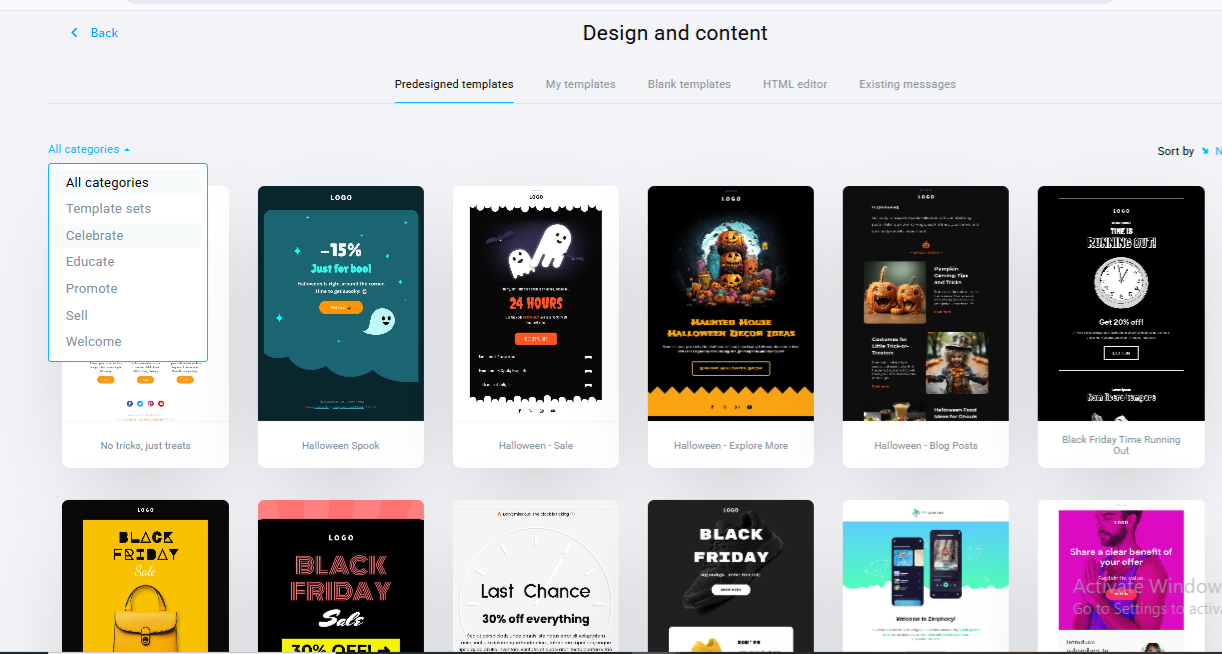
Mailerlite comes with 108 ready-to-use templates across campaign types such as product offers, brand updates, and event newsletters. The templates look modern, polished, and visually balanced. You can pick any design, edit the text or colors, and align it with your brand in seconds.
Customization & Flexibility
Customization is a strongest suit of the tool. Users can edit the design by clicking on any block. You can add/change fonts, colours, and layouts, add logos or banners, and embed product sections using e-commerce blocks.
The editor’s left panel includes navigation, hero sections, buttons, image boxes, dividers, blog/RSS blocks, and galleries. Everything can be moved, duplicated, or deleted with a single click.
Media Handling & Reusability
During our testing, image import and alignment are smooth; Mailerlite automatically compresses images for faster email loading. You can also create two- or three-column comparison layouts and save entire templates or blocks for reuse.
The tool gives mobile preview controls, meaning users can fine-tune how designs appear on smaller screens. In our testing, the mobile view was well optimised as per the screen size.
Contact List Management
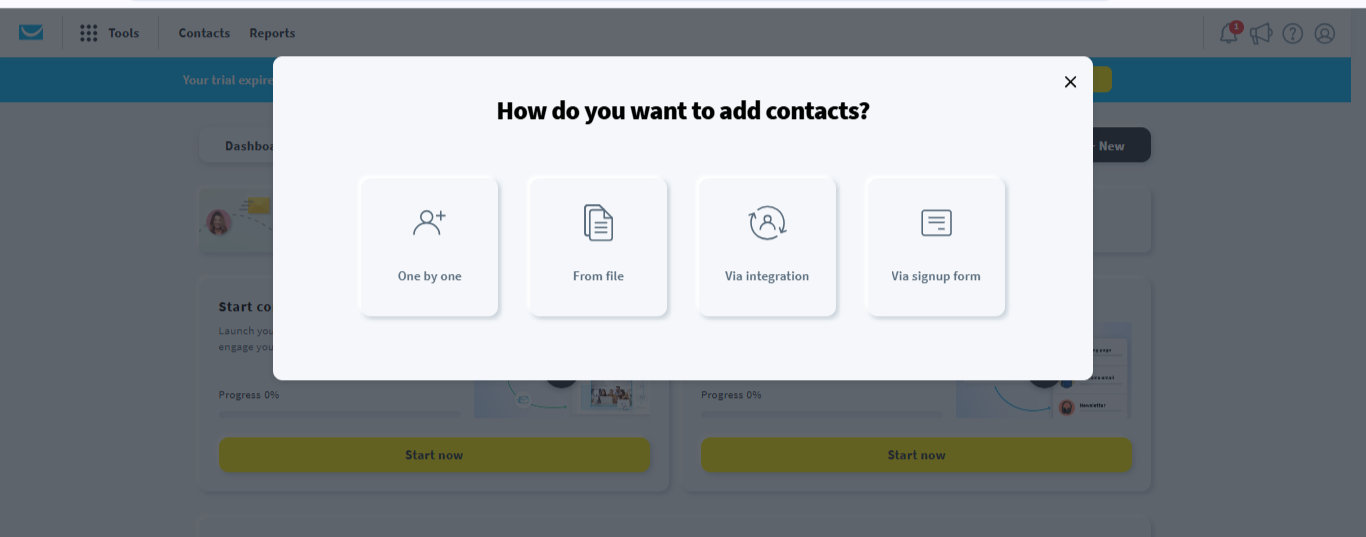
Adding and managing contacts in Mailerlite is refreshingly straightforward. You can import subscriber lists via CSV, TXT, or Excel files, or manually copy-paste data. When I started adding the contact list, the process is fast, guided, and includes helpful tips to avoid duplicates. Users can also integrate via API or import directly from Mailchimp or other services.
Segmentation & Tagging
Mailerlite’s segmentation is designed for non-technical marketers. You can group contacts by demographics, tags, or user activity using a drag-and-click interface. It requires no formulas or complex logic to execute. It’s ideal for personalizing campaigns and running behaviour-based automations.
Personalization & List Hygiene
Even the free plan supports personalization fields and merge tags, including name, company, and email. Mailerlite automatically flags duplicates and bounces, maintaining list hygiene. Signup forms are customizable, enabling easy audience growth directly from websites or landing pages.
Campaign Execution
When we tested Mailerlite, the tool streamlines the entire campaign process from setup to delivery. Setting up a campaign is simple. You just need to add your campaign name, subject line, and select the email type (regular, A/B test, or auto-resend). Before dispatch, you can edit any section of the email or reselect the audience list. However, on free trial, all campaigns will have the mailerlite branding at the bottom end of the designed mailer. To remove this, you need to upgrade to paid plans.
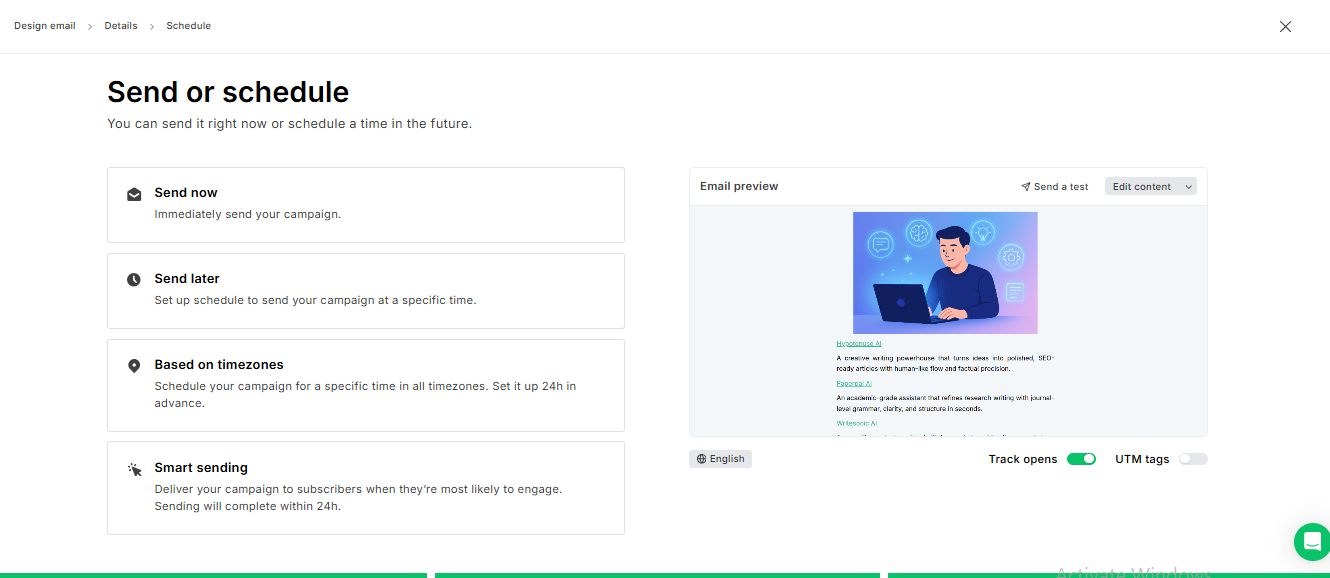
The platform supports scheduled and time-zone-based delivery, ensuring emails reach global audiences at the right moment. Sending speed is quick typically within a few minutes of scheduling.
Deliverability & Compliance
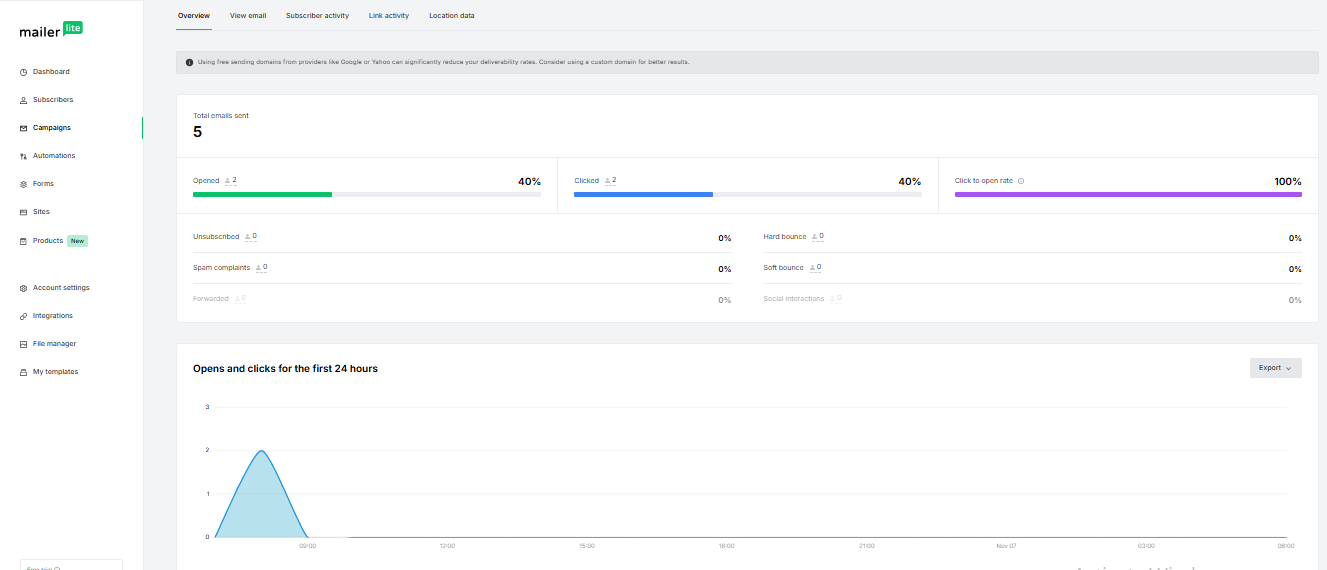
Mailerlite maintains strong deliverability; emails consistently land in the inbox (not spam), backed by SPF and DKIM authentication. In our testing, the deliverability rate was 100%.
One-click unsubscribe links ensure compliance with opt-out regulations. The functionality was working fine.
Reports & Analytics
The analytics dashboard tracks everything that matters such as opens, clicks, unsubscribes, bounces, and conversions in real time. Each metric is easy to read and visually clear.
You can export reports in CSV format and filter by campaign or automation workflow.
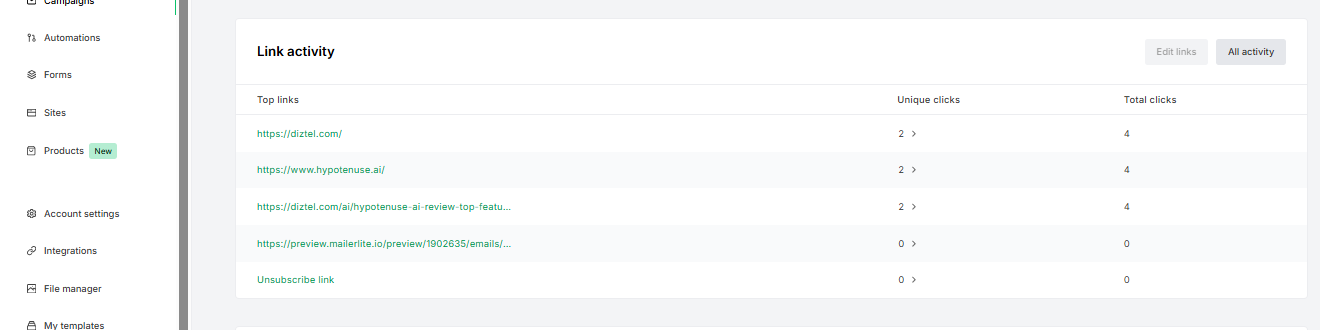
Link-tracking features give you insights into which sections of your emails drive engagement. Deliverability reports classify bounces and spam complaints, while automation reporting provides performance data for each triggered flow.
Pricing & Value
Here’s a clear breakdown of how MailerLite’s pricing aligns with value. The platform is ideal for creators, small businesses, and marketing teams evaluating affordability and scalability.
| Plan | Subscriber Limit* | Emails/Month | Approx. Price (USD) | Key Features |
|---|---|---|---|---|
| Free | Up to 500 active subscribers | Up to 12,000 | $0 | Full drag-and-drop editor, basic automation, landing pages, 1 user |
| Growing Business | Starts at ~500 subscribers (scales with list size) | Unlimited | ~$10/month | Remove branding, dynamic content blocks, 3 users, unlimited pages |
| Advanced | Starts at ~500 subscribers (scales with list size) | Unlimited | ~$20/month | Advanced automations, custom HTML editor, unlimited users, priority support |
| Enterprise | 100k+ subscribers (custom) | Custom | Custom Quote | Dedicated IP, account manager, high-volume delivery support |
Pricing Plans Vs Value
- Generous Free Plan: Ideal for early-stage users to test email creation, automation, and audience growth with 12,000 monthly sends at zero cost.
- Scalable Growth Path: Paid tiers grow with your subscriber base, unlocking richer automation, branding removal, and advanced features without steep jumps.
- Transparent Billing: You pay only for active subscribers — not unsubscribed or bounced contacts — ensuring fair value for every plan.
- Balanced Features vs Cost: The shift from Free → Growing → Advanced unlocks professional-grade tools without overspending.
- Sustainable Long-Term Value: The pricing structure ensures small teams can start lean and scale confidently as campaign volume and subscriber needs expand.
Best Alternatives of MailerLite
Here are five strong alternatives to MailerLite with its own unique strengths, so you can match your needs and budget accordingly.
1. Brevo (formerly Sendinblue)
- Why consider it: A true multi-channel platform combining email, SMS, live chat and CRM in one place. It is an excellent choice if you plan beyond just email.
- Best for: Growing businesses that want to scale in digital marketing channels.
- Key edge: Strong automation and multi-channel workflows, generous free-tier sending.
- Minor hiccups: The interface might feel slightly more complex compared to MailerLite’s streamlined design.
2. Moosend
- Why consider it: A budget-friendly option with advanced automation and features usually found higher up the ladder.
- Best for: Users who want more automation depth without breaking the bank.
- Key edge: Richer workflow triggers, design testing tools, good value pricing.
- Minor hiccups: Free plan may not match MailerLite’s; deliverability reports and template variety may still lag.
3. GetResponse
- Why consider it: A full-suite marketing tool that includes webinars, sales funnels, and stronger segmentation in addition to email.
- Best for: Businesses aiming to expand into lead generation, webinars, and richer funnels.
- Key edge: Higher-end automation, more powerful campaign types.
- Minor hiccups: More features often means steeper learning curve and higher price.
4. Omnisend
- Why consider it: Especially strong for e-commerce brand. Integrates email + SMS + push notifications; many e-commerce-specific workflows.
- Best for: Online stores and brands that use email as part of an integrated shopping-experience strategy.
- Key edge: Built for product updates, abandoned cart flows, advanced customer-segmentation.
- Minor hiccups: If you’re purely doing newsletters rather than store-driven campaigns, some features may go unused.
5. Mailchimp
- Why consider it: One of the largest players; huge ecosystem of templates, integrations, and brand recognition.
- Best for: Users who want maximum integrations, high brand familiarity, and an extensive template library.
- Key edge: Broad network of third-party integrations (CRMs, e-commerce, ad platforms), strong community.
- Minor hiccups: Free or lower-tier plans may be more limited in sending and features than MailerLite; cost can climb with scale.
Who should choose what?
- If you’re expanding into SMS/web push or multichannel, pick Brevo or Omnisend.
- If you need advanced automation but still on a budget, Moosend is worthy.
- If you’re aiming at webinars, funnels, and richer marketing suites, GetResponse is scalable.
- If you need massive template/integration support with broad ecosystem, Mailchimp is proven.
| Feature / Criteria | MailerLite | Brevo (Sendinblue) | Moosend | GetResponse | Omnisend | Mailchimp |
|---|---|---|---|---|---|---|
| Ease of Use | Simple drag-and-drop builder, guided onboarding | Slightly complex interface but powerful | Clean layout, some setup learning curve | Heavier interface due to multiple tools | Intuitive for e-commerce-specific use | Familiar but cluttered at times |
| Template Variety & Design | 108+ templates, modern layouts | 80+ templates, flexible drag-and-drop | 70+ templates, minimalist designs | 150+ templates, wide category coverage | 120+ templates tailored for e-commerce | 200+ templates, massive theme variety |
| Automation & Workflows | Basic to intermediate; ideal for small teams | Strong multi-channel (email + SMS + chat) | Advanced triggers and sequences | Deep automation (funnels, webinars) | Focused on e-commerce automations | Robust but complex automation builder |
| Deliverability | High inbox rate, DKIM/SPF support | Reliable, slightly slower bulk send speed | Solid performance, fewer spam filters | Excellent tracking and inbox testing | Optimized for retail and cart recovery | Strong infrastructure, variable on free tier |
| Reporting & Analytics | Clean dashboard, CSV exports, heatmaps | Detailed engagement reports | Granular automation reports | Visual dashboards with conversion data | E-commerce sales attribution | Comprehensive, but some reports locked in paid plans |
| Integrations | Shopify, WordPress, Zapier, API | CRM, chat, ads, SMS, API | Zapier, WordPress, WooCommerce | CRM, webinar, funnel tools | Shopify, WooCommerce, BigCommerce | Nearly all major apps, CRMs, and CMS platforms |
| Free Plan | Up to 500 subscribers / 12,000 emails | 300 emails/day (no subscriber cap) | Up to 1,000 subscribers | Limited features, trial-based | 500 contacts / 500 emails | 500 contacts / 1,000 emails |
| Starting Price (Paid Plan) | ~$10/month | ~$25/month | ~$9/month | ~$19/month | ~$16/month | ~$13/month |
| Best For | Creators & SMBs who want ease + value | Growing teams needing multi-channel outreach | Automators on a tight budget | Advanced marketers needing funnels | E-commerce & retail brands | Established brands needing broad integrations |
| Key Strength | User-friendly editor, affordable scaling | Multi-channel marketing capabilities | Automation depth at low cost | Full marketing suite | Retail-focused automations | Ecosystem & brand familiarity |
| Key Limitation | Limited mobile preview, fewer niche templates | UI complexity | Smaller template pool | Higher pricing tiers | Less useful outside e-commerce | Rising cost as contacts scale |
Final Verdict
MailerLite proves that simplicity doesn’t have to come at the cost of capability. It’s one of the few email marketing platforms that blends design freedom, automation power, and affordable pricing into a genuinely enjoyable experience even for beginners. For small businesses, creators, and marketing teams that prioritize clarity, speed, and solid automation, MailerLite remains one of the most balanced and trustworthy tools in its category.
On this page
Tags: review