We may earn affiliate commissions for the recommended tools. Learn more.

Omnisend Email Marketing Review: Pros & Cons, Hands-on Experience

Omnisend has become a go-to choice for ecommerce brands looking for an email & SMS marketing solution that blends ease of use, automation power, and strong design flexibility. To understand how well Omnisend performs in real-world scenarios, we spent hours working inside the dashboard including designing email templates, importing contacts, running test campaigns, checking analytics, exploring AI tools, and evaluating pricing plans.

This review covers everything we experienced during testing, including the real time it took to create templates, how fast campaigns were delivered, how duplicate contacts were handled, how AI behaved, and which features are locked behind paid plans. If you’re deciding whether Omnisend is right for your business, this hands-on review will give you clarity.

Quick Summary Snapshot

  • Perfect For:
    Ecommerce stores, small businesses, and growing brands that want to design high-quality emails, automate customer journeys, manage contacts, and run SMS + email campaigns without technical skills. Ideal for Shopify, WooCommerce, and D2C sellers who need product-focused templates and behavior-driven automation.
  • Why It Stands Out:
    Omnisend combines a clean drag-and-drop editor, 250+ ecommerce-ready templates, AI-powered subject lines, product recommendation blocks, and fast deliverability. Its automation builder, duplicate-contact cleanup, seamless import options, and revenue-attribution analytics make it a powerful, beginner-friendly platform, especially for brands that want real growth through email + SMS marketing.
7.5Expert Score
Ecommerce-Focused Email Marketing Platform

Ominisend’s clean editor, product-based content blocks, smart segmentation, and revenue-attribution reporting make it a powerful all-in-one toolkit for Shopify stores, WooCommerce brands, D2C businesses, and marketers who need a simple yet scalable email marketing solution.
Usability & Design
8
Features & Functionality
8
Email Deliverability
7.5
Analytics & Reporting
7.5
Pricing & Value
7.5

Performance Breakdown: Pros and Cons

Email Designing & Templates

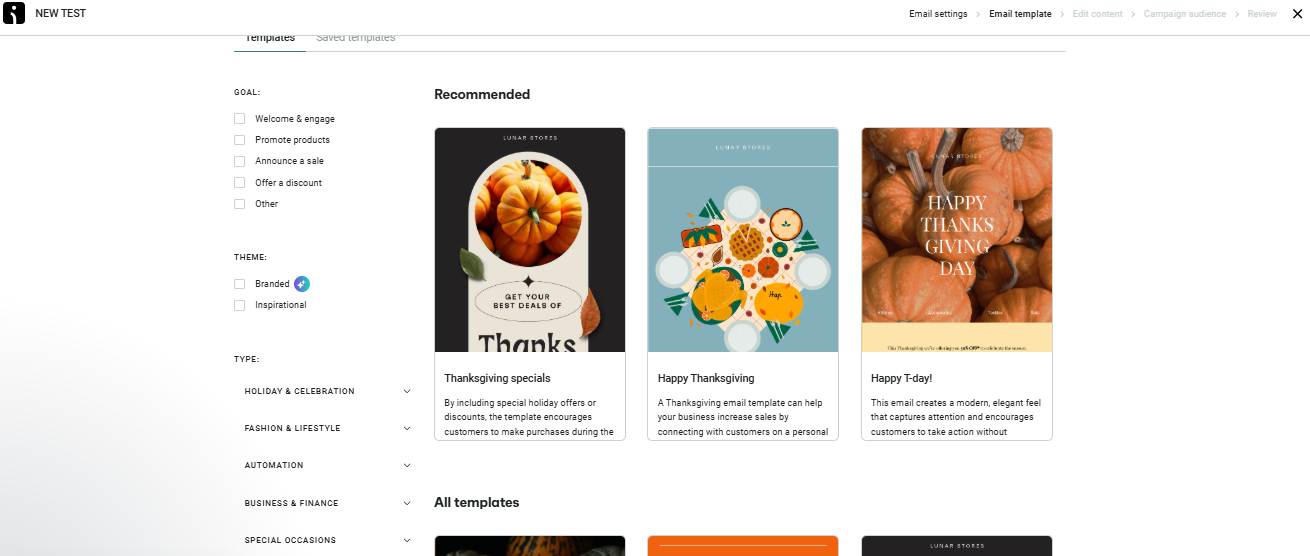
The editor feels clean, responsive, and beginner-friendly. While working on it, the drag-and-drop experience was smooth with no lag. Every block such as text, images, buttons, product feeds, drops precisely where you intend. Building a full template from scratch took 40–45 minutes during our testing, mainly because Omnisend gives you plenty of creative flexibility.

Over 250 templates to choose from

Omnisend’s library of templates offers a wide range of designs suited for ecommerce brands, product-based businesses, newsletters, and promotional campaigns. While testing, switching between templates felt instant and fluid, with no loading delays. Each template follows a clean structure with consistent spacing, readable text blocks, and well-balanced image-to-content ratios. The layouts feel intentionally crafted for conversions, highlighting products, prices, and CTAs in visually strong positions. Whether you’re running a seasonal sale, a new product launch, or a simple newsletter, there’s always a template that matches the tone. The diversity ensures that you never feel limited or forced into repetitive designs.

Customization & Flexibility

Customization inside the editor is highly visual and intuitive. While working on it, adjusting fonts, colours, section backgrounds, button shapes, or column layouts felt effortless. You can drag product blocks, add dividers, change spacing, or rearrange full sections without breaking the template’s structure. Even with heavier design changes such as multiple image swaps, product feeds, and layout adjustments, the editor remained responsive and stable during testing. Branding a template to match your store’s colour palette takes just a few minutes, and the consistency across blocks helps maintain a polished, professional look.

Media Handling & Reusability

Every template auto-optimizes for mobile, which is crucial for ecommerce audiences. During testing, mobile previews showed clean stacking, correctly scaled images, and properly aligned buttons. Media handling is equally smooth. Uploading images from a URL or your computer worked instantly, and the side panel controls made resizing, cropping, and alignment simple. Embedding product photos, banners, or even GIFs felt natural, and the designs retained their sharpness on both mobile and desktop views.

Contact List Management

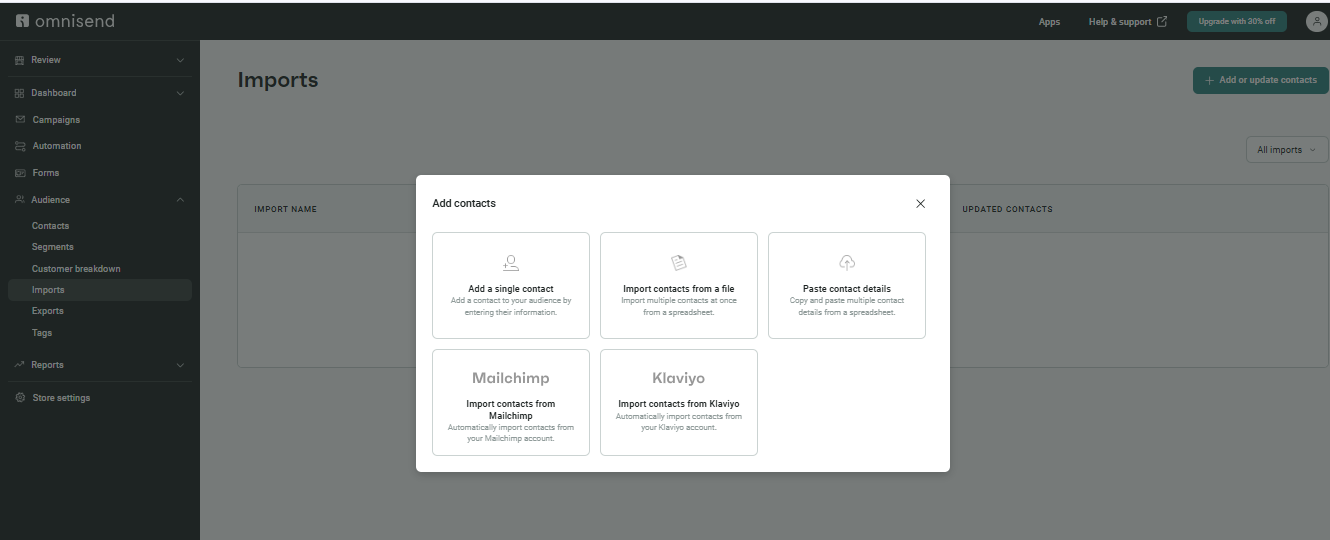
Omnisend handles contact management with a focus on flexibility and hygiene. Importing data is straightforward during our testing, we added contacts via multiple methods to see how the system behaved. You can upload CSV, XLSX, or TXT files, paste contact lists directly from spreadsheets, or manually add individual contacts. For users migrating from other platforms, direct imports from Mailchimp and Klaviyo are a big plus, reducing friction when switching tools.

Segmentation & Tagging

Tagging is available even on the free plan, which means you can label users by lead source, campaign, lifecycle stage, or any custom logic from day one. Segmentation builds on top of that, letting you create dynamic groups based on behaviour and attributes such as opens, clicks, purchase history, signup form, country, or applied tags. The interface for segment creation is straightforward, so you don’t feel like you need a data analyst to run targeted campaigns.

Personalization & List Hygiene

In our test, we deliberately imported duplicate entries to see what would happen. Omnisend automatically removed duplicate contacts, keeping the list clean without any extra work. This is crucial for accurate reporting, maintaining reputation, and avoiding wasted sends on duplicate records. Bounces and unsubscribes are also tracked and handled appropriately, helping you keep the list compliant and performance-ready over time.

Campaign Execution

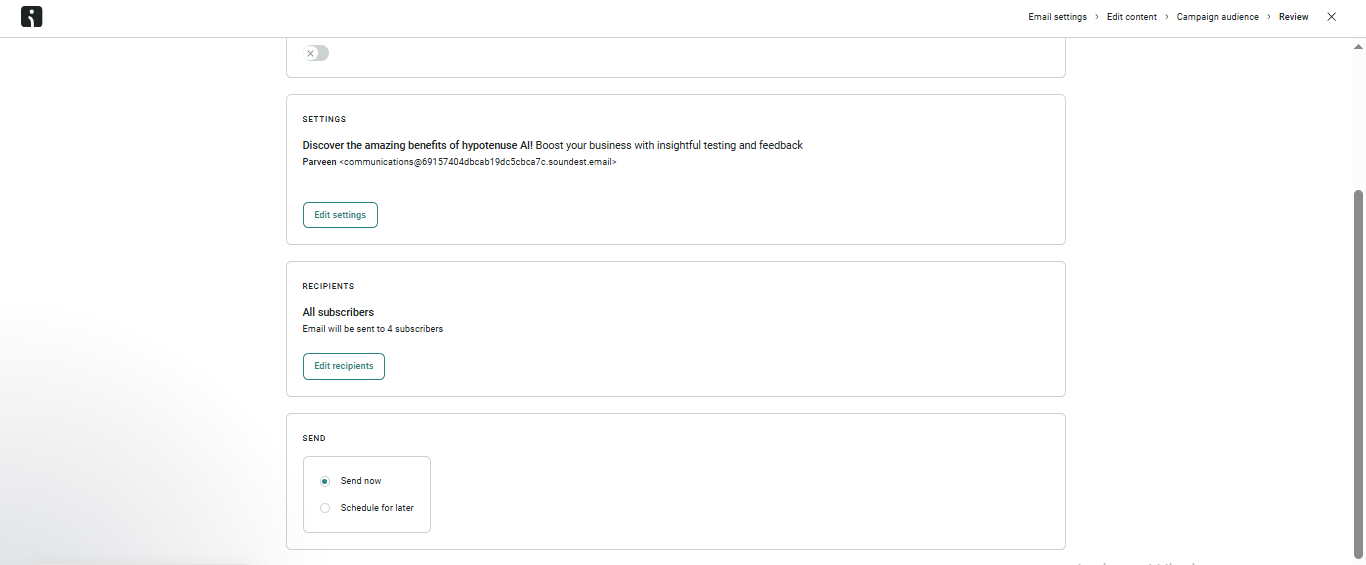
When testing Omnisend, the overall sending workflow felt streamlined from setup to delivery. Delivering a campaign is straightforward. You add your campaign name, subject line, preheader, and select the email type (regular send or automation-triggered). Before dispatching, you can edit any section of the email, replace media, adjust layouts, or reselect the audience list. The platform’s campaign setup screen is clean and beginner-friendly, which made the entire process quick during hands-on testing.

Omnisend supports both immediate sending and scheduled delivery (scheduling available on paid plans). The scheduling interface is simple, allowing users to pick exact send times or target specific time zones for global audiences. During our test campaigns, sending speed was consistently fast, with emails reaching inboxes within 5–10 minutes of hitting “Send.” The platform handled queued recipients well, without any noticeable delays or sending interruptions.

Deliverability & Compliance

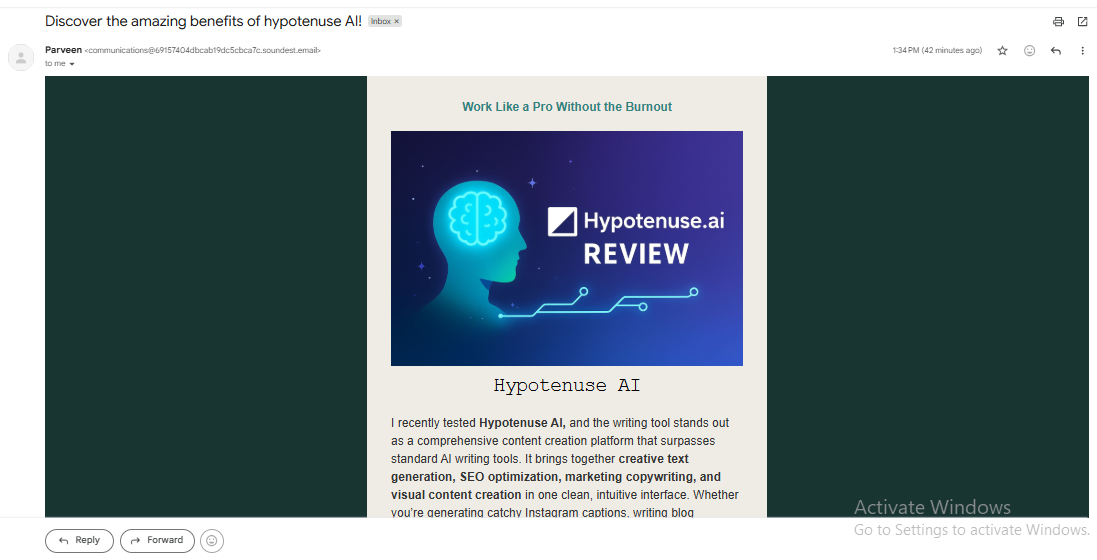
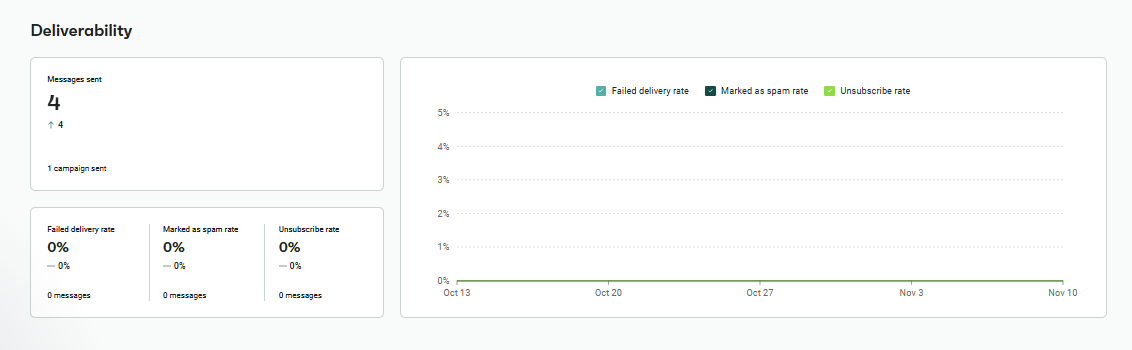
Omnisend maintains strong deliverability, with test emails landing in the inbox reliably (not spam) across multiple campaigns. Deliverability is supported by SPF and DKIM authentication prompts, helping improve sender reputation and inbox placement. During testing, inbox performance remained consistent across various templates and audience sizes.

One-click unsubscribe links are automatically added to every campaign, ensuring compliance with GDPR and global opt-out regulations. Unsubscribes and bounces updated instantly in the contact list, requiring no manual work. Overall, deliverability, compliance, and subscriber management performed smoothly throughout the testing process.

Reports & Analytics

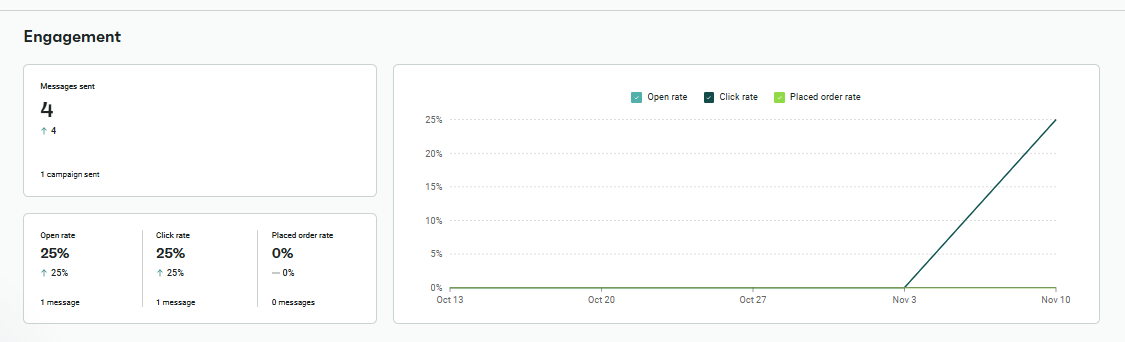
The analytics dashboard tracks all essential performance metrics such as opens, clicks, unsubscribes, bounces, and conversions in real time. Each metric is displayed clearly, making it easy to evaluate how the campaigns performed during testing. The layout is clean, and the data loads quickly after each send.

You can export reports in PDF or XLSX format, and filter them by individual campaigns or automation workflows. Link-tracking highlights which buttons, product blocks, or sections drive the most engagement, helping refine future email designs. Deliverability insights classify bounces and spam complaints, giving you a clear picture of sender reputation. For ecommerce users, revenue attribution reports show how much each email or automation flow contributed in sales. Automation reporting also provides performance data for every triggered step inside your workflows.

Pricing & Value

Omnisend’s pricing is built to support ecommerce brands at every growth stage, from beginners sending occasional campaigns to high-volume stores running advanced automation and multi-channel workflows. The structure is straightforward, transparent, and scales based on the number of contacts you manage, making it easy to predict monthly costs.

The Free Plan, which we tested, includes up to 500 monthly emails, email campaigns, signup forms, basic automation, product blocks, and AI-powered tools. It’s a strong starting point for small stores wanting to test Omnisend’s editor, templates, and sending performance without committing to a paid plan.

As you upgrade, the Standard and Pro plans expand your monthly email capacity, unlock time-zone-based scheduling, A/B testing, and significantly more automation depth. The Standard Plan is ideal for growing ecommerce brands that need consistent campaign scheduling and improved segmentation. The Pro Plan further enhances the platform with unlimited email sends, advanced reporting, aggregated benchmarks, priority support, and monthly SMS/MMS credits—making it suitable for fast-scaling online stores running multi-channel campaigns.

Free Plan — Best for Beginners and Small Ecommerce Stores

  • Price: ₹0/month (Free forever)
  • Email Sends: 500 emails per month
  • Contacts: Up to 250
  • Users: Single user
  • AI Tools: AI subject lines, AI content assistant
  • Automation: Basic workflows (welcome, abandoned cart, simple follow-ups)
  • Reports: Basic analytics with export (PDF/XLSX)
  • Support: Email support only
  • Extras: Product content blocks, discount code block, signup forms & popups, web push collection (up to 500 subscribers)

What You Get:
The Free Plan is ideal for beginners who want to try email marketing without spending upfront. You can design full emails using Omnisend’s drag-and-drop editor, test AI-generated subject lines, upload images, and create simple automation flows like welcome emails and abandoned cart recovery. Even though advanced features like scheduling, A/B testing, and detailed reporting are locked behind paid plans, the free tier still provides everything needed to run small newsletters or test ecommerce-focused campaigns with ease.

Best For:
Freelancers, early-stage ecommerce stores, creators, and small businesses who want to begin sending professional emails and explore automation features before upgrading to a paid plan.

Standard Plan — Best for Growing Ecommerce Brands

  • Price: Starts at ~$11.20/month 
  • Email Sends: 6000 mails per month
  • Contacts: 500 contacts
  • Users: Multiple users supported
  • AI Tools: AI subject lines & AI content assistant
  • Automation: Full automation suite (welcome, cart recovery, customer lifecycle flows)
  • A/B Testing: Available for subject lines & content
  • Reports: Standard analytics + performance insights
  • Scheduling: Send-later & time-zone-based delivery
  • Support: Email & chat support
  • Extras: Unlimited popups/forms, advanced segmentation, unlimited web push notifications

What You Get:
The Standard Plan is suitable for small to mid-sized ecommerce brands ready to scale their marketing. This plan unlocks key growth features such as A/B testing, flexible automation flows, and scheduled delivery. The expanded send limits and stronger segmentation tools make it easier to target the right audience with personalized content. Overall, this tier provides the upgrade most active stores will need once they outgrow the Free plan.

Best For:
Growing ecommerce stores, D2C brands, and small businesses that rely on regular campaigns, scheduling, and more advanced automation to increase conversions.

Pro Plan — Best for High-Volume Stores & Automation-Heavy Teams

  • Price: Starts at ~$41.30/month 
  • Email Sends: Unlimited
  • Contacts: Custom
  • Users: Multiple
  • AI Tools: Fully enabled AI content suite
  • Automation: Advanced workflows with branching, personalization, and ecommerce triggers
  • A/B Testing: Full testing capabilities
  • Reports: Advanced analytics + revenue attribution + aggregated benchmarks
  • SMS/MMS: Monthly SMS credits included
  • Support: Priority customer support
  • Extras: Unlimited web push, send-time optimization, high-speed sending capabilities

What You Get:
The Pro Plan is designed for fast-growing ecommerce stores that rely heavily on automation and multi-channel marketing. This plan offers the smoothest experience like advanced reporting, revenue attribution, and unlimited email sends allowed complete flexibility. The inclusion of SMS credits and web push notifications makes the Pro Plan a strong all-in-one communication suite. For brands running multiple campaigns per week or complex workflows, this tier delivers unmatched value.

Best For:
Mid-size to large ecommerce businesses, high-frequency senders, and marketing teams needing deep analytics, SMS/MMS integration, and unlimited email scalability.

Best Alternatives of Omnisend

1. Klaviyo

Why It’s a Strong Alternative:
Klaviyo is one of the most powerful ecommerce-focused email platforms, known for deep integrations with Shopify, WooCommerce, Magento, and other major commerce systems. It offers advanced behavioral automation and highly detailed segmentation built specifically for online stores.

Best For:
Fast-growing ecommerce brands that need data-driven automation and personalized, high-impact campaigns.

2. MailerLite

Why It’s a Strong Alternative:
MailerLite is simple, clean, and extremely beginner-friendly. It offers strong value for money and a smooth drag-and-drop editor, making it perfect for users who don’t need heavy ecommerce features.

Best For:
Creators, small businesses, and solopreneurs looking for an easy and affordable email marketing tool.

3. Brevo

Why It’s a Strong Alternative:
Brevo provides true multi-channel marketing—email, SMS, WhatsApp, chat, and CRM features—all under one roof. It also offers one of the most generous free plans and is known for predictable pricing.

Best For:
Businesses that want a versatile all-in-one communication platform with strong value at every tier.

4. ActiveCampaign

Why It’s a Strong Alternative:
ActiveCampaign is known for high-level automation, advanced workflows, and integrated CRM capabilities. It’s built for teams that need detailed customer journeys and sophisticated lead nurturing.

Best For:
Businesses ready for complex automation flows, multi-step funnels, and deeper customer lifecycle management.

5. Mailchimp

Why It’s a Strong Alternative:
Mailchimp is one of the most established email marketing tools with a broad set of features—templates, landing pages, ads, automations, and commerce integrations. Its ecosystem and reliability make it a popular choice.

Best For:
Small to mid-sized businesses wanting a mainstream, multi-purpose marketing tool with wide integration support.

Who should choose what?

  • If you’re an ecommerce brand wanting product-focused emails and automation, Omnisend or Klaviyo are your best picks.
  • If you want a simple, affordable tool for newsletters and basic automations, MailerLite is the most beginner-friendly.
  • If you need multichannel communication (email + SMS + WhatsApp + chat), Brevo offers the strongest all-in-one suite.
  • If your priority is advanced automation with CRM-level workflows, ActiveCampaign is the most powerful option.
  • If you want broad integrations, templates, and a familiar ecosystem, Mailchimp remains a reliable, widely supported choice.
Feature / CriteriaOmnisendKlaviyoMailerLiteBrevoActiveCampaignMailchimp
Ease of UseEasy to use, ecommerce-focusedModerate, data-heavyVery easyEasyModerate (more complex)Easy
Templates & DesignExcellent for ecommerceAdvanced layoutsClean & minimalGood varietyGood but complexLarge template library
SMS / MultichannelEmail + SMS + PushEmail + SMSEmail onlyEmail + SMS + Chat/WhatsAppEmail + SMS (via add-ons)Email + limited SMS
AI ToolsAI subject lines + contentPredictive analyticsBasic AIBasic AIAdvanced conditional logicBasic AI
Ecommerce FeaturesProduct blocks, recommendationsDeep product syncBasic ecommerce blocksBasic ecommerceCRM + ecommerceStore integrations
Reports & AnalyticsStrong, revenue attributionVery detailedGood basicsGoodAdvancedGood
PricingAffordable & scalableHigher costVery affordableBudget-friendlyMid–HighMid–High
Free PlanYes (500 emails/month)NoYesYesNoYes (limited)
Best ForEcommerce brandsLarge ecommerce brandsBeginners & creatorsMulti-channel marketingAutomation-heavy teamsGeneral marketing

Final Verdict

Omnisend delivers a powerful blend of ease, automation depth, and ecommerce-focused features that make it one of the strongest marketing platforms for online stores. During testing, the editor felt smooth, emails sent quickly, and workflows performed reliably across welcome, abandoned cart, and promotional sequences. The platform’s product-based blocks, AI-assisted content, and revenue attribution give ecommerce brands a real advantage, especially when paired with its multi-channel reach through SMS and web push. Pricing scales fairly, with the Pro Plan offering exceptional value for brands that send frequently or rely heavily on automation.

For ecommerce businesses looking for a scalable, automation-ready email platform with strong deliverability and meaningful reporting, Omnisend stands out as a well-rounded, high-ROI choice in the email marketing landscape.

On this page

Tags:

We will be happy to hear your thoughts

Leave a reply

Diztel
Logo