Brevo and MailerLite both focus on simplifying email creation, managing contact lists, and delivering consistent campaign performance, but they approach these goals differently in real-world use. Brevo emphasizes a clean, no-code editor with responsive controls and a set of practical features designed to make template creation smooth for beginners. MailerLite, on the other hand, leans on structured blocks, intuitive layout tools, and flexible customization to shape emails quickly. Their approaches to customization, reporting clarity, deliverability consistency, and feature depth vary across sections, making the comparison meaningful for users deciding which platform aligns better with their workflow simplicity, analytics visibility, and content-building style.
Who Should Use Which?
- Brevo is Best For:
- Users who prefer structured editing and polished campaign control
- Marketers needing deeper segmentation and behavioral targeting
- Teams that rely on detailed analytics and campaign performance tracking
- MailerLite is Best For:
- Creators, educators, and newsletter-focused brands
- Users who want a clean, minimal interface without complexity
- Small teams needing easy campaign setup and simple automation
Quick Comparison
| Criteria | Brevo | MailerLite |
|---|---|---|
| Ease of Use | Clean, structured dashboard with guided steps | Minimal and lightweight interface |
| Template Variety & Design | Polished templates for promotions and newsletters | Clean, modern templates for simple newsletters |
| Editor Experience | Visual block editor with detailed controls | Lightweight editor with essential modular blocks |
| List Management | Segmentation, behavior filters, profile insights | Straightforward groups and simple segmentation |
| Reports & Analytics | Detailed performance graphs and engagement metrics | Clean charts with essential insights |
| Free Plan | Yes | Yes |
| Paid Plan Starts From | Starting at $9/month | Starting at $10/month |
| Best For | Performance-driven marketing workflows | Creators and small teams wanting simplicity |
| Key Strength | Advanced segmentation + strong reporting visuals | Clean design + easy-to-use interface |

Evaluation Criteria (How We Compare)
We compared Brevo and MialerLite across five essential parameters that define how well an email marketing platform performs in real-world use:
- Email Designing & Templates – The creative flexibility, template variety, and customization depth each platform offers.
- Contact List Management – The efficiency and depth of managing subscribers, including segmentation, tagging, imports, and behavioral targeting.
- Campaign Execution – How quickly and reliably each platform sends campaigns, the ease of automation setup, and overall consistency in deliverability.
- Reports & Analytics – The quality, visualization, and actionability of data each platform provides from open and click tracking to conversions, heatmaps, and exportable reports; and how easily marketers can derive insights to improve performance.
- Pricing & Value – Affordability, plan transparency, and the balance of included features at each tier.
Email Designing & Templates
Brevo
Brevo’s email editor is built around simplicity and clean visual control. The drag-and-drop builder lets you add sections, media blocks, buttons, and product elements without friction. The interface is highly visual, making it easy to see how each design element behaves in both desktop and mobile previews. Editing controls like spacing, alignment, link insertion, and text adjustments respond quickly, ensuring a smooth workflow even for beginners. Brevo also supports image uploads, content blocks, and visual personalization options that help you structure campaigns effortlessly.
MailerLite
MailerLite’s template environment also focuses on clarity but leans more toward a minimalistic, creator-friendly layout. The editor features modular blocks that allow you to insert images, videos, countdown timers, and featured articles. Its mobile preview and block refinement options help creators maintain a consistent layout. MailerLite’s editor is fast, lightweight, and ideal for those who prefer simple visual structure without too many advanced elements.
Contact List Management
Brevo
Brevo’s contact management interface supports detailed filtering, segmentation, and list creation. Import options include standard spreadsheet uploads, and Brevo also highlights profile-level information, allowing marketers to understand each contact’s journey. The segmentation tool displayed allows filtering by custom attributes, providing a structured, data-ready list workflow.
MailerLite
MailerLite’s interface provides options for adding subscribers manually, using forms, or importing spreadsheets. Segmentation based on engagement, fields, and groups is shown, helping creators organise audiences cleanly. MailerLite also showcases simple grouping tools ideal for separating newsletter readers, customers, or leads without overwhelming complexity.
Campaign Execution
Brevo
Brevo’s campaign flow includes structured steps for selecting templates, editing content, configuring recipients, and scheduling delivery. It also supports A/B testing, with an interface that makes subject-line comparisons easy. Brevo highlights important delivery tools such as testing emails, reviewing message previews, and adjusting sending parameters before final dispatch.
MailerLite
MailerLite’s campaign execution panel is smooth as well. Users can set up campaigns by choosing templates, editing blocks, selecting audiences, and scheduling sends using simple dropdown options. The workflow displayed in the screenshots emphasizes linear steps, making it fast for creators who want minimal friction.
Reports & Analytics
Brevo
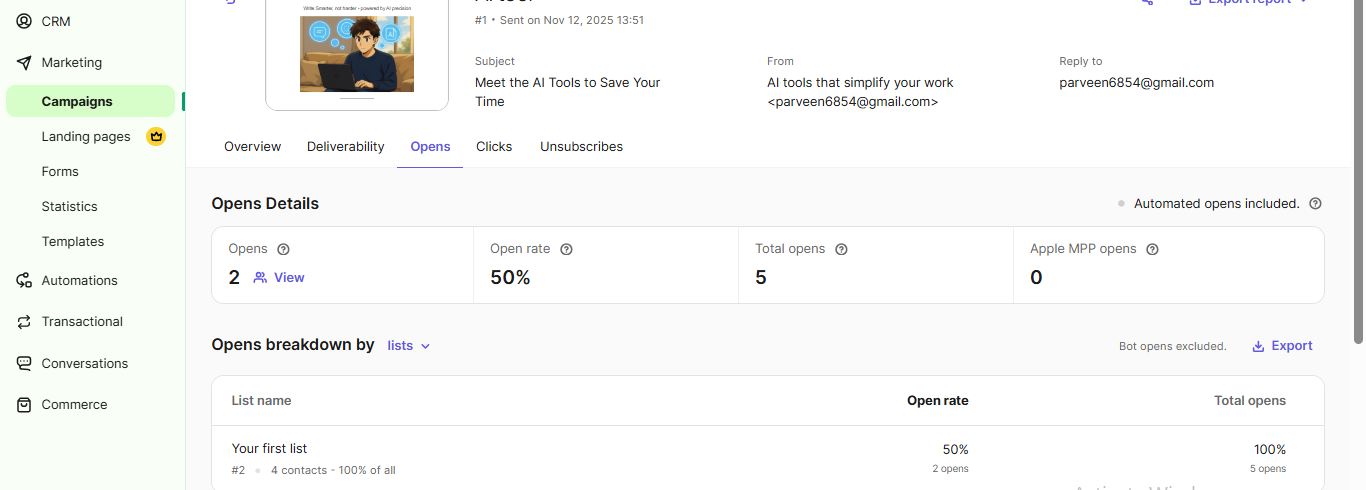
Brevo’s analytics dashboard presents clear visibility into opens, clicks, bounce rates, and engagement metrics. Reports include visual graphs and breakdowns that help evaluate performance effectively. It also provides details per campaign, allowing marketers to track user behaviour, message effectiveness, and delivery quality. The layout shows structured reporting with emphasis on quick understanding and real-time performance updates.
MailerLite
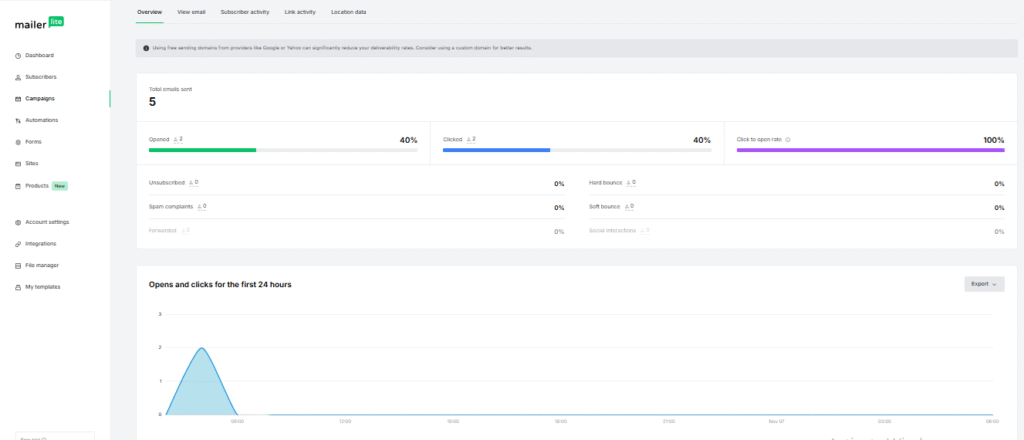
MailerLite’s analytics panel shows essential performance data such as opens, clicks, unsubscribes, and user engagement. The reports are visually simple, with basic charts that highlight top-level metrics. The focus appears to be on clarity rather than depth, which is ideal for creators who want quick insights without diving into granular analytical layers. MailerLite’s analytics layout is readable, straightforward, and suited for smaller or content-driven campaigns.
Pricing & Value
Brevo
Brevo offers automation, transactional email support, and additional features depending on the chosen plan. It emphasizes scalability with options for higher sending volumes and business-ready features. The platform structures its plans to support growing marketing needs, delivering value through workflow options, segmentation, and branded communication features.
MailerLite
MailerLite emphasizes affordability and clean usability in its pricing breakdown. The platform provides essential tools across its plans, focusing on templates, simple automations, and newsletter sending. It aligns with users who want a cost-efficient platform without extensive marketing complexities.
| Scenario | Best Choice |
|---|---|
| Testing before paying | Both — Each platform offers a free plan suitable for early experimentation and simple workflow testing. |
| Most budget-friendly starter use | MailerLite — Its lightweight editor and simple structure make it more efficient for beginners who need clean layouts without added complexity. |
| Scaling with a growing subscriber list | Brevo — Offers deeper reporting visuals and structured automation, which support growth-focused campaigns. |
| Advanced customization & detailed reporting | Brevo — Provides more detailed performance graphs, engagement metrics, and structured controls for refining campaigns. |
| Teams needing structured workflows | Brevo — Its dashboard and workflow tools are more geared toward organized sequences and performance tracking. |
| Long-term value for clean, simple email creation | MailerLite — Consistent simplicity, clean design blocks, and easy editing make it ideal for long-term use by creators who prioritize clarity and speed. |
Final Verdict
Brevo stands out for its structured email creation, deeper segmentation, and stronger reporting tools, making it better suited for performance-based marketers and ecommerce-style brands. On contrary, MailerLite excels in simplicity, clarity, and clean design workflows, making it ideal for creators, educators, bloggers, and small teams who want to send beautiful newsletters without complexity. Both platforms perform well in real-world use, but the best choice depends entirely on whether you prioritize advanced controls (Brevo) or ease of use (MailerLite).
On this page
Winner Snapshot: Brevo vs MailerLite
| Scenario | Best Choice |
|---|---|
| Fast newsletter creation | MailerLite – Cleaner editor for simple, quick layouts |
| Detailed design control | Brevo – More polished templates and flexible blocks |
| Data-focused reporting | Brevo – Stronger graphs and performance breakdowns |
| Creator-friendly workflow | MailerLite – Minimal, distraction-free interface |
| Campaign testing & precision | Brevo – Structured pipeline with A/B options |
| Best for small teams | MailerLite – Simple setup and lightweight controls |
| Best for marketing-driven brands | Brevo – Strong segmentation and analytics depth |
Tags: comparison