After testing CopySmith AI across multiple use cases, I found it as a a polished, fast, and accurate writing assistant. From blog introductions to SEO titles and even pros and cons lists, the tool delivers clean, human-like outputs that are easy to export and share. While the platform shines in speed and ease of use, certain advanced features remain locked behind paid plans, making the free trial more of a taste than a long-term solution.
Who is it Best For?
- Freelancers & Solo Creators – Perfect for individuals who need fast, accurate content like blog introductions, email replies, or SEO titles without spending hours editing.
- Small Businesses & Startups – A great fit for teams that want reliable blog posts, product descriptions, and pros/cons lists to boost their online presence without hiring large content teams.
- Marketing Teams – The SEO-focused tools (Meta Title Generator, Blog Intros, etc.) make CopySmith especially useful for marketers looking to scale content production while maintaining accuracy.
- Agencies – With paid plans offering more credits and customization, agencies handling multiple clients can generate bulk content, export easily in docx/PDF, and ensure consistency across projects.
- Students & Casual Writers (Trial Users) – The 7-day free trial makes it appealing for learners or casual writers to experiment with AI writing and understand its potential before investing.
What Makes it Stand Out
- Fast & Accurate Outputs – Generates blog intros, email replies, and article drafts within seconds, reducing turnaround time.
- Multiple Variants at Once – Unlike some tools, it gives 3+ variations (titles, pros & cons, intros) in one go, saving effort on re-prompts.
- Easy Export Options – Direct download in Docx/PDF format or share via link makes collaboration smooth.
- Strong SEO Focus – Tools like Meta Title Generator and Blog Intro are tailored for ranking content.
- Simple & Beginner-Friendly UI – No steep learning curve; anyone can start creating immediately after login.
- Customizable Editing – Flexibility to rewrite, expand, or shorten text with tone adjustments.
CopySmith AI shines as a content generator built for speed and accuracy. From blog articles and SEO titles to pros & cons lists and email replies, it delivers polished outputs in seconds. Ideal for marketers, startups, and agencies who need consistent, on-brand content without the hassle.
Ease of Use 8.5 Writing Quality & Output Accuracy 8 Customization & Control 7.5 Features & Functionality 8 AI Capabilities 8 Language & Format Support 7 Speed & Performance 9 Integrations & Compatibility 7.5 Pricing & Value for Money 7 Customer Support & Community 7.5How We Rate? Our ratings reflect hands-on testing and comparison across key parameters such as usability, features, pricing, support, and overall value.
Performance Breakdown: Pros and Cons
- Generates multiple variations instantly
- Strong, human-like outputs with tone flexibility.
- Easy to use with smooth onboarding and clean interface.
- Export options (Docx, links) add great flexibility
- Pricing is on the higher side for individuals
- Regional dialect support is limited
- Collaboration features missing in free plan
- Advanced tools only in paid tiers
Ease of Use (UI/UX)
The platform is very easy to navigate. Signing up is simple, onboarding is smooth, and even non-technical users can begin creating content immediately. The clean layout ensures you don’t waste time figuring things out.
Writing Quality & Output Accuracy
The quality of text generated is accurate, contextually relevant, and grammatically strong. Whether drafting an article introduction or a pros/cons list, the results feel natural and rarely robotic. It maintains context well across short and medium passages.
Customization & Control
Tone flexibility is present, though it leans more toward casual outputs. You can rewrite, expand, or shorten results with ease, ensuring control over content style and length.
Copysmith.ai Features I Used...
Here’s a closer look at the tools I tested:
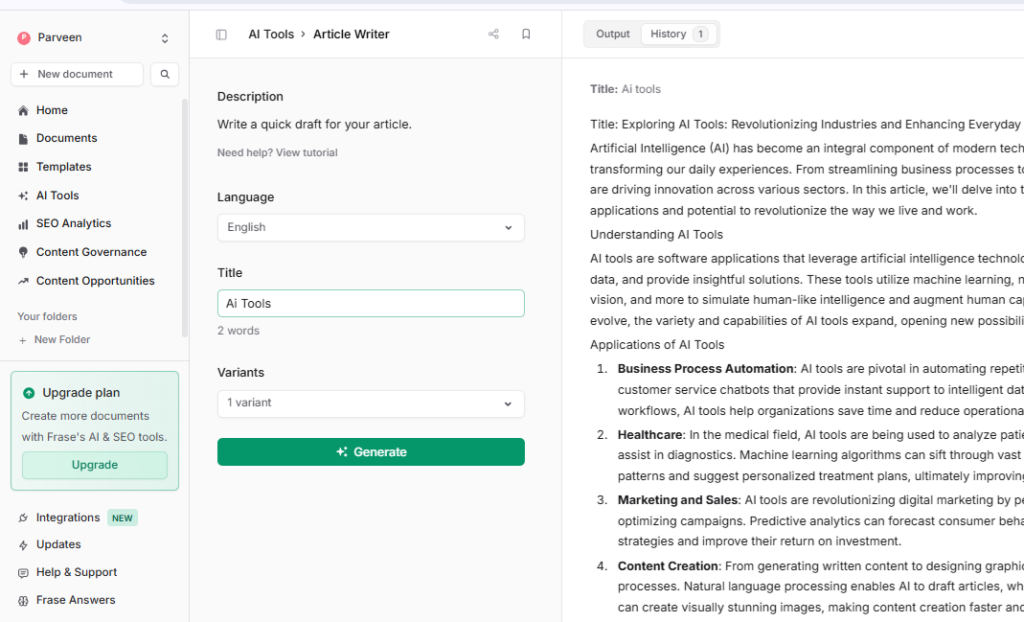
- Article Writer → Delivers fast, accurate long-form drafts. Export options (Docx & link) are handy for collaboration.
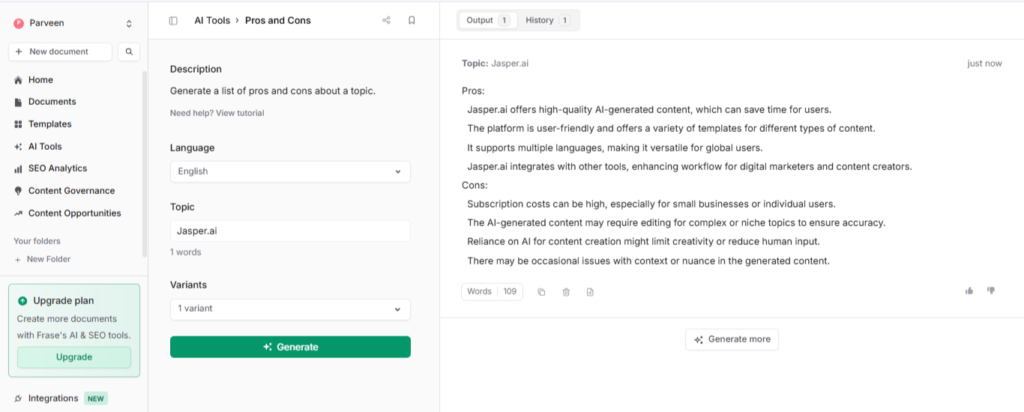
- Pros & Cons Generator → A standout feature. It generates multiple variants of pros and cons in one go, which is great for comparative blog posts or product reviews.
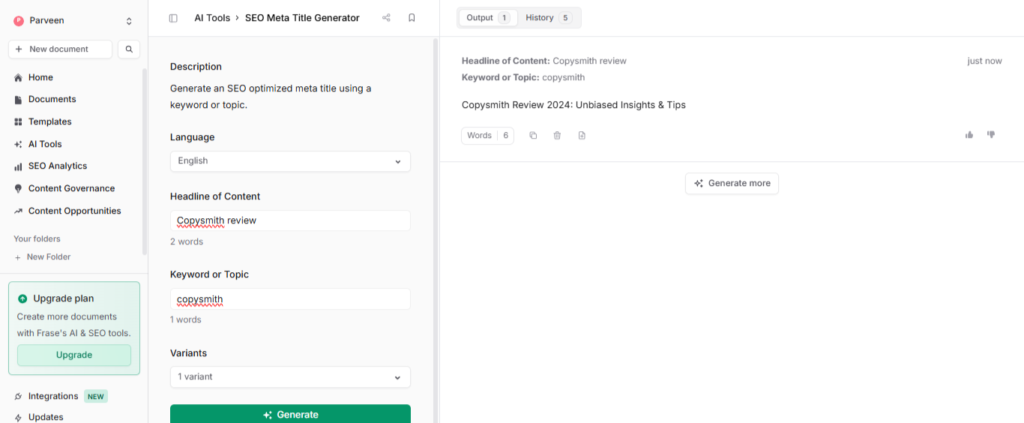
- SEO Meta Title Generator → Provides three title variations in seconds, with quick export to Docx or PDF. Efficient for marketers and SEO teams.
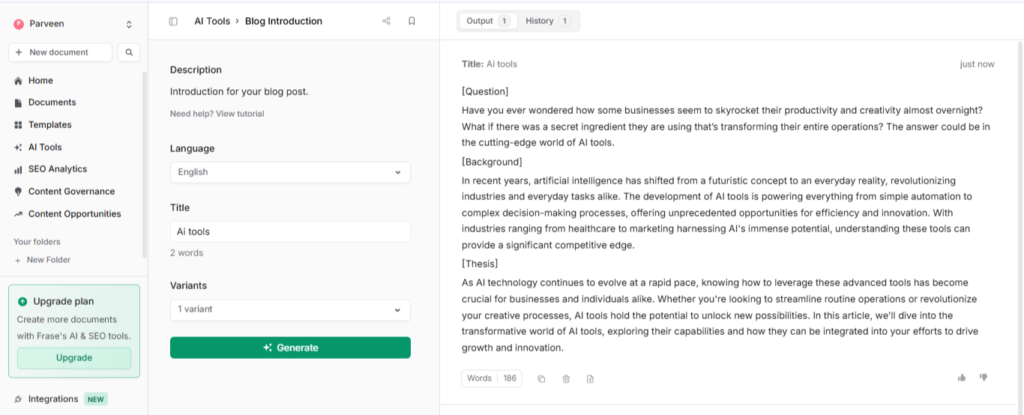
- Blog Post Introduction Generator → Generates three unique intro options instantly. Exports in Docx or link format for easy editing.
- Email Reply Generator → Simplifies communication by creating professional email responses (three variants each time). Exports are seamless.
These features make CopySmith more than just a “writing bot”—it feels like a mini content suite.
Article Writer
The Article Writer feels like a reliable workhorse. It produces long-form drafts quickly with good accuracy and structure. Exporting directly into Docx or shareable links makes collaboration smooth, especially for teams working on content at scale.
Pros & Cons Generator
This tool stands out because it generates multiple pros and cons in one go, saving time for product reviewers and comparison writers. Instead of brainstorming from scratch, you get different angles instantly, which is super helpful for blogs and decision-making content.
SEO Meta Title Generator
This feature is built for marketers and content creators who want SEO-optimized titles instantly. In testing, it delivered three variations in just a few seconds, which is a huge time saver. Exporting directly to Docx or PDF makes it practical for team sharing and documentation.
When I tested it for a “Copysmith Review” title, the tool generated “Copysmith Review 2024.” While the structure and keyword focus were strong, the automatic addition of the year felt outdated in 2025. This shows the tool sometimes assumes future or current years, which may not always align with your publishing context.
Blog Post Introduction Generator
The blog intro tool is a time-saver. With just a prompt, it offers three polished intro variations instantly. It’s great for avoiding writer’s block, and exporting in Docx or link form makes it easy to drop into a draft.
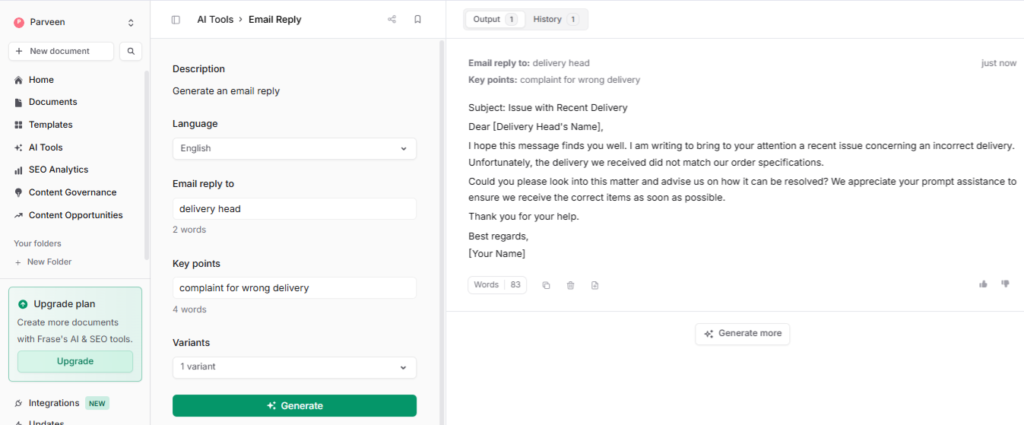
Email Reply Generator
Perfect for professionals, this tool crafts three different email responses quickly. The replies are professional, structured, and exportable in Docx or via shareable link. It makes handling communication faster and more consistent.
AI Capabilities
The AI follows prompts well, shows creativity in structure and phrasing, and rarely feels robotic. Like most AI tools, occasional repetition or factual gaps can occur, but overall performance is strong.
Language & Format Support
Supports major languages but lacks depth in regional dialects. Exporting is smooth (Docx, PDF, shareable links), which adds professional utility.
Speed & Performance
Output is generated in seconds. Even with longer text, performance remains stable with no errors or downtime.
Integrations & Compatibility
Integrations with Google Docs, WordPress, and Shopify are available, but locked behind paid plans
Pricing & Value for Money
The free plan provides a taste of Writesonic’s capabilities but feels restrictive with daily usage limits and feature lockouts. Paid plans open access to premium features like Chatsonic, plagiarism checks, integrations, and advanced templates. Compared to competitors, Writesonic offers affordable pricing with unique tools like carousels and humanizers that justify the upgrade.
Free Trial Plan (7 Days)
- Access to core AI writing features (article writer, pros/cons generator, titles, blog intros, etc.)
- Limited projects and exports
- A test-drive version to explore functionality
Who should use it: Beginners, students, or freelancers who want to test Copysmith before committing.
Best for: Trial users exploring if AI can fit into their workflow.
Why: Provides hands-on experience with full functionality for a week without cost.
Starter Plan – $45/month
- 1 User Seat
- 15 content projects per month
- 2 Rank-Ready AI documents free/month (then $2/doc)
- Unlimited word count
- 1 Brand Voice
- 50 pages of content opportunities
- Includes: SEO basics, SERP analysis, content optimization, outline builder
Who should use it: Freelancers, solopreneurs, or small bloggers who produce a few pieces of content monthly.
Best for: Writers looking for accurate SEO-driven copy without needing collaboration.
Why: Affordable entry point with strong SEO workflow support and unlimited word count.
Professional Plan – $115/month
- 3 User Seats (add more at $25/seat up to 9)
- 75 content projects/month
- 10 Rank-Ready AI documents free/month (then $2/doc)
- Unlimited words & API access
- 5 Brand Voices
- 200 pages of content opportunities
- Covers: Unlimited domains, advanced SEO analytics, competitive intelligence, multi-query docs, automatic content briefs
Who should use it: Small agencies, marketing teams, and businesses running multiple campaigns.
Best for: Teams that need collaboration, brand consistency, and advanced SEO automation.
Why: Balances pricing and features—multiple seats, deeper SEO, and workflow automation make it ideal for scaling.
Customer Support & Community
Support is email-based with tutorials and blog guides available. The knowledge base helps first-time users, but real-time support (like live chat) would improve the experience.
Best Alternatives of Copysmith.ai
1. Writesonic
- Why it’s an alternative: Strong creative suite including blog writers, LinkedIn carousels, video script tools—similar breadth to CopySmith but with extra speciality features.
- Best For: Marketers, freelancers, and small teams needing a wide variety of content formats and quick, visually-driven output.
- Trade-off: Some advanced features are locked behind paid plans and may be less optimal for purely SEO-centred workflows.
2. Rytr.ai
- Why it’s an alternative: Very affordable with broad tone support and many writing use cases. Captures the “all-round writing assistant” feel that CopySmith also delivers.
- Best For: Students, solopreneurs, and budget-conscious creators who need reliable AI writing without heavy investment.
- Trade-off: Free-tier limitations (Character counts, less advanced customization) are stricter, and fewer export/sharing options.
3. Jasper AI
- Why it’s an alternative: Premium tool with focus on long-form content, brand voice consistency, high-quality outputs—similar to or better than CopySmith in control and depth.
- Best For: Agencies, content teams, businesses needing scalable, polished content with branded voice.
- Trade-off: Higher price point, steeper learning curve, possibly over-engineered for casual users.
4. HyperWrite
- Why it’s an alternative: Offers more than typical writing tools—business, education, research tools, and export/sharing features that align well with your feedback on CopySmith.
- Best For: Professionals juggling writing, business communication, and academic roles who want a versatile AI assistant.
- Trade-off: Some niche features may feel under-utilised by users only focused on blogs or marketing; integrations may be limited in lower tiers.
Final Verdict
CopySmith AI delivers where it matters most: speed, accuracy, and useful variations. It’s an especially good fit for marketers, SEO professionals, and content creators who need polished drafts fast. While pricing may deter solo creators, its professional features make it a strong contender for teams and agencies.