ActiveCampaign is widely known for combining email marketing with CRM-style capabilities, but even on the free trial plan, the first impression is less about advanced automation and more about how polished and practical the core email experience feels. The platform clearly prioritizes a smooth design workflow, easy branding setup, clean contact importing, and reliable campaign execution. To understand what beginners, creators, and small teams can realistically expect before upgrading, we tested ActiveCampaign’s template editor, contact import system, campaign-sending process, and reporting tools in detail — using only the features available in the free trial. The goal was to see how well the platform performs when stripped down to its essentials, and whether it offers enough value to justify moving into a paid plan later.
Quick Summary Snapshot
- Perfect For:
Beginners, small teams, and businesses who want a polished email editor, branded templates, and smooth contact importing — all without coding or complex setup. - Why It Stands Out:
ActiveCampaign’s drag-and-drop editor is extremely smooth, the AI brand importer instantly creates branded designs using your website URL, and CSV imports with automatic duplicate removal make list management effortless. Test sending, mobile preview, spam check, and fast report access create a highly practical experience even on the free trial plan.
ActiveCampaign delivers a refined email-building workflow backed by AI-powered branding, clean contact importing, and reliable sending. Even in the free trial, the editor feels fast, previews are accurate, and reporting is clear. You don’t get high-volume sending or deeper features, but as a pure email creation and testing tool, it performs extremely well.
Usability & Design 9 Features & Functionality 8 Email Deliverability 8.5 Analytics & Reporting 8 Pricing & Value 8Performance Breakdown: Pros and Cons
- Very smooth, modern, and responsive drag-and-drop editor
- AI Brand Kit pulls logo, colors, address & social links from your website
- Over 125 templates + AI-generated template options
- CSV import with automatic duplicate detection and removal
- Free trial plan limit of only 100 email sends
- No advanced sending options (like time-zone delivery) in free trial plan
- Limited depth in personalization testing during trial
- Some integrations and features require paid plans
Email Designing & Templates
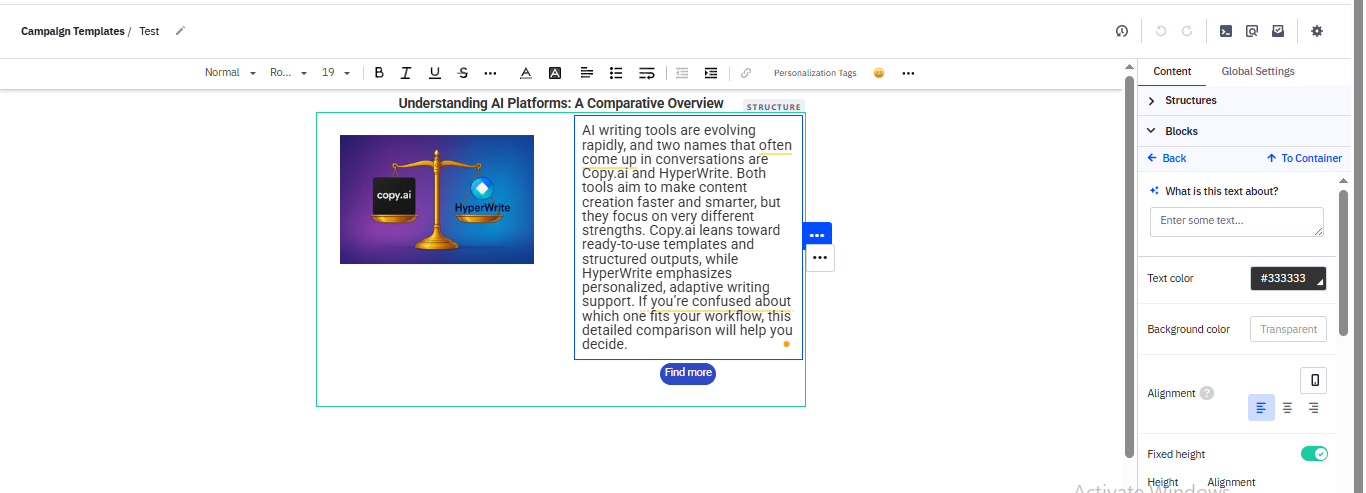
ActiveCampaign’s editor is clean, intuitive, and genuinely beginner-friendly. You don’t need any coding knowledge — everything works through drag-and-drop blocks and intuitive panels. Basic tasks like adding text, images, buttons, or social links feel smooth, and the editor responds instantly without lag. During testing, it took around 30–40 minutes to build a complete email from scratch, including a headline, image section, and short content block. Adjusting colors, fonts, spacing, and layout options was equally simple.
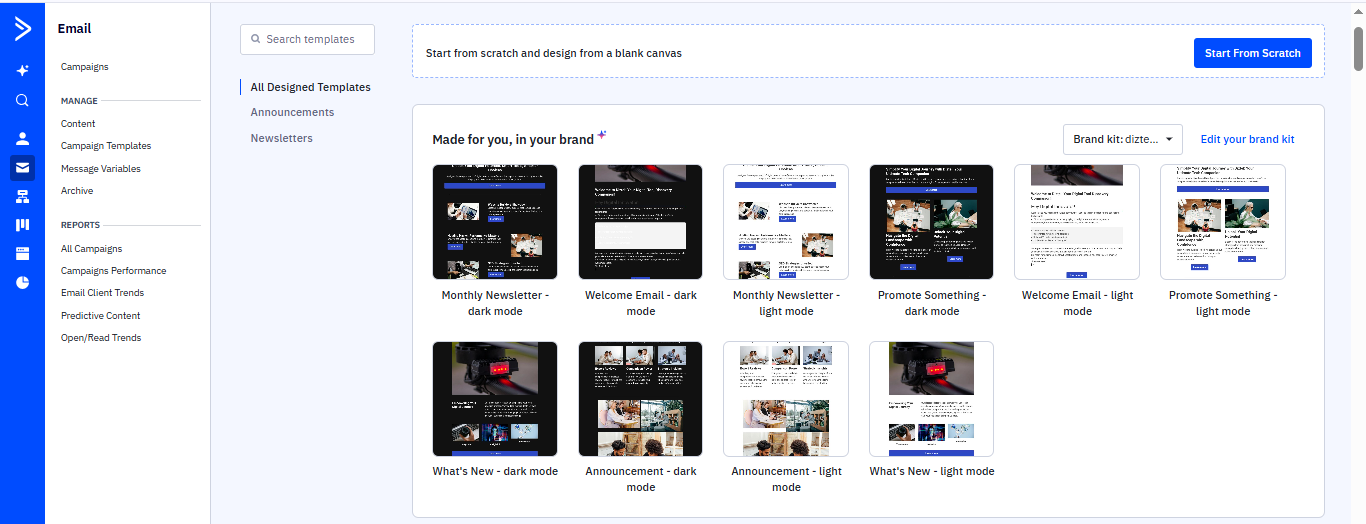
One standout feature is the AI-powered branded template generator. After entering a business URL, ActiveCampaign automatically pulls brand colors, logo, address, and social links — saving a lot of setup time. This reduces repetitive work and ensures the first version of your template already feels branded. You can also import your own templates directly from your computer or upload HTML files if needed.
Template Variety
Template variety is strong. There are 125+ standard templates, plus additional AI-generated ones created using your Brand Kit. You can also start from scratch or use a blank template. The library includes formats for newsletters, greetings, promotional emails, announcements, and seasonal campaigns such as birthdays or festive days.
Customization & Flexibility
Customization is a strongest suit of the tool. Users can edit the design by clicking on any block. You can add/change fonts, colours, and layouts, add logos or banners, and embed product sections using e-commerce blocks.
The editor’s left panel includes navigation, hero sections, buttons, image boxes, dividers, blog/RSS blocks, and galleries. Everything can be moved, duplicated, or deleted with a single click.
Media Handling & Reusability
Mobile responsiveness works perfectly. Templates automatically adjust for smaller screens, and you can preview mobile and tablet versions directly inside the editor. Image handling is simple — you can upload files easily and adjust alignment, cropping, or placement from the editing panel.
You can also save entire templates or reusable blocks for future campaigns. This is helpful for brands or creators who want consistent branding across all emails.
Our Verdict ActiveCampaign’s email design experience stands out for its smooth editor, easy drag-and-drop elements, and helpful AI branding tools. Creating a template from scratch feels fast and intuitive, and the system automatically adjusts layouts for mobile. With 125+ templates, branded auto-generated designs, reusable blocks, and simple media handling, even beginners can produce polished emails quickly. Overall, the editor saves time, removes technical barriers, and delivers a clean, professional workflow ideal for small teams testing email design.Contact List Management
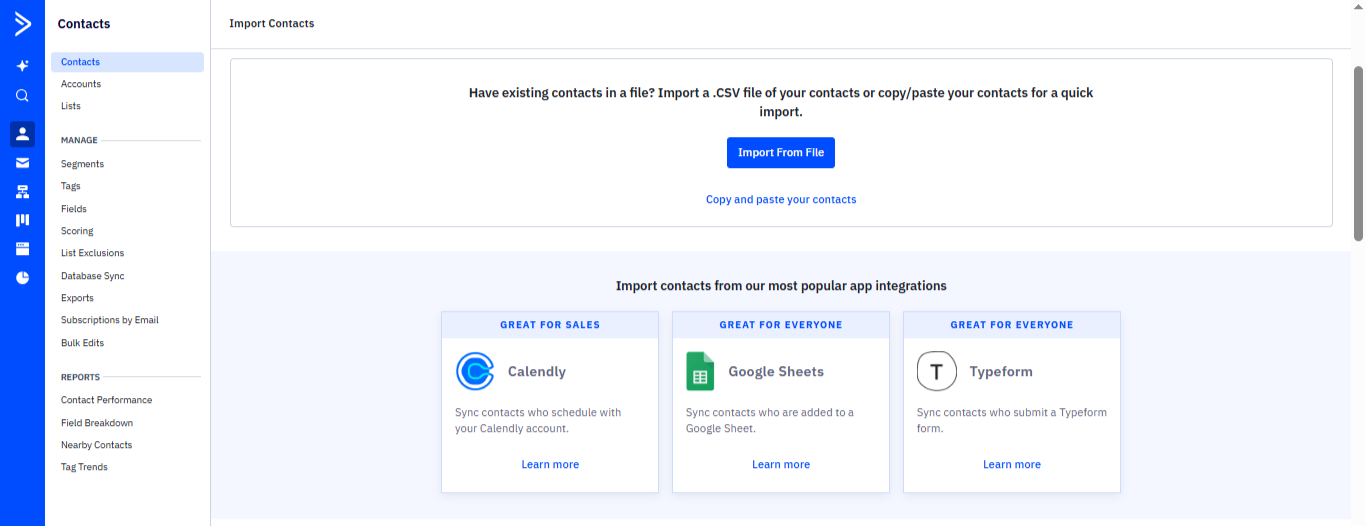
Importing contacts into ActiveCampaign is extremely flexible, even on the free trial. You can upload contacts via CSV, paste contact lists manually, or sync them from several popular integrations. During testing, importing via CSV worked smoothly. Duplicate entries were automatically detected and removed, and the system clearly showed which ones were duplicates.
Tagging is available in the free trial. You can apply tags to contacts or campaigns, making it easier to categorize subscribers for future communication. This helps maintain list structure even when you’re still building your first 1,000 contacts.
ActiveCampaign also handles list hygiene well. It automatically prevents duplicate entries during import, keeping your list clean. Dynamic fields and personalization (like first name) are supported, though they weren’t tested in detail.
 Our Verdict
ActiveCampaign’s contact management on the free trial is practical and beginner-friendly. Importing via CSV works smoothly, duplicate entries are automatically removed, and the system clearly flags repeated records. The ability to paste contacts manually or sync from apps like Calendly, Google Sheets, and Typeform makes list building effortless. Tagging is available for basic organization, and list hygiene is handled well. Overall, the free trial provides a clean, structured contact-importing experience suitable for new users and small teams.
Our Verdict
ActiveCampaign’s contact management on the free trial is practical and beginner-friendly. Importing via CSV works smoothly, duplicate entries are automatically removed, and the system clearly flags repeated records. The ability to paste contacts manually or sync from apps like Calendly, Google Sheets, and Typeform makes list building effortless. Tagging is available for basic organization, and list hygiene is handled well. Overall, the free trial provides a clean, structured contact-importing experience suitable for new users and small teams.
Campaign Execution
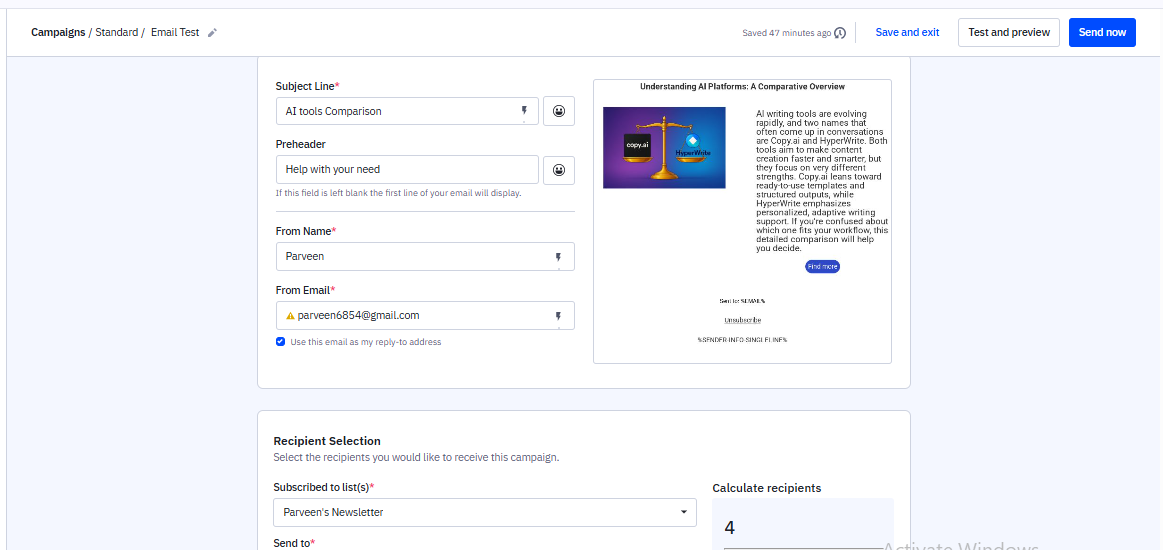
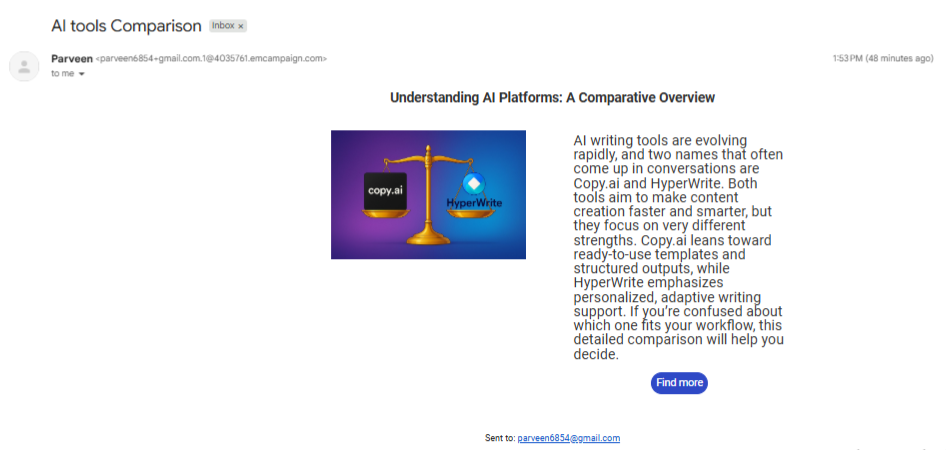
ActiveCampaign makes the campaign-sending process smooth and beginner-friendly. You can preview your email in mobile or tablet mode, run a spam check, and send a test message to yourself before launching the campaign. Domain authentication options like SPF and DKIM are visible, and during testing, emails were delivered reliably without delays. The editor also allows quick adjustments, and sending a campaign takes only a few minutes—typically around 5–10 minutes to reach the inbox.
The free trial supports up to 1,000 contacts and up to 100 email sends, which is enough for basic testing and evaluating real-world performance. Scheduling is available, but more advanced timing features remain locked to paid plans. Compliance is handled automatically with one-click unsubscribe links included in every email. Overall, the sending flow feels professional, stable, and easy to manage for anyone testing the platform for the first time.
 Our Verdict
Campaign sending in ActiveCampaign is smooth, reliable, and easy to control. The platform supports basic scheduling, mobile preview, tablet preview, spam checks, and test sends, giving users a clear idea of how the email will perform before launch. Delivery speed is fast, averaging 5–10 minutes, and inbox placement remains stable with SPF/DKIM enabled. While the free trial is limited to 1,000 contacts and 100 email sends, the sending workflow remains polished, efficient, and user-friendly throughout.
Our Verdict
Campaign sending in ActiveCampaign is smooth, reliable, and easy to control. The platform supports basic scheduling, mobile preview, tablet preview, spam checks, and test sends, giving users a clear idea of how the email will perform before launch. Delivery speed is fast, averaging 5–10 minutes, and inbox placement remains stable with SPF/DKIM enabled. While the free trial is limited to 1,000 contacts and 100 email sends, the sending workflow remains polished, efficient, and user-friendly throughout.
Reports & Analytics
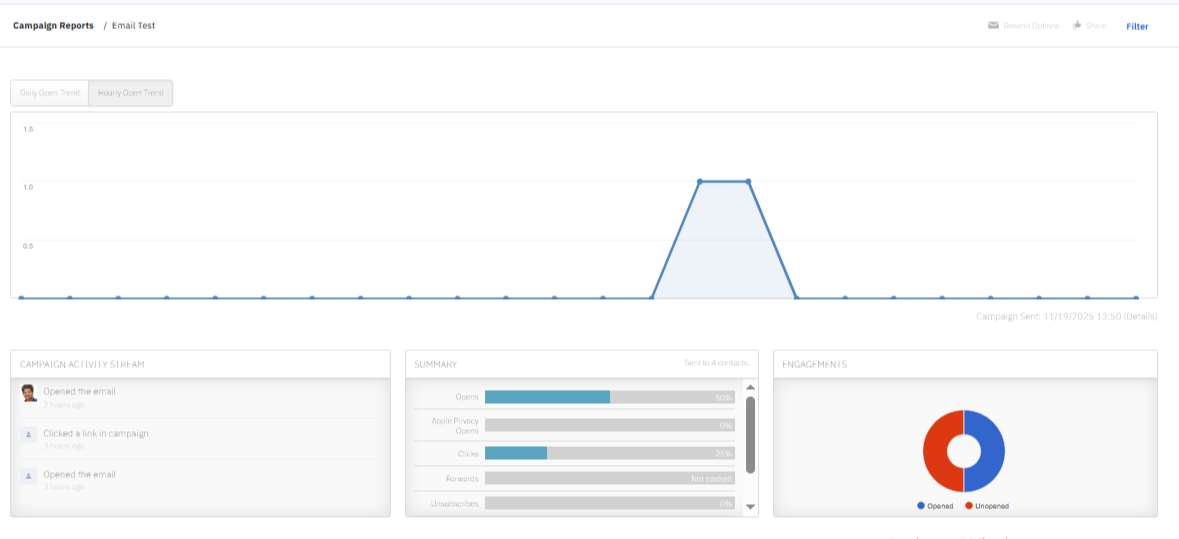
ActiveCampaign’s reporting dashboard is simple, clear, and focused on the metrics that matter. You can easily check open rates, click rates, unsubscribes, bounce details, and spam complaints to understand how each campaign performed. Delivery reports show exactly how many subscribers received, opened, or clicked the email, and you can view which individual recipients interacted with your content.
Link tracking works effectively, highlighting which URLs were clicked the most and giving a sharper picture of engagement. Deliverability information, including bounce classifications and spam-related signals, helps you identify potential issues before they affect future campaigns. Reports can be shared directly via email or through a link, making it convenient for small teams or clients who need quick access to results.
 Our Verdict
ActiveCampaign’s analytics provide essential clarity into campaign performance, showing opens, clicks, unsubscribes, bounces, and spam-related activity in a simple dashboard. Link tracking works well and highlights which subscribers clicked which URLs, making it easier to understand engagement. Bounce classifications and spam feedback further support deliverability awareness. Reports can be shared by link or email, adding convenience for small teams. Overall, the reporting tools are straightforward, useful, and effective for evaluating basic campaigns on the free trial.
Our Verdict
ActiveCampaign’s analytics provide essential clarity into campaign performance, showing opens, clicks, unsubscribes, bounces, and spam-related activity in a simple dashboard. Link tracking works well and highlights which subscribers clicked which URLs, making it easier to understand engagement. Bounce classifications and spam feedback further support deliverability awareness. Reports can be shared by link or email, adding convenience for small teams. Overall, the reporting tools are straightforward, useful, and effective for evaluating basic campaigns on the free trial.
Pricing & Value
ActiveCampaign’s free trial gives access to the core email-building and sending experience with practical but limited capacity. You can add up to 1,000 contacts and send up to 100 emails, which is enough to test template quality, contact importing, campaign previews, spam checks, mobile views, and reporting. The trial also allows you to explore the branded template generator and AI text features, giving a realistic picture of the platform before upgrading.
Starter Plan – Best for Beginners & Essential Marketing
- Starts at: $15/month (billed annually)
- Users: 1
- Email Sending Limit: 10× contact limit
- Includes: Standard campaigns, newsletters, basic web forms
Ideal for: New creators or small teams setting up their first email marketing workflows, sending simple newsletters, and building basic lists.
Plus Plan – Best for Small Businesses Scaling Their Email Activity
- Starts at: $49/month (billed annually)
- Users: 1
- Email Sending Limit: 10× contact limit
- Includes: Landing pages, more advanced templates, customer insights
Ideal for: Small teams that need richer design flexibility, better audience understanding, and want to start running more structured marketing campaigns.
Pro Plan – Best for Growing Brands Requiring High-Level Orchestration
- Starts at: $79/month (billed annually)
- Users: 3
- Email Sending Limit: 12× contact limit
- Includes: Advanced email orchestration, more user seats
Ideal for: Growing businesses that want deeper control over campaign execution, improved workflows, and more team collaboration features.
Who Should Choose What?
- If you’re a new creator or small business, the Starter plan is enough to begin sending simple campaigns and building your list.
- If your campaigns need stronger branding or landing pages, the Plus plan fits well.
- If your team grows and you need multi-user access and higher-capacity sending, go for the Pro plan.
- If you’re running high-volume operations with multiple team members, choose Enterprise.
Best Alternatives of ActiveCampaign
Here are five strong alternatives to ActiveCampaign with its own unique strengths, so you can match your needs and budget accordingly.
1. Moosend — Best Alternative for Beginners & Small Businesses
- Why choose it:
If your priority is simplicity, fast template-building, and easy contact importing, Moosend is the closest to ActiveCampaign’s editor but much easier for beginners. It offers very flexible CSV/Excel imports, stable deliverability, and a generous free plan with 300/day sending. - Best for:
Creators, beginners, freelancers, and small shops that want a clean interface without complexity. - Key advantage from table:
Very easy editor + flexible imports + automatic duplicate cleanup. - Limitation:
Not suitable for advanced or multi-channel workflows.
2. Brevo — Best Budget Multi-Channel Alternative
- Why choose it:
Brevo is the strongest low-cost option if you need email + SMS + WhatsApp + multi-channel communication. It provides strong deliverability, automatic duplicate cleanup, and solid basic reporting. - Best for:
Businesses that want multi-channel messaging without paying high-tier pricing. - Key advantage from table:
Best budget-friendly multi-channel platform. - Limitation:
Some features are locked behind paid tiers.
3. Omnisend — Best Alternative for Ecommerce Brands
- Why choose it:
Omnisend excels in ecommerce workflows with templates, insights, and automation designed for product-based businesses. Even the free plan supports ecommerce sync and offers strong deliverability. - Best for:
Shopify, WooCommerce, BigCommerce, and D2C brands. - Key advantage from table:
Ecommerce insights + ecommerce templates + smooth store sync. - Limitation:
Pricing scales quickly as the store grows.
4. MailerLite — Best for Creators, Bloggers & Simple Newsletters
- Why choose it:
MailerLite offers the cleanest UI, very easy editing, and modern templates for creators. It’s highly beginner-friendly with predictable sending and straightforward workflows. - Best for:
Bloggers, creators, coaches, personal newsletters. - Key advantage from table:
Extremely easy to use + clean UI + modern templates. - Limitation:
Limited advanced features.
5. GetResponse — Best for Funnels, Landing Pages & Webinar Marketing
- Why choose it:
For businesses that need more than email—such as landing pages, funnels, or webinar funnels—GetResponse stands out. It has a large template library and stronger analytics for marketing journeys. - Best for:
Brands running funnels, lead-generation campaigns, and webinars. - Key advantage from table:
Best funnel + landing page + webinar combination. - Limitation:
The interface may feel heavy if you only need simple emails.
Who should choose what?
- If you’re expanding into SMS/web push or multichannel, pick Brevo or Omnisend.
- If you need advanced automation but still on a budget, Moosend is worthy.
- If you’re aiming at webinars, funnels, and richer marketing suites, GetResponse is scalable.
- If you need massive template/integration support with broad ecosystem, Mailchimp is proven.
Final Verdict
ActiveCampaign’s free trial offers a polished, smooth, and reliable experience for users who want to test its core email features without committing to a paid plan. The editor is fast, the branded template generator saves time, contact importing is clean, and reports are clear. Sending campaigns feels easy and professional, and the platform handles previews, spam checks, and deliverability smoothly. While sending limits are small, the trial provides an accurate picture of the platform’s quality.