We may earn affiliate commissions for the recommended tools. Learn more.

Mailchimp vs MailerLite: Which Email Marketing Tool Is Better for You?

Choosing between Mailchimp and MailerLite often comes down to what you value more – a platform loaded with advanced features or a tool that gets out of your way and lets you build and send campaigns quickly.

We tested both tools hands-on, exploring their editors, campaign execution, contact management, automations, analytics, and pricing. Here’s a practical comparison based entirely on the real product behaviour visible in the screenshots.

Who Should Use Which?

Quick Comparison

CategoryMailerLiteMailchimp
Ease of UseBeginner-friendly, clean interfaceMore features → higher learning curve
Email TemplatesModern, aestheticLarger template library
Editor SpeedVery smooth and responsivePowerful but heavier
AutomationSimple flowsAdvanced journeys
SegmentationClean and easyVery detailed
ReportingEssential metrics, simpleDeep analytics & insights
PricingAffordableExpensive as list grows
Best ForCreators, beginners, small teamsEcommerce, agencies, advanced marketers

Evaluation Criteria (How We Compare)

We compare MailerLite and Mailchimp across five core parameters that matter most when choosing an email marketing tool:

  • Usability & Design – How intuitive and smooth the interface is, including the editor experience, navigation flow, and overall beginner-friendliness.
  • Features & Functionality – The depth and versatility of tools such as templates, automation workflows, segmentation options, and available integrations.
  • Email Deliverability – How reliably each platform sends campaigns, inbox placement quality, and overall sending performance during real tests.
  • Analytics & Reporting – The quality of insights each tool provides, including open rates, click maps, automation performance, and audience behavior tracking.
  • Pricing & Value – Affordability, transparency of plans, free tier usefulness, and the long-term value each platform offers as your subscriber list grows.

Ease of Use

MailerLite

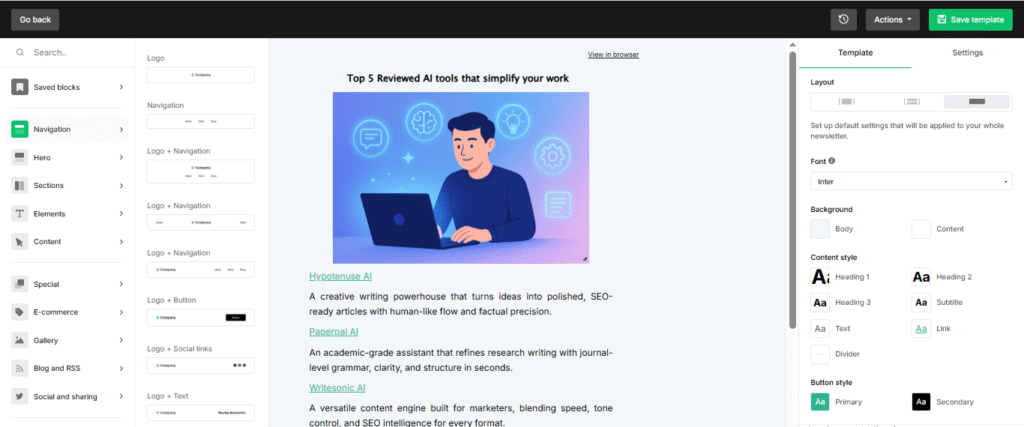
MailerLite stands out immediately with its uncluttered, modern, and welcoming interface. Everything from browsing templates to editing a design, feels smooth and intuitive. It’s the kind of platform where you don’t need instructions or tutorials; you simply open it and start working. The editor moves quickly, blocks snap into place cleanly, and the overall environment feels light and distraction-free. For creators, small businesses, and beginners, this level of simplicity removes the fear of messing something up. It encourages experimentation because nothing ever feels overwhelming or overly technical.

Mailchimp

Mailchimp, in contrast, takes a more structured and traditional design approach. The interface includes more side panels, menus, and deeper settings. For a newcomer, the layout might feel a bit dense at first glance, but once you spend a little time navigating the system, the logic behind the design becomes clear. Mailchimp’s workspace is built for marketers who like having multiple layers of control at their fingertips. The editor gives you more toggles, more formatting layers, and more opportunities to refine tiny details. It’s not difficult — just more thorough. For some users, especially those who like working with structured workflows, this feels reassuring and professional.

Features & Functionality

MailerLite
MailerLite focuses on giving you the essentials in the cleanest, most accessible way possible. The builder uses simple blocks that are easy to add and rearrange, and the template gallery includes modern layouts that don’t require heavy editing. The emphasis is on speed. You can jump into a campaign, pick a design, drop in your content, and finish fast. For creators, small marketing teams, and non-technical users, this approach removes complexity and keeps workflows efficient.

Mailchimp
Mailchimp, meanwhile, offers more robust functionality woven into its editor and design tools. Templates come in more structured categories, with clearer distinctions between industries and use cases. There are more block variations, more styling options, and more places where you can adjust spacing, formatting, and layout structure. This makes it easier to build highly customized email designs or maintain a consistent brand look across campaigns. Mailchimp is built for those who enjoy adding layers to their content with precise alignment, multiple content segments, or dense newsletters.

Email Deliverability

MailerLite
MailerLite keeps the sending process extremely straightforward. Preparing a campaign, reviewing the details, and dispatching it follows a clean step-by-step flow. During testing, delivery felt reliable and smooth, with no delays or confusing confirmation steps. The interface simply gets out of your way and lets you send your emails confidently. For small teams or solo users, this simplicity makes sending feel natural and stress-free.

Mailchimp
Mailchimp also performed strongly in deliverability but used a more structured approach during the sending flow. The pre-send checks, review screens, and scheduling steps feel more enterprise-grade. While it takes slightly longer to move through the steps, the process feels secure and thorough. The tool guides you with clearer checkpoints that help prevent mistakes which are useful for teams sending high-volume campaigns or messages with tighter accuracy requirements.

Reports & Analytics

MailerLite
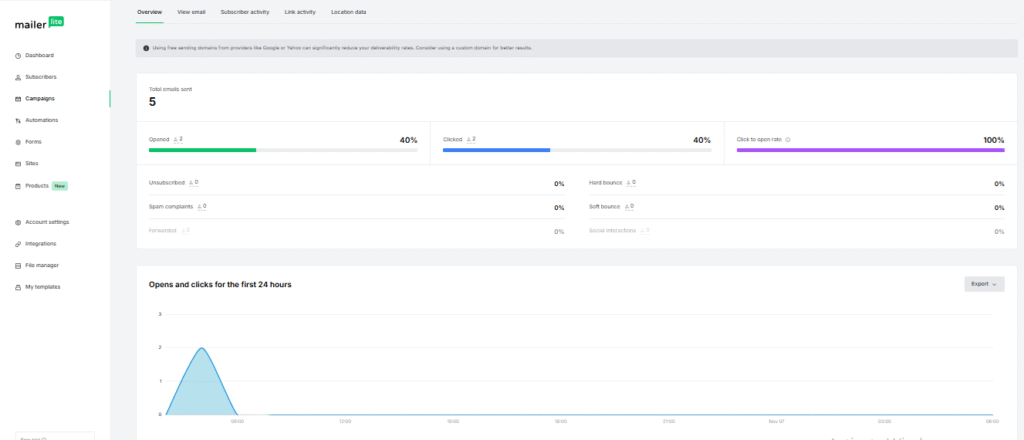
MailerLite provides clear, digestible analytics for each campaign. Reports highlight the key metrics most users care about such as opens, clicks, device breakdowns, and basic engagement insights. The dashboard design is clean and easy to scan, giving you a quick understanding of how your email performed without overwhelming you with charts or filters. This makes MailerLite ideal for users who just want to know what worked and what didn’t so they can adjust their content quickly.

Mailchip
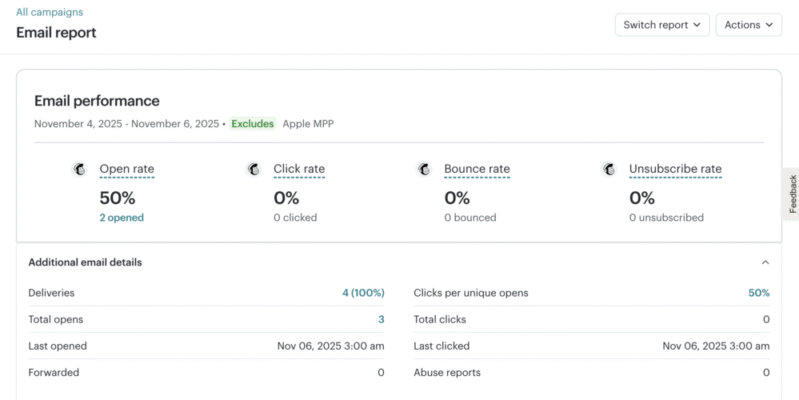
Mailchimp also offers a more detailed reporting structure. Its analytics panels contain more data categories, more segmentation views, and more granular engagement insights. The reports feel richer, more layered, and more suitable for users who want to analyze audience behaviour in depth. From the way performance is broken down to the way segments are displayed, Mailchimp provides more analytical muscle for teams who rely on data-driven decisions.

Pricing & Value

Plan / ToolMailerLiteMailchimp
Free Plan✅ Available — supports up to 500 subscribers and monthly sending limits suitable for beginners.✅ Available — supports 500 contacts with 1,000 sends/month, best for basic testing.
Entry Paid TierStarting at ~$10/month (500 subscribers) — includes better templates, enhanced editor features, and unlimited monthly emails.Starting at ~$13/month (Essentials – 500 contacts) — includes email scheduling, more templates, and basic automation.
Mid / Pro Tier~$20/month (Advanced – 500 subscribers) — adds advanced targeting, more tools, unlimited users, and priority features.~$20/month (Standard – 500 contacts) — deeper automation options, send-time optimization, and enhanced reporting.
EnterpriseCustom pricing for high-volume senders or 100k+ subscriber needs; includes dedicated support + custom infrastructure.Starting from ~$350/month+ (Premium) — advanced segmentation, comparative reporting, and full feature depth for large teams.
Best ForCreators, freelancers, startups, and small businesses wanting simple design, fast workflows, and predictable pricing.Established teams, data-driven marketers, agencies, and ecommerce brands needing deeper analytics and advanced controls.
Overall ValueBest long-term affordability with smooth feature access across tiers; excellent value for growing lists.Strong depth and analytics, but pricing rises quickly with contacts; best for teams needing premium capabilities.

Pricing plays a major role in choosing between MailerLite and Mailchimp, and both platforms approach it very differently.

MailerLite
MailerLite positions itself as a value-friendly tool. Its plans feel straightforward, easy to understand, and intentionally designed to support beginners and small teams without creating budget pressure. The interface reflects this mindset: nothing feels locked away unnecessarily, and you get access to the core features you need without being pushed into higher tiers. For creators, startups, and cost-conscious users, MailerLite offers a strong balance between affordability and practical features. You feel like you’re getting more than what you’re paying for.

Mailchimp
Mailchimp, on the other hand, feels more premium and its pricing structure reflects that. The platform offers more design flexibility and deeper reporting tools, but you can also sense that these capabilities come at a higher long-term cost, especially as your subscriber list grows. The tiered layout and feature separation make it clear that Mailchimp is built for businesses that want professional-grade tools and don’t mind investing more to get them. For experienced marketers, agencies, and brands requiring detailed insights or richer customization, the added cost can feel justified.

Which Plan Is Best for Whom?

MailerLite Plans

  • Free Plan: Ideal for beginners, hobby creators, or small side projects who want to experiment without spending anything.
  • Entry/Paid Starter Plan: Best for small businesses that want polished emails, better design control, and dependable sending at a low monthly cost.
  • Mid-Tier Plan: Suited for growing teams needing more flexibility, more subscribers, and consistently reliable performance without significant price jumps.

MailerLite’s plans are structured for users who want maximum value with minimum complexity. The pricing feels fair, and you don’t feel pressured to upgrade early.

Mailchimp Plans

  • Free Plan: Best for very early testing which is enough to explore the platform but too limited for long-term use.
  • Essentials / Lower Tiers: Good for small marketing teams that need Mailchimp’s design flexibility but don’t require deep data insights yet.
  • Standard / Higher Tiers: Ideal for established businesses, agencies, or ecommerce teams that rely heavily on advanced reporting, richer template blocks, and a more structured workflow.

Mailchimp’s plans are designed for users who want power, precision, and deeper analytics and who don’t mind paying more for that capability as they scale.

ScenarioBest Choice
Testing before payingBoth – Each platform offers a free plan suitable for initial exploration and early testing.
Most budget-friendly starter useMailerLite – More economical early tiers with better value for beginners and small teams.
Scaling with a growing subscriber listMailerLite – Pricing remains steady and manageable as list size increases, making long-term scaling more cost-efficient.
Advanced customization & detailed reportingMailchimp – Provides deeper analytics and richer customization options ideal for data-driven users.
Teams needing structured workflowsMailchimp – A more layered interface with organized controls suited for multi-step campaign processes.
Long-term cost efficiencyMailerLite – Delivers better sustained value over time, especially for creators, small businesses, and growing lists.

Final Verdict

MailerLite is the better choice if you want a platform that feels modern, quick, and beginner-friendly. Its clean interface, effortless editor, and straightforward reporting make it a perfect match for creators, solo founders, and small businesses that want to send polished emails without getting lost in complex menus. The overall experience stays light and approachable, which helps you move from idea to execution without friction.

Mailchimp, meanwhile, is the stronger choice if you prefer a more powerful and structured environment. Its richer design controls, deeper analytics, and more layered workspace give experienced marketers greater precision and flexibility. It rewards users who enjoy fine-tuning details and making data-driven decisions based on comprehensive performance reports.

Both tools are excellent. They simply cater to different working styles. MailerLite excels in simplicity, speed, and ease of use, while Mailchimp stands out for depth, control, and professional-grade customization.

On this page

Winner Snapshot: MailerLite vs Mailchimp

ScenarioBest Choice
Fast, beginner-friendly email creationMailerLite
Clean UI with quick learning curveMailerLite
Detailed design control & structured layoutsMailchimp
Data-focused reporting & deeper analyticsMailchimp
Best value for small or growing listsMailerLite
Best fit for teams wanting precision & customizationMailchimp

Tags:

We will be happy to hear your thoughts

Leave a reply

Diztel
Logo