We may earn affiliate commissions for the recommended tools. Learn more.

Moosend Review: Hands-on Testing, Pros, Cons & Real Performance Breakdown

Moosend presents itself as a simple, budget-friendly email marketing tool designed for beginners, small ecommerce stores, bloggers, and businesses that want a smooth way to send newsletters without heavy technical requirements. To understand how well it performs in real scenarios, we tested Moosend extensively from creating templates and uploading contacts to sending campaigns and analyzing reports. What follows is a complete, practical breakdown of Moosend’s strengths, limitations, design workflow, contact management, deliverability performance, reporting clarity, and overall value.

Quick Summary Snapshot

  • Perfect For:
    Beginners, small businesses, bloggers, and early-stage ecommerce stores that want an easy, code-free way to design emails, manage contacts, and send campaigns without complex tools or high pricing.
  • Why It Stands Out:
    A simple drag-and-drop editor, 75+ templates, flexible contact importing, stable deliverability, AI-powered subject lines, and one of the most generous free plans (300 emails/day for up to 1,000 subscribers) make Moosend a highly accessible choice for anyone starting out in email marketing.
7.5Expert Score
Simple & Beginner-Friendly Email Marketing Platform

Moosend focuses on simplicity, accessibility, and reliable performance for new marketers, small businesses, and creators. With 75+ ready-made templates, an easy drag-and-drop editor, flexible contact importing, stable deliverability, and AI-powered subject and preview lines, it offers a smooth experience even for users with zero technical background.

Usability & Design
8
Features & Functionality
8
Email Deliverability
7.5
Analytics & Reporting
7.5
Pricing & Value
8

Performance Breakdown: Pros and Cons

Email Designing & Templates

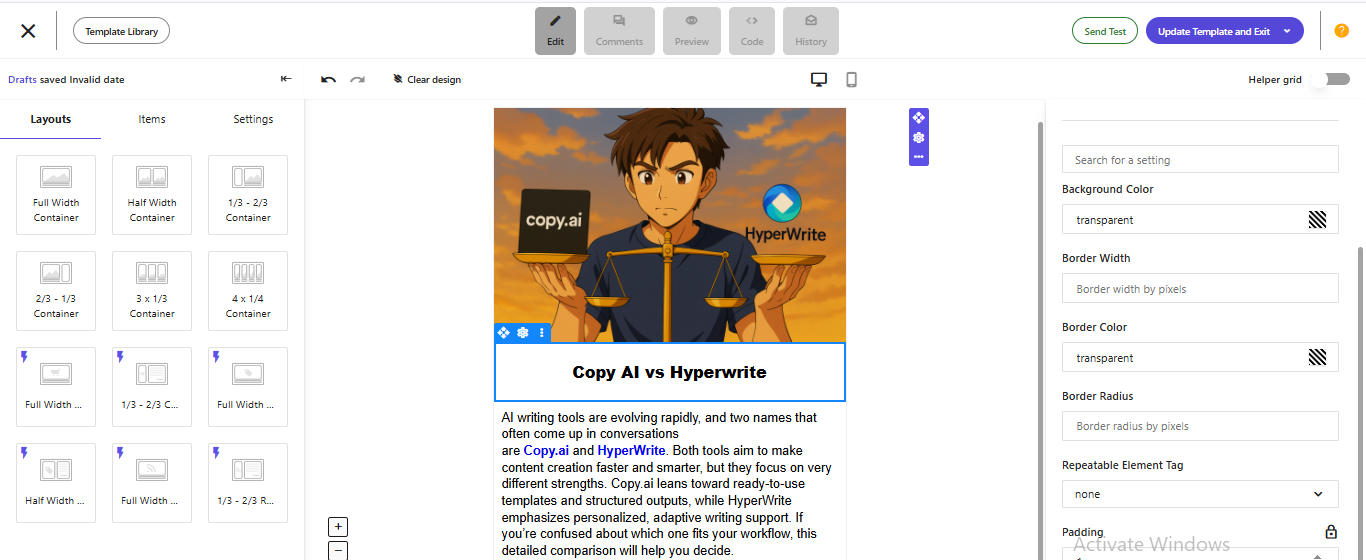
Moosend’s editor is built for beginners which is clean, simple, and fully drag-and-drop. Every block can be moved, styled, resized, or swapped without ever touching code. During testing, the editor felt easy to understand: text blocks, images, buttons, and social icons responded smoothly, and all settings were available in the right-side panel. It took around one hour to create a complete template from scratch, including an “AI Tools Review” layout with multiple sections. Editing spacing, layout, padding, and content felt natural, and onboarding someone new to email design would be easy.

Template Variety

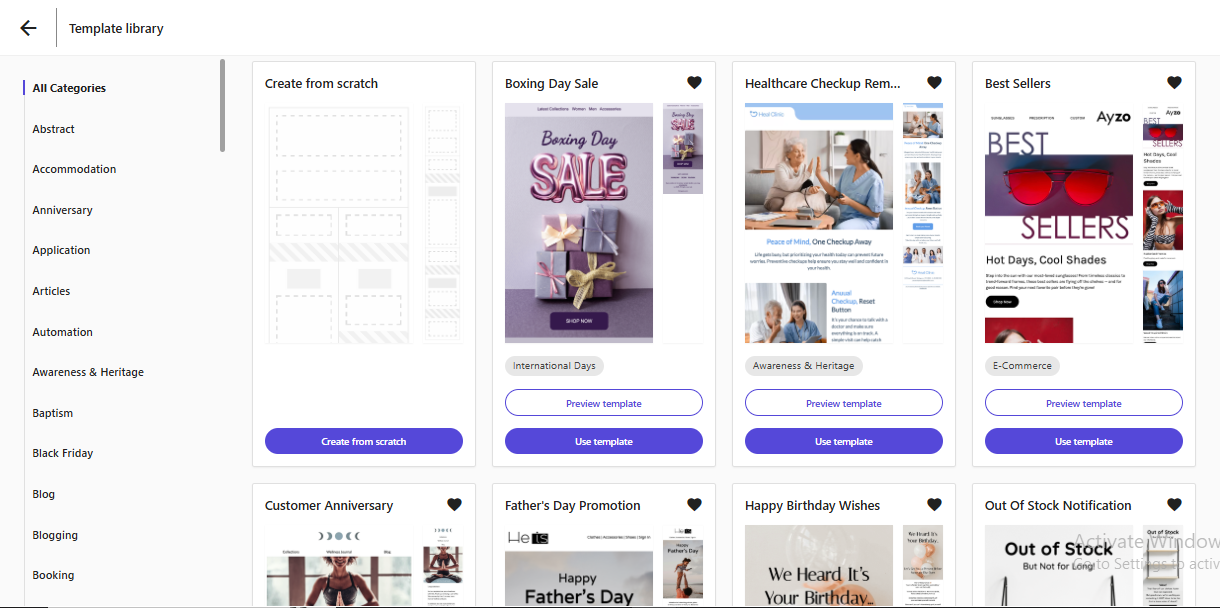
The template library is far more extensive than expected for a budget-friendly tool. Moosend offers 75+ newsletter designs across ecommerce, SaaS, hospitality, real estate, blogging, and publishing. Beyond that, you get 130+ free email templates suitable for greetings, Women’s Day campaigns, festive wishes, birthday promotions, and general newsletters. The templates aren’t flashy like premium platforms, but they are clean, well-structured, and quick to adapt to any brand style.

Customization & Flexibility

Customization is flexible enough for personalizing every section. You can adjust fonts, colors, layouts, column widths, and spacing with simple clicks. The panel allows precise control over padding and elements, and you can drag any block into place without restrictions. If you prefer manual editing, a plain text editor and custom HTML block are available as well. Moosend manages to provide solid flexibility while keeping the interface beginner-friendly.

Media Handling & Reusability

Media handling is also smooth. Videos, images, and GIFs can be uploaded with drag-and-drop or through the file manager. The editor lets you adjust compression, alignment, and placement quickly, and assets displayed cleanly during our tests without distortion or broken formatting.

Moosend supports reusability for faster design cycles. Blocks and entire templates can be saved, reused, or cloned from past campaigns. For small teams or solo creators sending weekly newsletters, this saves considerable time.

Mobile responsiveness works flawlessly. Every template automatically adjusts to smaller screens, resizing images and repositioning text as needed. Mobile preview mode shows exactly how subscribers will see the email on their phone. Transformations happen automatically, so no manual restructuring is needed. It’s an advantage for users who don’t want to design separate mobile versions.

Contact List Management

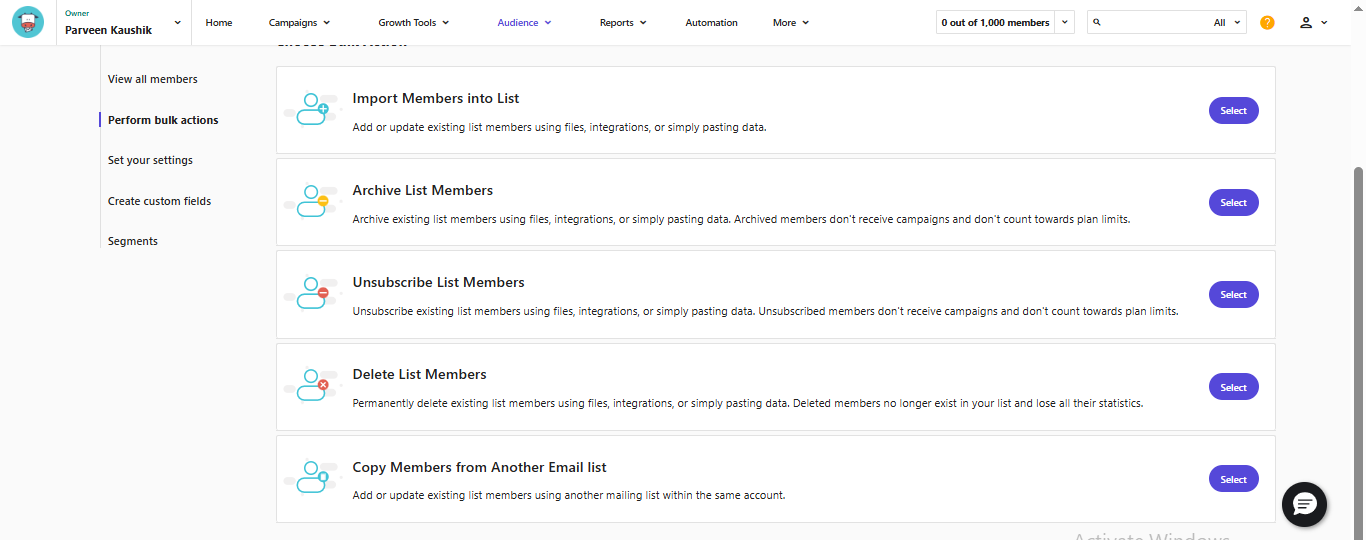
Moosend offers one of the most flexible importing systems for a free-tier platform. Contacts can be imported via CSV, TXT, Excel, or by pasting entries directly into a text field. You can also import Google Contacts or sync through a Salesforce plugin, which is not commonly available in free plans. During testing, contact uploading was seamless, and Moosend automatically detected and removed duplicate entries, ensuring the list remained clean.

Growth tools like customizable signup forms, embedded forms, and landing pages are included, though restricted under the free tier. You get one unpublished landing page and one unpublished form, but the builder is easy to use and effective for collecting new subscribers.

Segmentation & Tagging

Segmentation and tagging are both available in the free plan. You can tag subscribers or entire campaigns, making it easy to categorize contacts by interest, behaviour, or source. Segments can be created based on attributes or engagement activity, helping target specific groups with relevant campaigns. While the segmentation engine isn’t as advanced as enterprise tools, it still offers enough flexibility for meaningful targeting.

Personalization & List Hygiene

List hygiene is taken seriously. Moosend automatically flags invalid emails, removes duplicates during import, and categorises bounces during campaign results. These hygiene tools help protect sender reputation and reduce wasted email sends especially valuable when operating under daily limits.

Moosend supports a range of personalization fields. You can add first names, last names, and other subscriber data directly within the email body using merge tags. Personalized content can significantly improve open rates and engagement, even on simple newsletters.

Campaign Execution

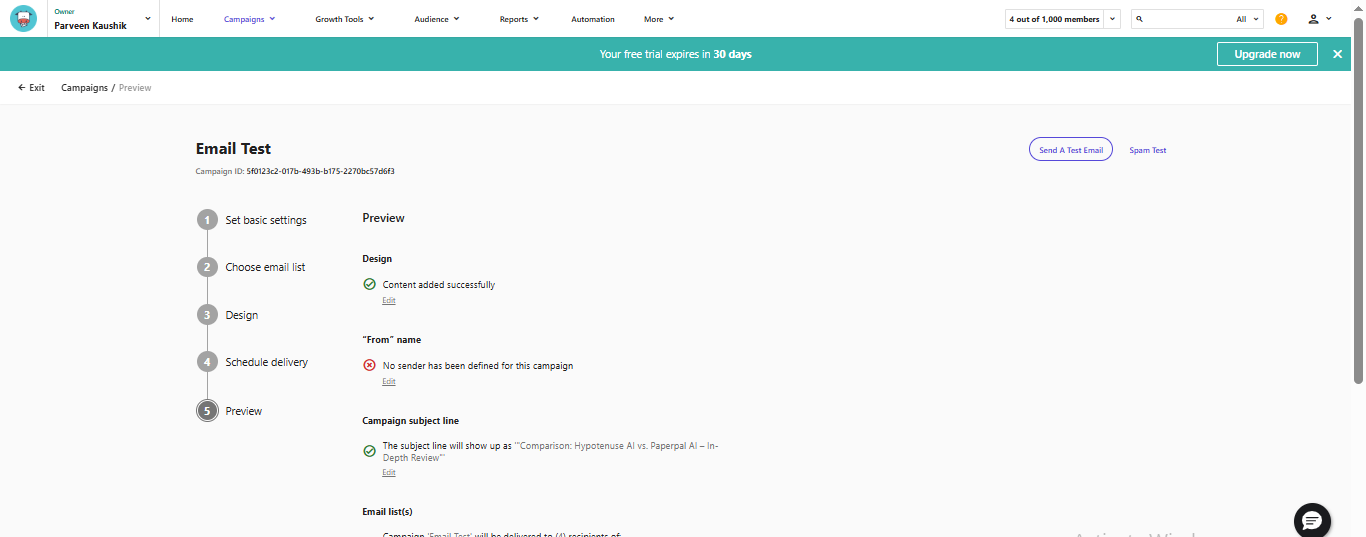
Moosend keeps the sending experience simple and beginner-friendly. Emails consistently reached the inbox during testing, provided SPF and DKIM were properly authenticated. Campaigns send quickly once scheduled, and while advanced options like time-zone delivery are paid-only, the basic scheduling tools are enough for most small senders.

The workflow is intentionally streamlined i.e. pick your audience, select a template, preview, and send. There’s no unnecessary complexity, making it ideal for creators and small teams who just need a quick, reliable way to launch newsletters. The free plan limits (300 emails per day and up to 1,000 subscribers) are practical for new users, with upgrades required only as your list grows. Compliance is also handled smoothly, with automatic unsubscribe links, proper footers, and clear bounce/spam reporting to help maintain good deliverability.

Reports & Analytics

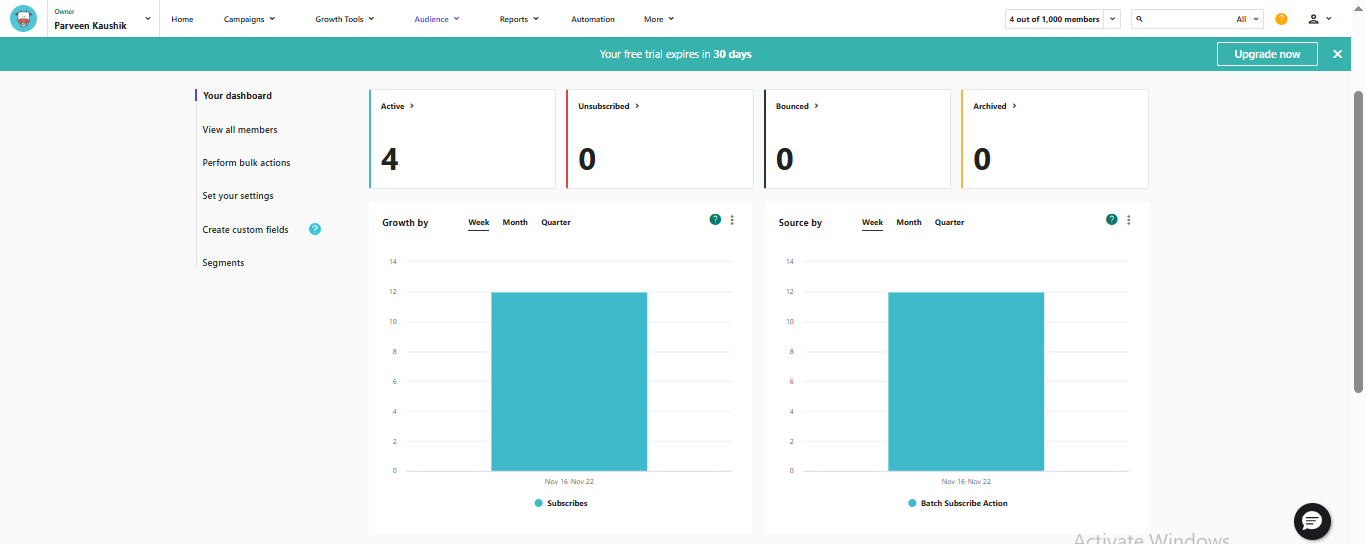
Moosend’s reporting dashboard gives a clear view of all essential campaign metrics, including opens, clicks, unsubscribes, bounces, and spam complaints. You can also see exactly which subscribers opened or clicked your emails, making it easier to understand engagement patterns and identify what type of content resonates best with your audience.

Engagement insights go a step further with URL-level link tracking, showing which buttons or links drove the most interactions. While advanced visuals like heatmaps are reserved for paid plans, the free tier still provides enough data to evaluate campaign performance and improve future emails. Deliverability reports break down bounce types and spam complaints, helping you spot list issues early and maintain good sending reputation.

Moosend also supports easy report exporting, allowing you to download metrics as PDF files or share them via a dedicated link. For deeper analysis, UTM parameters can be added to connect campaign performance with Google Analytics. Helpful AI tools like AI-generated subject lines and preview text make it easier to craft compelling messages and improve open rates without relying on copywriting expertise.

Pricing & Value

Here’s a clear breakdown of how Moosend pricing aligns with value. The platform is ideal for creators, small businesses, and marketing teams evaluating affordability and scalability.

CategoryFreeProMoosend+Enterprise
Price$0Starts at $9/monthCustomCustom
Email Sending Limits300 emails/day (unlimited monthly within daily cap)UnlimitedUnlimitedUnlimited
Contacts AllowedUp to 1,000Based on selected tierCustomCustom
Templates & EditorDrag-and-drop editorDrag-and-drop editor + 130+ templatesAll Pro featuresAll Moosend+ features
Landing Pages & Forms1 unpublished landing page, 1 unpublished formFull landing pages & forms builderIncluded + hosted filesIncluded + advanced features
A/B TestingNot includedIncludedIncludedIncluded
AI ToolsAI subject & preview linesAI writer + AI subject/preview linesAll AI toolsAll AI tools
Reporting & AnalyticsBasic reporting & analyticsReal-time reportsCustom dashboardsCustom dashboards & deep reporting
Team MembersSingle userUp to 5 usersAdditional team members10+ team members
Additional FeaturesUnlimited emails, no credit card requiredSMTP server, unlimited campaignsDedicated IPs, SSO & SAML, audience discoveryAccount manager, SLAs, onboarding & migration

Which Plan Is Best for Whom?

• Free Plan — Best for Beginners & Creators
Perfect for individuals, small newsletters, and new ecommerce stores who want to test email marketing without spending money. The 300/day limit is enough for slow, consistent growth, and the editor + templates provide everything needed to start.

• Pro Plan — Best for Small to Mid-Sized Businesses
Ideal for brands ready to scale beyond basic sending. If you need unlimited email sends, landing pages, A/B testing, automation templates, and real-time reports, this plan offers the best value at a very accessible price point.

• Moosend+ — Best for Growing Teams & Expanding Ecommerce Brands
A great fit for businesses that need additional power and control: transactional emails, dedicated IPs, custom dashboards, advanced reporting, and more team collaboration. The custom structure ensures you only pay for what you need.

Best Alternatives of Moosend

Here are the best alternatives to Moosend, each with its own strengths and use-cases so you can find the right fit for your needs and budget.

1. Brevo

  • Why consider it: A true multi-channel platform combining email, SMS, live chat and basic CRM all in one place.
  • Best for: Growing businesses that want to scale across digital channels and not just email.
  • Key edge: Flexible pricing, SMS/WhatsApp support, and unlimited contacts in many tiers.
  • Minor hiccups: Some advanced automation features are reserved for higher plans.

2. Omnisend

  • Why consider it: Built for ecommerce, with strong email + SMS + push-notification workflows and deep integrations with stores.
  • Best for: Online shops, D2C brands, and those already using Shopify/WooCommerce.
  • Key edge: Ecommerce-centric automation recipes, product blocks in emails, strong segmentation for buyers.
  • Minor hiccups: Pricing scales quickly and for basic newsletter-only use it may be overkill.

3. MailerLite

  • Why consider it: Clean, intuitive email marketing for creators, bloggers, and small businesses.
  • Best for: Businesses prioritizing simplicity and budget over complex automation.
  • Key edge: User-friendly interface, generous lower-tier pricing, and fast setup.
  • Minor hiccups: Automation and ecommerce features are more limited.

4. ActiveCampaign

  • Why consider it: A premium option offering advanced automation, CRM integration, and behavior-based journeys.
  • Best for: Brands ready to invest in full-scale marketing automation and cross-channel customer journeys.
  • Key edge: Deep workflows, triggers, personalization, and unified sales/marketing data.
  • Minor hiccups: Steeper learning curve and higher price than entry-level tools.

5. GetResponse

  • Why consider it: More than email marketing. It extends to conversion funnels, webinars, landing pages and automated workflows.
  • Best for: Marketers who want a single tool covering newsletter, funnel, and event/webinar marketing.
  • Key edge: Strong all-in-one features, good value for mid-sized campaigns.
  • Minor hiccups: Less specialized for pure newsletter workflow; some features may feel more complex.

Who should choose what?

  • If you want budget-friendly multi-channel communication (Email + SMS + WhatsApp), choose Brevo.
  • If you run an ecommerce store and want store-focused messaging with product-based emails, choose Omnisend.
  • If you prefer a clean, simple, creator-friendly email builder, choose MailerLite.
  • If you need deeper CRM capabilities and advanced customer journeys, choose ActiveCampaign.
  • If you want a balanced, beginner-friendly tool with strong value for money, choose Moosend.
Feature / CriteriaMoosendBrevoOmnisendMailerLiteActiveCampaignGetResponse
Best ForBudget-friendly email marketing for beginners & small brandsMulti-channel messaging (Email, SMS, WhatsApp)Ecommerce-focused email + SMS campaignsCreators, bloggers & simple email campaignsEmail marketing with CRM supportEmail + funnels + webinars + landing pages
Ease of UseVery easy drag-and-drop editorBeginner-friendly, clean interfaceSimple ecommerce-oriented workflowExtremely easy & minimalSlightly complex due to CRM toolsClear UI with many built-in modules
Templates130+ templatesDecent template collectionEcommerce-ready templatesModern creator-friendly templatesProfessional designsLarge library of promotional & webinar templates
Contact ImportingCSV, TXT, Excel, Google ContactsCSV, manual importCSV & ecommerce syncCSV, manual importCSV, CRM syncCSV, forms, funnel-based importing
Segmentation & TaggingBasic tagging & groupingBasic to mid-levelEcommerce-oriented segmentationBasic segmentationDeep contact grouping (CRM based)Mid-level segmentation features
Sending LimitsFree: 300/day (1,000 subs)Free: daily cap, unlimited contactsFree: 500 emails/moFree: limited monthly sendTrial-basedFree: limited features and sends
Reports & AnalyticsCore metrics, link tracking, PDF exportCore metrics + SMS reportsEmail & SMS performanceBasic metricsAdvanced CRM-based insightsDetailed email + webinar + funnel analytics
Extra ChannelsEmail onlyEmail, SMS, WhatsApp, ChatEmail, SMS, PushEmailEmail + CRMEmail + Funnels + Webinars
Free PlanYesYesYesYesNo (trial only)Yes (restricted)
Pricing (Starting)$9/mo$ 9/mo$16/mo$10/mo$29/mo$19/mo
Key StrengthsSimple UI, flexible editor, strong template choiceMulti-channel messaging & affordabilityBest for ecommerce-focused messagingClean UI, low pricing, great for creatorsCRM integration for relationship buildingAll-in-one tool with landing pages + webinars
Key LimitationsLimited advanced featuresSome features behind higher tiersPricing increases for larger listsLimited advanced depthSlight learning curveCan feel heavy for basic newsletter needs

Final Verdict

Moosend offers a remarkably user-friendly and robust email marketing solution, especially for beginners, bloggers, and small-to-mid sized ecommerce brands who need to launch campaigns quickly and affordably. From a streamlined drag-and-drop editor and a strong template library to excellent contact-list management features, Moosend delivers a complete toolkit without unnecessary complexity.

On this page

Tags:

We will be happy to hear your thoughts

Leave a reply

Diztel
Logo