We may earn affiliate commissions for the recommended tools. Learn more.

GetResponse Website Builder Hands-on Review (2025): Pros & Cons, Features Tested

I tried GetResponse’s Website Builder recently. It combines AI-driven design with drag-and-drop editing, making it easy to launch a professional-looking site in minutes. The tool feels more integrated than many competitors because it’s not just a builder. It’s tied directly into GetResponse’s strong email marketing and automation ecosystem, which is great for growing businesses.

Who is it Best For?

  • Small businesses looking for a simple online presence
  • Marketers who want a site connected to email campaigns
  • Entrepreneurs testing business ideas quickly
  • Non-technical users needing AI-powered setup

What Makes it Stand Out

GetResponse Website Builder stands out because it merges AI website creation with built-in marketing automation tools. You can launch a site, capture leads, and run email campaigns all in one platform without requiring third-party integrations. This “all-in-one growth toolkit” approach is where it beats many standalone builders.

7Expert Score
Powerful but Complex

While its flexibility is unmatched, the learning curve and pricing make it less beginner-friendly compared to Wix or Squarespace, and its e-commerce is solid but not Shopify-level.

Ease of Use
7.5
Templates & Design
7
Ecommerce Capabilities
7
Pricing & Value
7.5
Customer Support
7

Performance Breakdown: Pros and Cons

Who Should Use GetResponse?

  • Small Business Owners – who want a simple, AI-powered site tied directly to marketing tools.
  • Email Marketers – needing seamless integration between a website, landing pages, and email campaigns.
  • Entrepreneurs & Startups – who need to quickly test business ideas with minimal setup.
  • Non-Technical Users – beginners who prefer guided AI setup over complex design controls.
  • Freelancers & Consultants – looking for a one-stop solution to showcase services and capture leads.

Who Should Skip This Tool?

  • Advanced Designers & Developers – If you need full control over code, custom animations, or complex layouts, platforms like Webflow or
  • WordPress are a better fit.
    Large Ecommerce Stores – GetResponse isn’t designed for managing thousands of products or advanced ecommerce workflows. Shopify or BigCommerce would be more suitable.
  • Template-Heavy Users – If you want hundreds of pre-made templates to choose from, builders like Wix or Squarespace offer more design variety.
  • Performance-Driven Agencies – Agencies needing deep SEO controls, multilingual support, and advanced integrations may find GetResponse limiting.

Ease of Use (UI/UX)

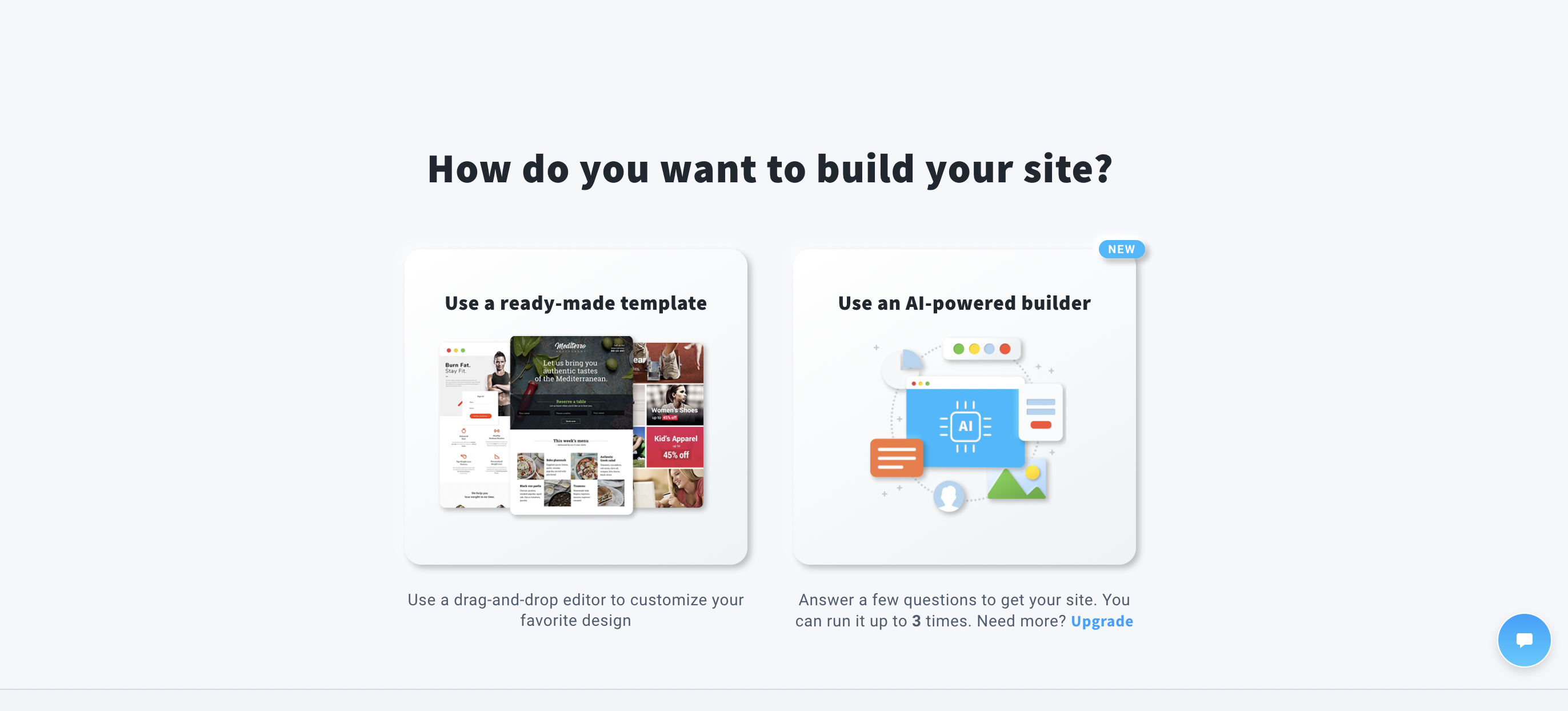
After signing up, you’re asked a few simple questions about your business type and goals. From there, the AI wizard automatically generates a website draft with pages, layouts, and images tailored to your answers. The sign-in and sign-up process takes only a few minutes, and you can begin editing right away.

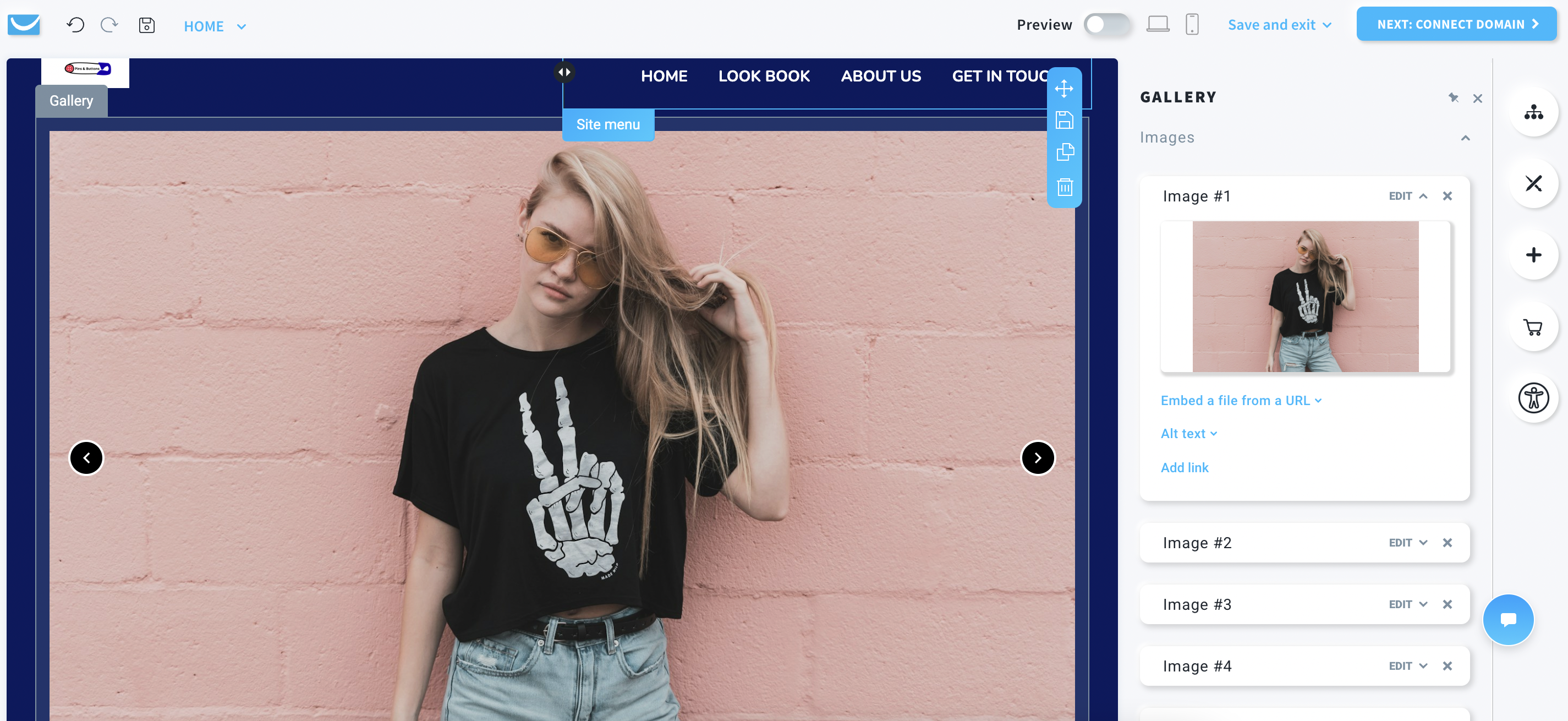
The drag-and-drop editor is clean and minimal. You can easily adjust text, swap images, and reorganize sections without touching code. Beginners will find it intuitive, though advanced users may feel restricted by the lack of granular design controls.

This is the sample website that I created using this tool.

Mobile responsiveness is handled automatically, meaning the site adjusts nicely to tablets and smartphones without requiring extra tweaks. For a quick business or marketing site, the workflow feels smooth and beginner-friendly.

Overall, the builder prioritizes speed and simplicity over deep customization, making it a good fit for non-technical users.

Design & Templates

The AI-generated templates in GetResponse Website Builder are functional but not particularly impressive

When tested for an ecommerce niche, the AI output looked more like a service-based website, which may not meet expectations for online stores. While it’s quick for a draft, it lacks the polish you’d expect from premium builders.

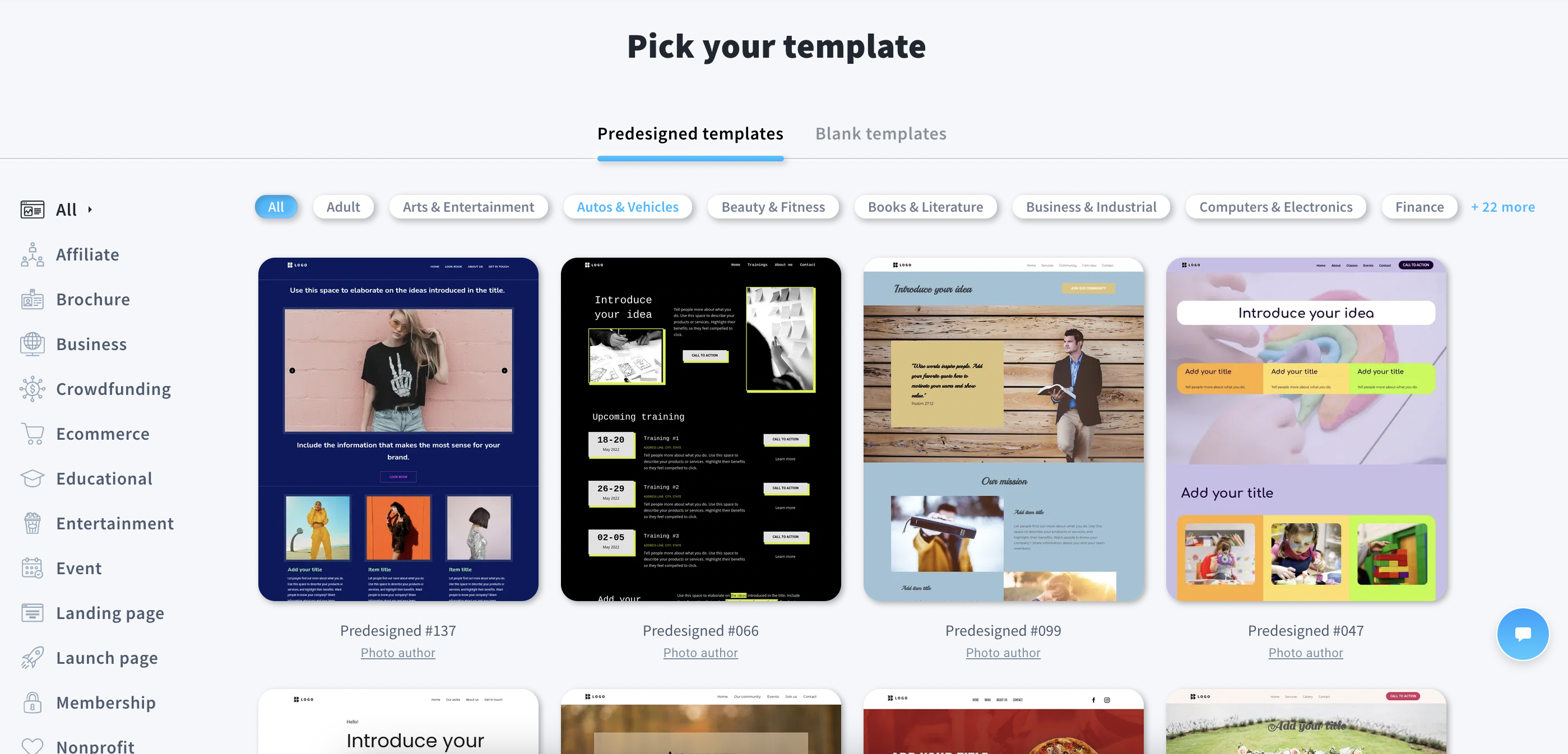
Switching to the default template library improves the experience. There are several templates categorized under business, personal, and ecommerce. The ecommerce templates are slightly better but still feel limited compared to platforms like Wix or Squarespace, which offer more refined, modern, and niche-specific designs.

Customization options are decent

You can adjust colors, fonts, and layouts but design flexibility doesn’t match advanced builders. On the positive side, all templates are mobile-responsive by default, so your site looks clean across devices.

In short, GetResponse’s templates are usable but basic, best suited for quick launches rather than design-heavy projects.

Ecommerce Capabilities

On the free plan, ecommerce functionality is restricted. You can build a website, but you won’t be able to add or manage products until you upgrade. With the Marketer plan ($48/month), ecommerce features are unlocked.

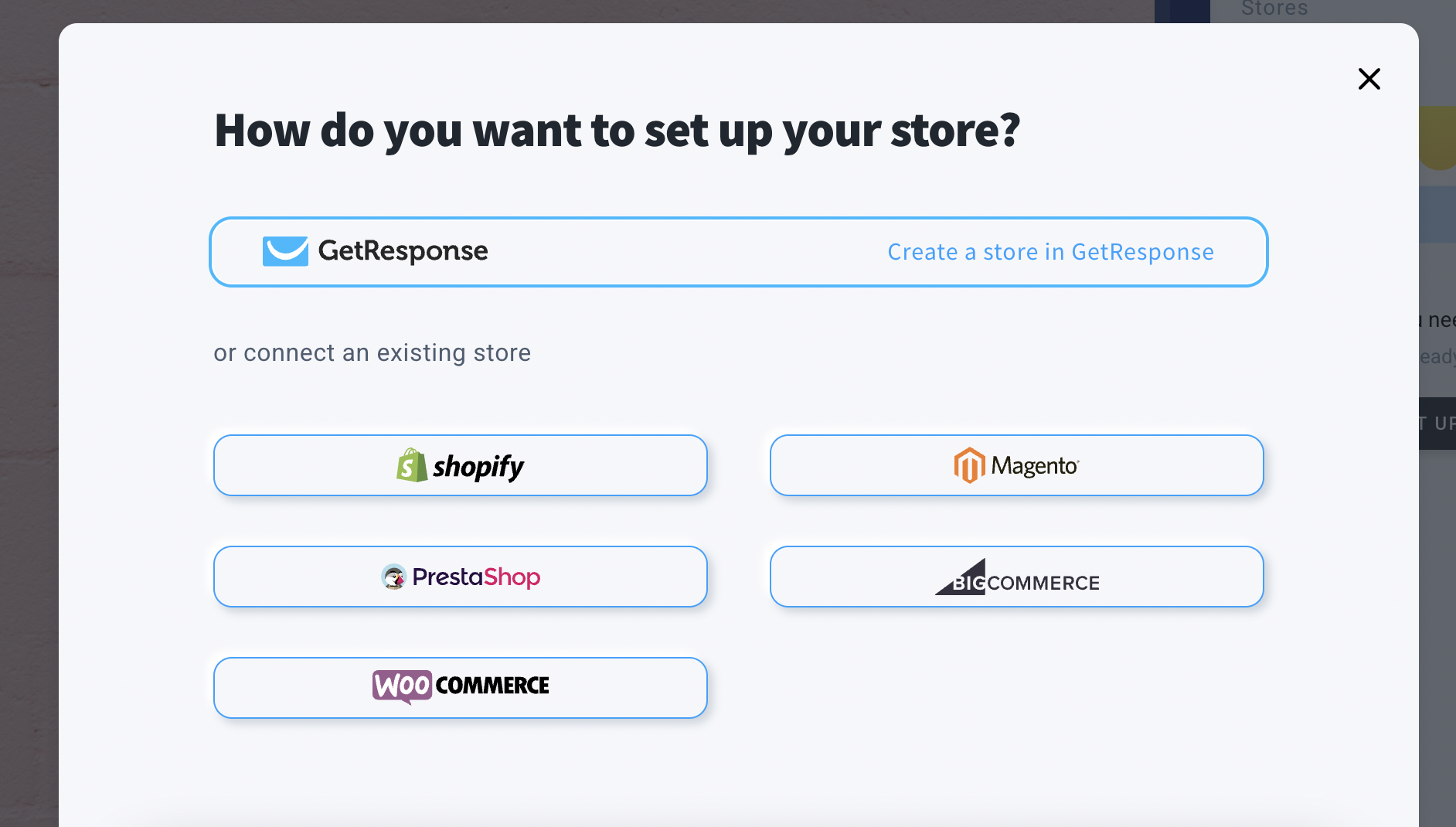
You can either create a GetResponse native store for simple product management or connect your site with third-party platforms like WooCommerce or Shopify for more robust inventory handling. This flexibility allows small stores to start simple and later integrate with established ecommerce systems.

Once enabled, you also gain access to advanced tools such as:

  • Audience segmentation for targeted campaigns
  • Abandoned cart recovery to boost conversions
  • Sales funnels to guide customers through purchases
  • Promo codes and discounts to run offers
  • Revenue reports for performance tracking

In practice, GetResponse is best suited for small to medium stores that want ecommerce directly tied into email marketing and sales funnels, rather than enterprises with large catalogs.

Publishing & Hosting

  • Publishing a website with GetResponse Website Builder is seamless. You can instantly publish your site on a GetResponse-provided subdomain, which is great for testing or quick launches. For a more professional presence, you also have the option to connect your own custom domain with just a few clicks.
  • Hosting is included in all plans, so there’s no need to manage it separately. SSL security is applied automatically, ensuring your site is secure from the start. The process feels smooth and requires little technical know-how, making it especially beginner-friendly.
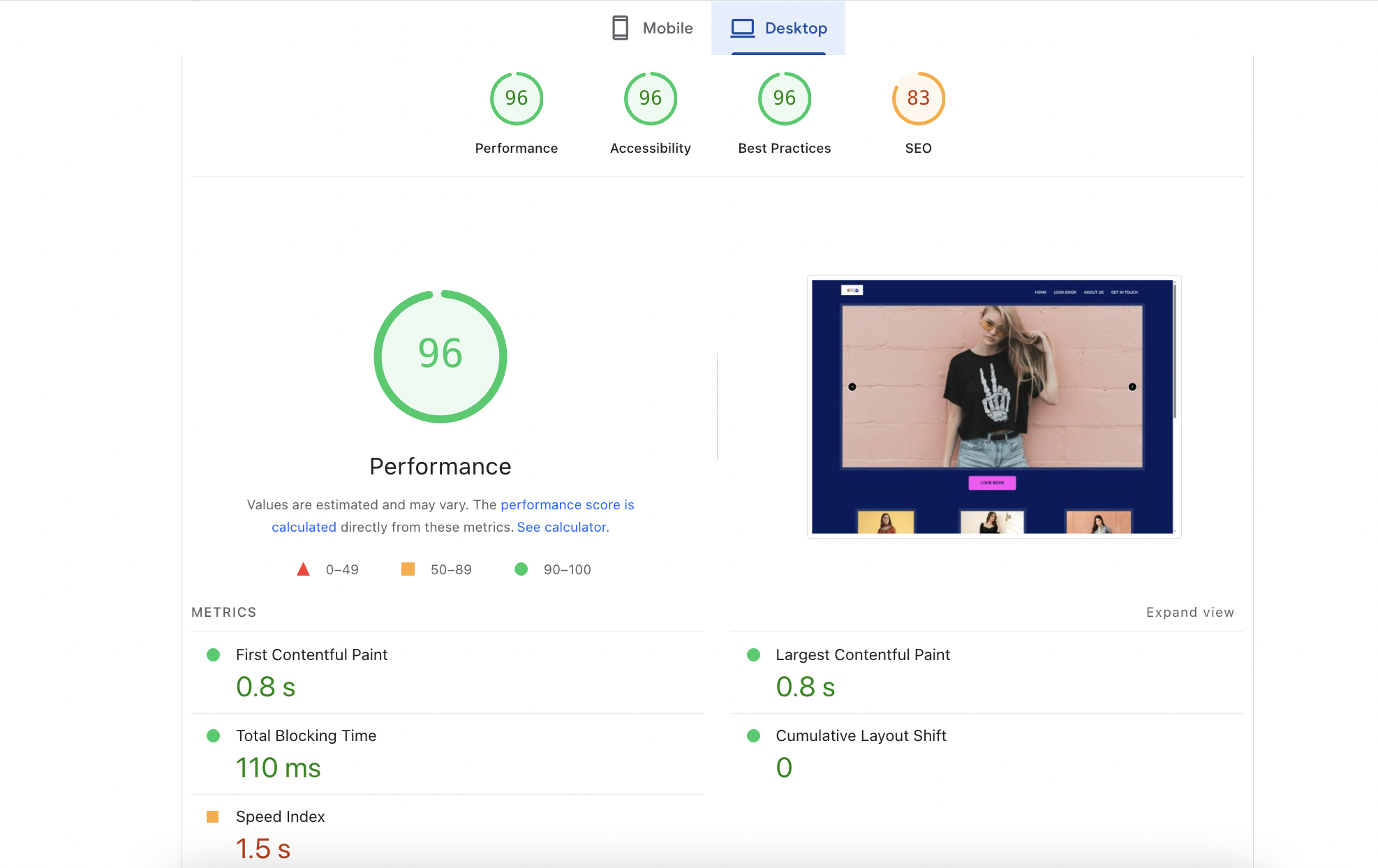
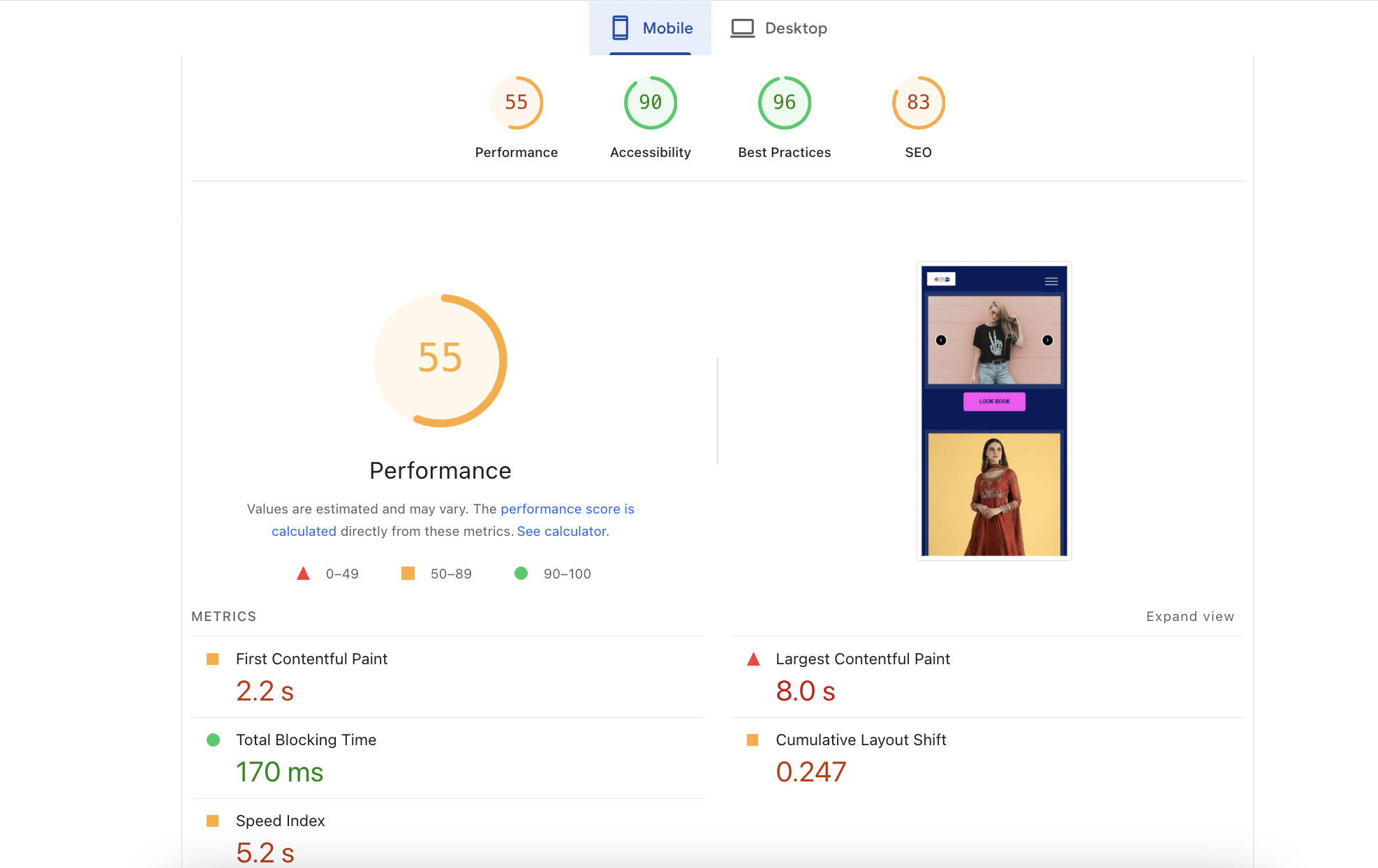
  • In my testing on pagespeed insights, the core web vitals were better in desktop compared to mobile version. 
Before imageAfter image

Compared to some AI website builders that restrict free publishing, GetResponse makes it easy to take your site live, whether on its own subdomain or a custom domain.

Pricing & Value for Money

GetResponse Website Builder follows a flexible pricing model, designed for businesses of different sizes and marketing needs. While the website builder itself is included in higher plans, users can start with a free trial to test the platform before committing.

Free Plan / Trial

The free trial lets you explore the platform, create a basic website, and test its AI builder. However, advanced ecommerce features and integrations remain locked until you upgrade to a paid plan.

Starter Plan – $15.58/month (paid annually)

Best For: Beginners and small businesses just getting started with email marketing and online presence.

Features:

  • Unlimited monthly email sends
  • AI-powered content generators
  • Welcome email series
  • Custom automation workflow
  • Landing page builder
  • Signup forms & popups
  • Free custom domain with yearly plan

Marketer Plan – $48.38/month (paid annually)

Best For: Marketers and small sellers who want to promote and sell across multiple channels.

Features:

  • Everything in Starter, plus:
  • Advanced audience segmentation
  • Abandoned cart recovery
    Sales funnels
  • Promo codes & revenue reports
  • Unlimited web push notifications
  • Free custom domain with yearly plan

Creator Plan – $56.58/month (paid annually)

Best For: Course creators, educators, and entrepreneurs building knowledge-based businesses.

Features:

  • Everything in Marketer, plus:
  • Website builder unlocked
  • Course creator & student management tools
  • Webinars & premium newsletter subscriptions
  • Advanced automation features for scaling
  • Free custom domain with yearly plan

Which Pricing Plan is Best for You?

  • Starter is ideal if you just need a website with email campaigns and lead capture.
  • Marketer is the sweet spot for ecommerce businesses, unlocking sales funnels, cart recovery, and promo codes.
  • Creator is best for educators, coaches, or digital entrepreneurs who want to run courses and webinars alongside their websites.

For most small ecommerce businesses, the Marketer Plan offers the best value since it combines the website builder with marketing automation and sales tools.

Customer Support & Community

  • GetResponse offers a strong support system compared to many website builders. You can reach out via 24/7 live chat or email, which ensures timely responses. In my test, the live chat connected fairly quickly, and the support staff were knowledgeable about both website builder features and marketing automation tools. There’s no direct phone support, but most issues are handled smoothly through chat.

  • The platform also has a comprehensive knowledge base with tutorials, guides, and step-by-step walkthroughs. Video webinars and training sessions are available for users who want more in-depth learning, especially on marketing and ecommerce features.

  • Community-wise, GetResponse has an active blog and learning hub, though it lacks a large user forum like Wix. Still, the combination of responsive support and educational resources makes it a beginner-friendly option.

Best Alternatives of GetResponse

  • Wix ADI – Wix’s AI builder offers more polished templates and greater design flexibility. It’s better for users who value customization and aesthetics over integrated marketing. However, Wix doesn’t include built-in email marketing as seamlessly as GetResponse.
  • Squarespace – Known for stunning, professional-grade templates, Squarespace is ideal for creatives and design-focused businesses. But unlike GetResponse, it lacks deep native marketing automation and advanced email workflows.
  • Hostinger AI Website Builder – A budget-friendly alternative that bundles hosting with AI site creation. It’s cheaper and simpler, but doesn’t match GetResponse’s email marketing, funnels, and sales automation features.
FeatureGetResponseWIXSquarespaceHostinger
Ease of UseVery easy, AI-assisted setup + drag & dropVery easy, polished AI onboardingEasy, but more manual setupQuick, beginner-friendly, bundled with hosting
Templates & DesignLimited, AI drafts are basic; better with default templates900+ templates, flexible customizationStunning, modern templates (great for creatives)Decent templates but fewer than Wix
EcommerceAvailable in paid plans (Marketer+); supports native store & WooCommerce/ShopifyGood for small to medium storesStrong ecommerce tools for stores & creativesStandard ecommerce features, good for small shops
Marketing ToolsBuilt-in email marketing, funnels, automation, abandoned cartBasic email integrations onlyStrong SEO & blogging, but marketing via add-onsVery limited marketing tools
Pricing (Starting)$15.58/month (Starter, billed annually)$16/month$16/month$2.99/month (with long-term billing)
Free Plan/TrialFree trial, but ecommerce locked until upgradeFree plan available14-day trial onlyFree subdomain included
Support Options24/7 chat, email, webinars; no phone24/7 chat, help centerChat (limited), email, guidesEmail, tutorials, live chat
Ideal ForBusinesses wanting all-in-one site + email + funnelsBeginners wanting easy customizationCreatives needing polished designBudget-conscious users needing simple AI sites

Final Verdict

GetResponse Website Builder is best described as an all-in-one solution for businesses that want more than just a website. Its biggest advantage is the seamless integration of email marketing, automation, and ecommerce tools within the same platform, something competitors like Wix or Squarespace can’t match natively. While the AI templates feel basic and design flexibility is limited compared to Webflow or Wix, the builder is intuitive, mobile-responsive, and quick to publish. For marketers, small businesses, and entrepreneurs focused on growth rather than design perfection, GetResponse delivers solid value.

On this page

Tags:

We will be happy to hear your thoughts

Leave a reply

Diztel
Logo
Free Website Audit

“Actionable Website Insights at No Cost”
Sign Up Free